
Nissan Murano: Body Exterior, Doors, Roof & Vehicle Security / Exterior :: Removal and Installation
Nissan Murano (Z52) 2015-2024 Service Manual / Body Exterior, Doors, Roof & Vehicle Security / Exterior :: Removal and Installation
- Front Bumper
- Rear Bumper
- Front Grille
- Active Grille Shutter
- Front Spoiler
- Cowl Top
- Fender Protector
- Over Fender
- Under Cover
- Roof Side Molding
- Roof Side Rail
- Door Sash Molding
- Door Outside Molding
- Door Outside Lower Molding
- Quarter Glass Molding
- Rear Spoiler
- Side Air Spoiler
- Back Door Outer Finisher
- Emblem
 Exterior :: Symptom Diagnosis. Squeak and Rattle Trouble Diagnoses
Work Flow
CUSTOMER INTERVIEWInterview the customer if possible, to determine the conditions that exist when the noise occurs. Use the Diagnostic Worksheet during the interview to document the facts and conditions when the noise occurs and any customer's comments; refer to Diagnostic Worksheet...
 Front Bumper
Exploded View
1.
Front bumper fascia side bracket (RH)
2.
Front bumper side retainer (RH)
3.
Front bumper reinforcement bracket (RH)
4.
Front bumper reinforcement
5...
Other information:
Nissan Murano (Z52) 2015-2024 Service Manual: U1010 Control Unit(can)
DTC Description DTC DETECTION LOGIC DTC No. CONSULT screen terms (Trouble diagnosis content) DTC Detection Condition U1010 CONTROL UNIT(CAN) [Control unit (CAN)] Diagnosis condition When ignition switch ON. Signal (terminal) — Threshold — Diagnosis delay time 2 seconds or more POSSIBLE CAUSEBCMFAIL-SAFE— Diagnosis Procedure REPLACE DRIVER SEAT CONTROL UNIT When DTC "U1010" is detected, replace driver seat control unit...
Nissan Murano (Z52) 2015-2024 Service Manual: Electric Resistance Spot Welding
Principles of Spot Welding Resistance spot welding is a kind of electric resistance welding. It is classified as pressure welding. Two or three sheets of metal are overlapped and pressed, and current is passed through the mating surfaces. As the current flows, the metals melt due to Joule heat at the mating surfaces and are joined by the pressure...
Categories
- Manuals Home
- Nissan Murano Owners Manual
- Nissan Murano Service Manual
- Passenger compartment
- Rear bench seat adjustment
- Memory storage function (key-link)
- New on site
- Most important about car
Autolight system
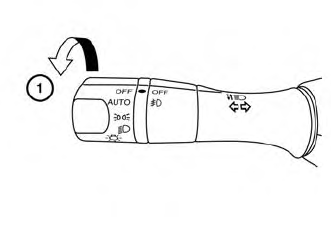
The autolight system allows the headlights to turn on and off automatically. The autolight system can:
Turn on the headlights, front parking, tail, license plate and instrument panel lights automatically when it is dark. Turn off all the lights (except daylight running lights) when it is light. Keep all the lights on for a period of time after you place the ignition switch in the OFF position and all doors are closed.
Copyright © 2026 www.nimurano.com