
Nissan Murano: Body Exterior, Doors, Roof & Vehicle Security / Door & Lock :: Symptom Diagnosis
Nissan Murano (Z52) 2015-2024 Service Manual / Body Exterior, Doors, Roof & Vehicle Security / Door & Lock :: Symptom Diagnosis
- Intelligent Key System Symptoms
- All Doors Do Not Lock/unlock or Trunk/back Door Do Not Open with Request Switch
- Door Does Not Lock/unlock and Engine Does Not Start (req Sw/push Sw) (all Keys)
- Door Does Not Lock/unlock and Engine Does Not Start (all I-Key/req Sw/push Sw)
- Intelligent Key System All Functions Cannot Operate (all Keys)
- Door Does Not Lock/unlock with Intelligent Key
- Door Does Not Lock/unlock with Door Request Switch and Intelligent Key
- Intelligent Key Button Operation Has Poor Range (all Keys)
- Door Does Not Lock/unlock with Intelligent Key (one Key)
- Door Does Not Lock/unlock and Engine Does Not Start (one I-Key/req Sw/push Sw)
- Intelligent Key Button Operation Has Poor Range (one Key)
- Automatic Back Door Operation Does Not Operate
- Automatic Back Door Warning Does Not Operate. Buzzer
- Automatic Back Door Functions Do Not Cancel
- Automatic Back Door Anti-Pinch Function Does Not Operate
- Motion Activated Back Door Does Not Operate Properly
- Integrated Homelink Transceiver Does Not Operate
- Squeak and Rattle Trouble Diagnoses
- Normal Operating Condition
 Integrated Homelink Transceiver
Component Function Check
CHECK FUNCTION
Check that system receiver (garage door opener, etc.) operates with original hand-held transmitter.
Is the inspection result normal?
YES>>
GO TO 2...
 Intelligent Key System Symptoms
Diagnosis Procedure
NOTE:
Perform the self diagnosis result with CONSULT before the symptom diagnosis. Perform the trouble diagnosis if any DTC is detected...
Other information:
Nissan Murano (Z52) 2015-2024 Service Manual: Defogger :: Basic Inspection. Diagnosis and Repair Work Flow
Work Flow OVERALL SEQUENCEDETAILED FLOWGET INFORMATION FOR SYMPTOM Get detailed information from the customer about the symptom (the condition and the environment when the incident/malfunction occurred). >> GO TO 2. CHECK DTC CONSULT Check DTC...
Nissan Murano (Z52) 2015-2024 Owners Manual: Vehicle information display
The vehicle information display is located to the left of the speedometer. It displays such items as: Home Audio information Navigation information (if so equipped) Drive computer information Fuel economy information Driving aids information (if so equipped) Speed Limit Sign (if so equipped) Tire pressure information Indicators and warnings Vehicle and meter display settings Cruise control status Odometer/twin trip odometer Gear position information (P, R, N, D) Distance To Empty and fuel indicator Time Outside Air Temperature The display will be interrupted when a phone call is received...
Categories
- Manuals Home
- Nissan Murano Owners Manual
- Nissan Murano Service Manual
- Vehicle Dynamic Control (VDC) OFF switch
- Passenger compartment
- Turning the AEB system on/off
- New on site
- Most important about car
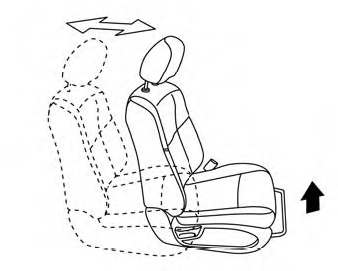
Front manual seat adjustment (if so equipped)
Your vehicle seats can be adjusted manually. For additional information about adjusting the seats, refer to the steps outlined in this section.
Forward and backward

Copyright © 2026 www.nimurano.com