
Nissan Murano: Door & Lock :: Symptom Diagnosis / Normal Operating Condition
If the Remote Engine Start (RES) function is inoperative, make sure the system is properly set to operate.
Operating Conditions
-
Ignition switch is OFF
-
Shift selector is in P position
-
Nissan Murano Vehicle security system is not in operation
-
Hood and all doors are closed
-
Registered Intelligent Key is not in the Nissan Murano vehicle
-
Intelligent Key is within operating range
If the RES is still not operating, refer to the table below.
| Symptom | Condition | Possible cause | Confirmation procedure | Action |
| Engine does not start using the remote engine start function | 1 | ECM has not completed shutdown procedure after engine/ignition OFF. | ECM has to end shutdown process and save data prior to allowing RES to operate. Shutdown process takes 6 seconds to complete after engine/ignition is turned OFF. | Wait 6 seconds after engine has stopped prior to attempting RES activation. |
| 2 |
RES is correctly activated more than 2 times consecutively OR RES is activated once, and with engine running, another request is generated. |
Not possible to confirm how many times RES has been activated. | Start engine in the conventional manner using ignition switch. Then, turn engine/ignition OFF, exit and lock all doors and try RES activation again. This action will reset counter. | |
| 3 | One or more key fobs for this Nissan Murano vehicle are still inside the vehicle. | With all known keyfobs outside and out of range of the vehicle, try to turn ON ignition with ignition switch. If ignition presses ON, a key fob/Intelligent Key remains inside Nissan Murano vehicle. | Find and remove all remaining keyfobs from the vehicle, lock doors with keyfob, and then perform RES activation. | |
| 4 | Doors and back door are not closed and locked. |
Doors/back door may not be completely closed and locked. Using CONSULT, confirm both conditions in Data Monitor mode of BCM:
|
Close and lock all doors/back door. If switches still do not show correct status, refer to Diagnosis Procedure. | |
| 5 | Door lock button on key fob was not pressed prior to initiating RES. | Not possible to confirm if lock button was pressed first. | Press the lock button before pressing and holding the RES button | |
| 6 | RES button on the key fob is not held long enough | Not possible to confirm how long the RES button was held. | Hold RES button for more than 2 seconds to initiate RES. | |
| 7 | Waited longer than 5 seconds to activate RES after door lock operation. | Not possible to confirm how long RES was pressed after lock. | Press and hold the RES button within 5 seconds of pressing the lock button | |
| 8 | Ignition switch is not in LOCK position. | Confirm that ignition switch was not left in any position other than LOCK. | Place ignition switch in LOCK position. | |
| Engine does not start using the remote engine start function | 9 | Shift position is not in P position. |
Shift selector may appear to be in P position, but is not. Using CONSULT, confirm condition in Data Monitor mode of BCM: SFT P-MET = On |
Place shift selector in P position. If “SFT P-MET” is Off, refer toDiagnosis Procedure. |
| 10 | Shift selector release button is not in released (unpressed) position. |
Using CONSULT, confirm condition in Data Monitor mode of IPDM E/R: DETENT SW = On (when release button is not pressed) |
If “Detent SW” data monitor item is Off when release button is not pressed, refer to Diagnosis Procedure. | |
| 11 | Environmental factors interfere with signal from key fob to BCM. | This could be a result of RF interference that may exist inside Nissan Murano vehicle with aftermarket devices such as alarm systems --or-- other devices found near the key such as highway pass card or RF device such as phone or portable garage door opener. | Remove interference sources away from the key fob or the path of signal. | |
| 12 | Stop lamp switch is misadjusted or inoperative, giving a stop lamp switch ON signal (or brake pedal is depressed). |
Stop lamp switch adjustment may not be within specification. Using CONSULT, confirm condition in Data Monitor mode of ABS: STOP LAMP SW = OFF (with brake pedal released) |
Adjust/replace stop lamp switch. | |
| 13 | Hood is open. |
Hood may not be completely closed. Using CONSULT, confirm condition in Data Monitor mode of IPDM E/R: HOOD SW = Off (when hood is closed). |
Close the hood. If switch is malfunctioning, refer to Diagnosis Procedure. | |
| 14 | Security system is currently activated. |
Check security system activation by trying to start engine normally (using ignition switch). Note: Engine will not start with security system activated. |
Turn OFF/deactivate security system (unlock doors with key fob). If condition persists, refer to Diagnosis Procedure. | |
| 15 | Remote engine start is attempted from within the Nissan Murano vehicle. | RES can only operate from outside the vehicle with doors locked. | Exit vehicle, lock doors and within 5 seconds activate RES. | |
| 16 | Specific DTC's may prevent RES from operating: B261B, B26FE, B26FD | Confirm using CONSULT that no DTC's are set. | Refer to Intermittent Incident. After repair, clear DTC using CONSULT. | |
| 17 | Hazard lights are flashing. | Confirm visually. | Turn off hazard switch. |
 Squeak and Rattle Trouble Diagnoses
Work Flow
CUSTOMER INTERVIEWInterview the customer if possible, to determine the conditions that exist when the noise occurs. Use the Diagnostic Worksheet during the interview to document the facts and conditions when the noise occurs and any customer's comments; refer to Diagnostic Worksheet...

Other information:
Nissan Murano (Z52) 2015-2024 Service Manual: Awd Error Is Displayed on Information Display
Diagnosis Procedure AWD warning icon/display (AWD Error: See Owner′s Manual) is displayed on information display after the engine started.SELECT SELF DIAGNOSTIC RESULT CONSULT Select “Self Diagnostic Result” mode of “ALL MODE AWD/4WD”. Is any DTC detected? YES>> Check the DTC...
Nissan Murano (Z52) 2015-2024 Service Manual: U1044 Eng Comm Circuit
DTC Description DTC DETECTION LOGICA signal voltage of LIN communication between ECM and generator is excessively low or excessively high. DTC CONSULT screen terms (Trouble diagnosis content) DTC detection condition U1044 ENG COMM CIRCUIT (Engine communication circuit) Diagnosis condition Ignition switch ON Signal (terminal) Signal voltage of LIN communication Threshold Signal voltage between ECM and generator is excessively low or excessively high Diagnosis delay time — POSSIBLE CAUSE Harness or connectors (LIN communication circuit is open or shorted...
Categories
- Manuals Home
- Nissan Murano Owners Manual
- Nissan Murano Service Manual
- High Beam Assist (if so equipped)
- Shift lock release
- Jacking up vehicle and removing the damaged tire
- New on site
- Most important about car
Fuel gauge
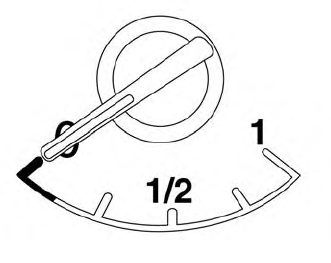
The gauge indicates the approximate fuel level in the tank.
The gauge may move slightly during braking, turning, acceleration, or going up or down hills.
The gauge needle returns to 0 (Empty) after the ignition switch is placed in the OFF position.
