
Nissan Murano: Removal and Installation / Microphone
REMOVAL
Remove the map lamp assembly. Refer to Removal and Installation.
Remove the microphone connector  from the map lamp assembly
  .
.
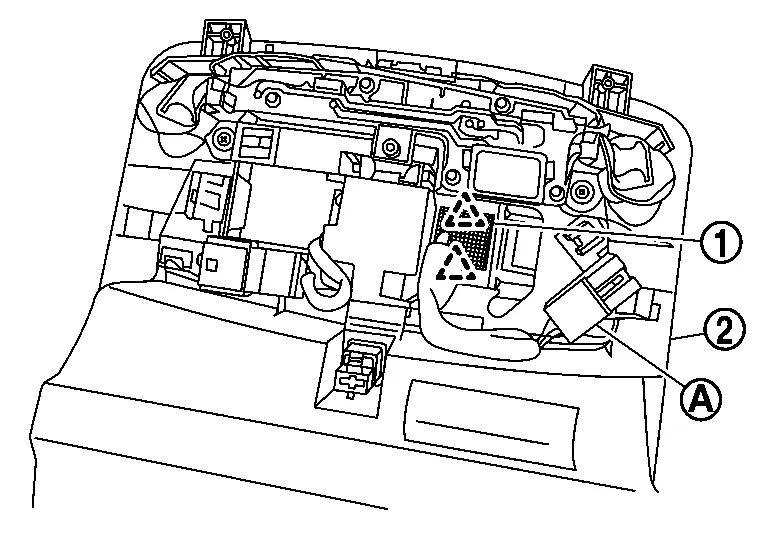
Release the microphone pawls, then remove the microphone  .
.
 |
: Pawl |
INSTALLATION
Installation is in the reverse order of removal.
 Tcu
Tcu
Removal and Installation
REMOVALCAUTION:
Before replacing TCU, perform “ADDITIONAL SERVICE WHEN REPLACING TCU”. For details, refer to Description.
Remove the cluster lid D...
 Telematics Switch
Removal and Installation
REMOVALRemove the map lamp assembly. Refer to Removal and Installation.
Remove the connector and screws .
Remove the telematics switch with the map lamp assembly finisher as a single unit from the map lamp assembly...
Other information:
Nissan Murano (Z52) 2015-2024 Service Manual: Battery Tray
Exploded View 1. Battery frame 2. Battery rods 3. Battery 4. Battery cover 5. Battery tray liner 6. Battery tray 7. Battery tray support Front Removal and Installation REMOVALRemove the battery. Refer to Removal and Installation...
Nissan Murano (Z52) 2015-2024 Service Manual: Key Reminder Function
System Description SYSTEM DIAGRAMINPUT SIGNAL AND OUTPUT SIGNAL Signal name Input Output Description Key ID signal Remote keyless entry receiver BCM The BCM receives key ID signal inputs and activates the actuators accordingly. Inside key antenna signal Inside key antenna BCM The BCM receives inside key antenna signals inputs and activates the actuators accordingly...
Categories
- Manuals Home
- Nissan Murano Owners Manual
- Nissan Murano Service Manual
- Passenger compartment
- Tire rotation
- Checking engine oil level
- New on site
- Most important about car
Vehicle security system

Your vehicle has two types of security systems:
Vehicle security system NISSAN Vehicle Immobilizer SystemThe vehicle security system provides visual and audible alarm signals if someone opens the doors, liftgate or the hood when the system is armed. It is not, however, a motion detection type system that activates when a vehicle is moved or when a vibration occurs.

Copyright © 2026 www.nimurano.com