
Nissan Murano: Power Supply, Ground & Circuit Elements :: Removal and Installation / Battery Tray
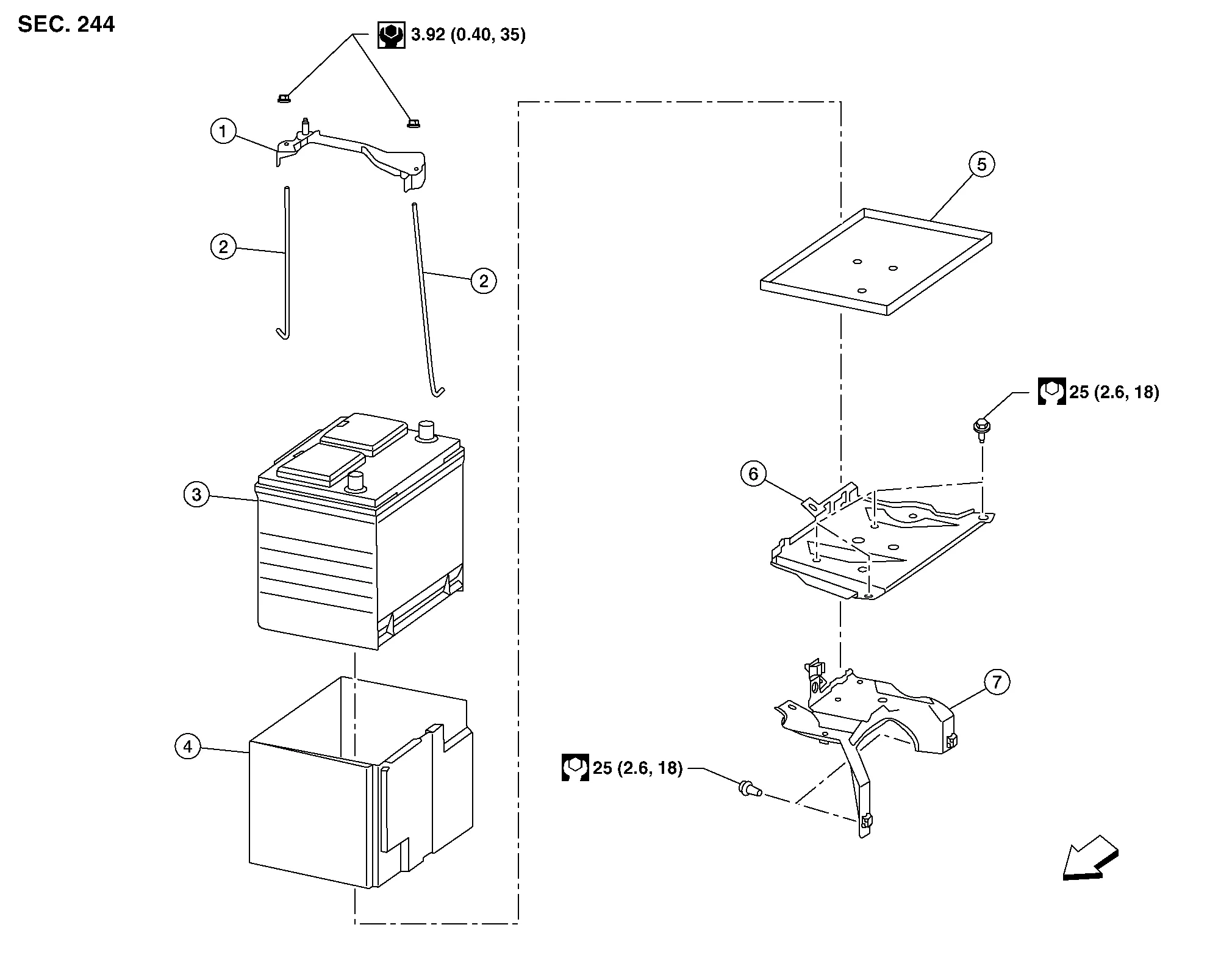
| 1. | Battery frame | 2. | Battery rods | 3. | Battery |
| 4. | Battery cover | 5. | Battery tray liner | 6. | Battery tray |
| 7. | Battery tray support |  |
Front |
REMOVAL
Remove the battery. Refer to Removal and Installation.
Remove the air cleaner and air duct. Refer to Removal and Installation.
Disconnect the transmission control module (TCM). Refer to Exploded View.
Remove the ECM bracket.
Remove the battery tray bolts and battery tray.
Remove the battery tray support bolts and battery tray support.
INSTALLATION
Installation is in the reverse order of removal.
Reset electronic systems as necessary. Refer to Special Repair Requirement.
 Battery Terminal with Fusible Link
Exploded View
1.
Cover
2.
Positive terminal
3.
Battery
4.
Harness connectors
5.
Fusible link box (battery)
6.
Positive cable
Front
Removal and Installation
REMOVALDisconnect negative battery terminal...
 Power Supply, Ground & Circuit Elements :: Service Data and Specifications (sds). Service Data and Specifications (sds)
Battery
Type* L2
Capacity (20HR) minimum V-AH
12 - 63
Cold cranking current A @ -18°C (0°F)
550
*: Always check with the Parts Department for the latest parts information...
Other information:
Nissan Murano (Z52) 2015-2024 Service Manual: Oil Pump
Removal and Installation REMOVALRemove the engine from the vehicle. Refer to Removal and Installation (FWD) or Removal and Installation (AWD). Remove the upper oil pan. Refer to Removal and Installation (Upper Oil Pan). Remove the timing chain. Refer to Removal and Installation...
Nissan Murano (Z52) 2015-2024 Owners Manual: Startup display
When the vehicle in placed in theONor ACC position the screens that display in the vehicle information display include: Home Audio Navigation (if so equipped) Drive computer Fuel economy Driving aids (if so equipped) Speed Limit Sign (if so equipped) Tire pressure information Warning review Settings The warnings review title screen will show how many active warnings exist, or “No items to review” in the event that no warnings are active...
Categories
- Manuals Home
- Nissan Murano Owners Manual
- Nissan Murano Service Manual
- Vehicle Dynamic Control (VDC) OFF switch
- Warning lights
- Turning the AEB system on/off
- New on site
- Most important about car

Copyright © 2026 www.nimurano.com