
Nissan Murano: HomeLink® Universal Transceiver (if so equipped) / If your vehicle is stolen.
If your vehicle is stolen, you should change the codes of any non-rolling code device that has been programmed into HomeLink®. Consult the Owner’s Manual of each device or call the manufacturer or dealer of those devices for additional information.
When your vehicle is recovered, you will need to reprogram the HomeLink® Universal Transceiver with your new transmitter information.
FCC Notice:
For USA:
This device complies with Part 15 of the FCC Rules. Operation is subject to the following two conditions: (1) This device maynot cause harmful interference,and (2) this device must accept any interference received, including interference that may cause undesired operation.
NOTE:
Changes or modifications not expressly approved by the party responsible for compliance could void the user’s authority to operate the equipment.
For Canada:
This device complies with Industry Canada licence-exempt RSS standard(s). Operation is subject to the following two conditions: (1) this device may not cause interference, and (2) this device must accept any received, including interference that may cause undesired operation of the device.
 Reprogramming a single HomeLink® button
To reprogram a HomeLink® Universal
Transceiver button, complete the following:
Press and hold the desired HomeLink®
button. DO NOT release the button...

Other information:
Nissan Murano (Z52) 2015-2024 Service Manual: I-Da
Description Always perform the Intelligent Drive Alertness (I-DA) system action test to check that the system operates normally after replacing the around view monitor control unit and any Intelligent Drive Alertness (I-DA) system malfunction.WARNING: Be careful of traffic conditions and safety around the vehicle when performing road test...
Nissan Murano (Z52) 2015-2024 Service Manual: Warning System Buzzer
Component Function Check CHECK SYSTEM WARNING BUZZER CONSULT Turn the ignition switch ON. Select the active test item “ICC BUZZER” of “ICC/ADAS”. With operating the test item, check the operation. On : Warning buzzer is activated. Off : Warning buzzer is not activated...
Categories
- Manuals Home
- Nissan Murano Owners Manual
- Nissan Murano Service Manual
- All-Wheel Drive (AWD) (if so equipped)
- Tire rotation
- Warning lights
- New on site
- Most important about car
Fuel gauge
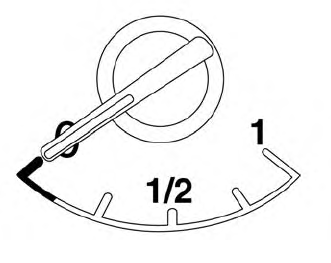
The gauge indicates the approximate fuel level in the tank.
The gauge may move slightly during braking, turning, acceleration, or going up or down hills.
The gauge needle returns to 0 (Empty) after the ignition switch is placed in the OFF position.
