
Nissan Murano: Door & Lock :: Removal and Installation / Back Door Lock
 Outside Handle
Removal and Installation
REMOVALFully close rear door glass.
Remove rear door finisher. Refer to Removal and Installation.
Remove rear door vapor barrier...
 Door Lock
Exploded View
1.
Back door stay [(LH/RH) (without automatic back door)]
2.
Spindle unit [(LH/RH) (with automatic back door)]
3.
Back door touch sensor [(LH) (with automatic back door)]
4...
Other information:
Nissan Murano (Z52) 2015-2024 Service Manual: P1148 Closed Loop Control
DTC Description DTC DETECTION LOGIC DTC CONSULT screen terms (Trouble diagnosis content) DTC detection condition P1148 CLOSED LOOP-B1 (Closed loop bank 1) Diagnosis condition — Signal (terminal) — Threshold The closed loop control function for bank 1 does not operate even when Nissan Murano vehicle is being driven in the specified condition Diagnosis delay time — P1168 CLOSED LOOP-B2 (Closed loop bank 2) Diagnosis condition — Signal (terminal) — Threshold The closed loop control function for bank 2 does not operate even when Nissan Murano vehicle is being driven in the specified condition Diagnosis delay time — POSSIBLE CAUSE Harness or connectors (The A/F sensor 1 circuit is open or shorted...
Nissan Murano (Z52) 2015-2024 Owners Manual: Vehicle-to-vehicle distance control mode
In the vehicle-to-vehicle distance control mode, the ICC system automatically maintains a selected distance from the vehicle traveling in front of you according to that vehicle’s speed (up to the set speed), or at the set speed when the road ahead is clear...
Categories
- Manuals Home
- Nissan Murano Owners Manual
- Nissan Murano Service Manual
- Indicator lights
- Rear bench seat adjustment
- Tire rotation
- New on site
- Most important about car
Autolight system
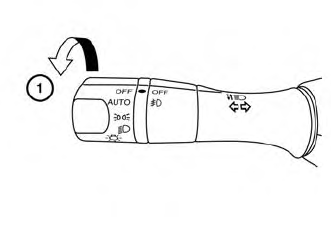
The autolight system allows the headlights to turn on and off automatically. The autolight system can:
Turn on the headlights, front parking, tail, license plate and instrument panel lights automatically when it is dark. Turn off all the lights (except daylight running lights) when it is light. Keep all the lights on for a period of time after you place the ignition switch in the OFF position and all doors are closed.
Copyright © 2026 www.nimurano.com