
Nissan Murano: Back Door Lock / Back Door Stay
REMOVAL
Support back door using a suitable tool.
WARNING:
Bodily injury may occur if no supporting rod is holding back door open when removing back door stay.
Release metal clip (3) located on connection between back door stay (1) and stud ball (back door side) (2) using a suitable tool (A).
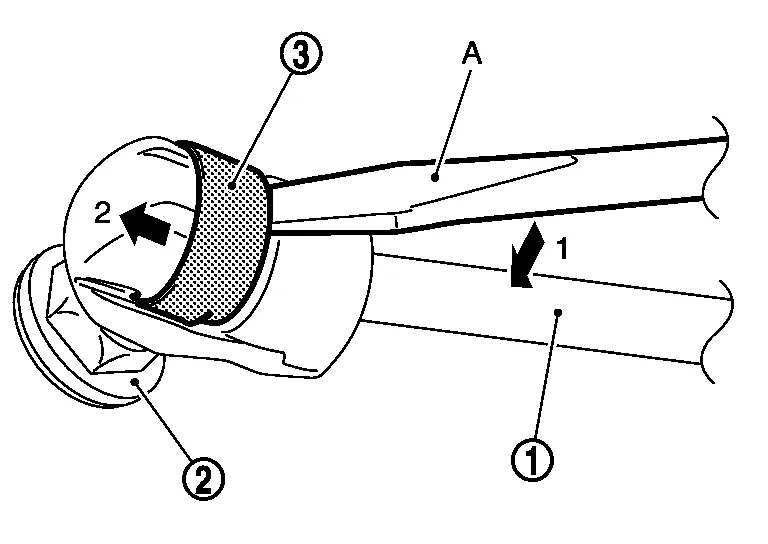
Remove back door stay (back door side).
Repeat procedure for removing back door stay from body side.
INSTALLATION
Installation is in the reverse order of removal.
CAUTION:
After installation, check back door open/close operation.
 Spindle Unit
Removal and Installation
REMOVALSupport back door using a suitable tool.
WARNING:
Bodily injury may occur if back door is not supported properly when removing back door spindle unit...
 Back Door Touch Sensor
Removal and Installation
CAUTION:
Use care not to bend touch sensor.
Replace the back door touch sensor if it has been dropped or sustained an impact...
Other information:
Nissan Murano (Z52) 2015-2024 Owners Manual: Seats
WARNING Do not ride in a moving vehicle when the seatback is reclined. This can be dangerous. The shoulder belt will not be against your body. In an accident, you could be thrown into it and receive neck or other serious injuries. You could also slide under the lap belt and receive serious internal injuries...
Nissan Murano (Z52) 2015-2024 Owners Manual: How to use the remote keyless entry function
The remote keyless entry function can operate all door locks using the remote keyless function of the Intelligent Key. The remote keyless function can operate at a distance of 33 ft (10 m) away from the vehicle. The operating distance depends upon the conditions around the vehicle...
Categories
- Manuals Home
- Nissan Murano Owners Manual
- Nissan Murano Service Manual
- Memory storage function (key-link)
- All-Wheel Drive (AWD) (if so equipped)
- Passenger compartment
- New on site
- Most important about car
Luggage hooks

When securing items using luggage hooks located on the back of the seat or side finisher do not apply a load over more than 6.5 lbs. (29 N) to a single hook.
The luggage hooks that are located on the floor should have loads less than 110 lbs. (490 N) to a single hook.
