
Nissan Murano: Back Door Lock / Spindle Unit
REMOVAL
Support back door using a suitable tool.
WARNING:
Bodily injury may occur if back door is not supported properly when removing back door spindle unit.
Remove luggage side upper finisher. Refer to Removal and Installation.
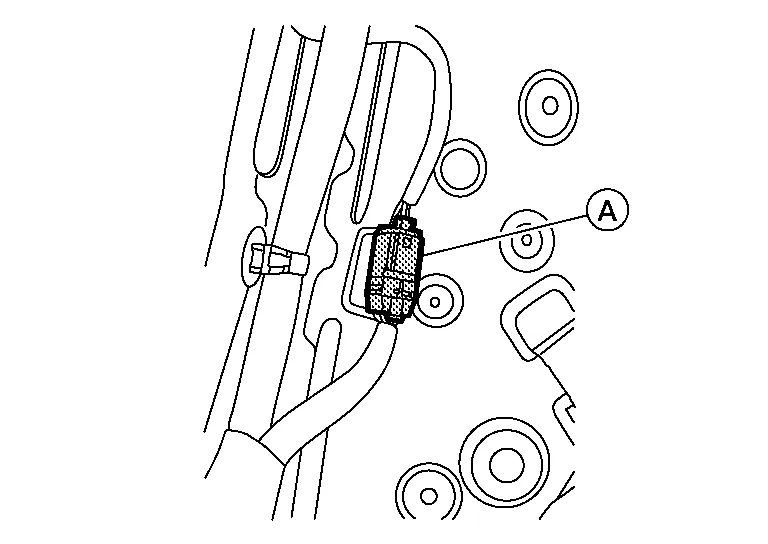
Disconnect the harness connector (A) from the spindle unit.
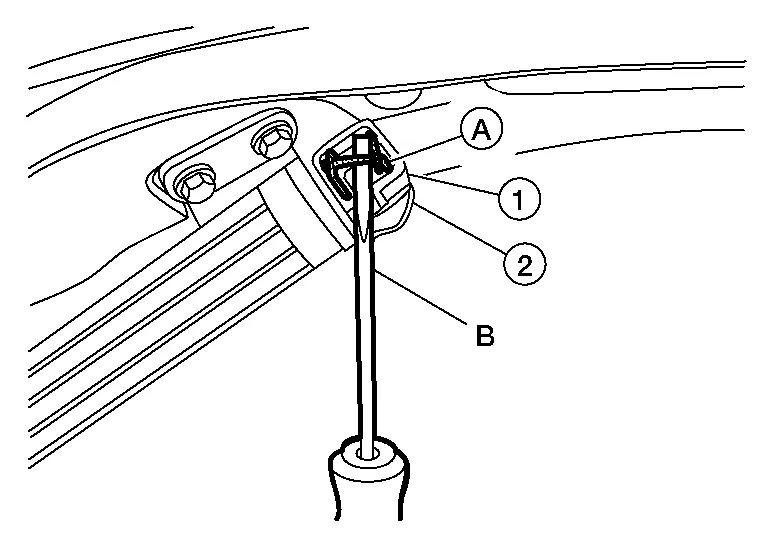
Remove metal clip (A) from spindle unit upper hinge ball socket (1) using a suitable tool (B) and release spindle unit from spindle unit upper hinge (2).
Remove metal clip from spindle unit lower hinge ball socket using a suitable tool and release spindle unit.
Pull harness through Nissan Murano vehicle body and remove spindle unit.
INSTALLATION
Installation is in the reverse order of removal.
CAUTION:
-
When reusing stud ball, always apply locking sealant before installing stud ball to back door.
-
After installation, check back door open/close and lock/unlock operation.
-
Perform calibration of automatic back door position information. Refer to Description.
 NOTE:
NOTE:
Check spindle unit grommet lubrication condition. if necessary, apply a suitable lubrication to spindle unit grommet during installation.
 Door Lock
Exploded View
1.
Back door stay [(LH/RH) (without automatic back door)]
2.
Spindle unit [(LH/RH) (with automatic back door)]
3.
Back door touch sensor [(LH) (with automatic back door)]
4...
 Back Door Stay
Removal and Installation
REMOVALSupport back door using a suitable tool.
WARNING:
Bodily injury may occur if no supporting rod is holding back door open when removing back door stay...
Other information:
Nissan Murano (Z52) 2015-2024 Owners Manual: Instrument panel
..
Nissan Murano (Z52) 2015-2024 Service Manual: Heater & Air Conditioning Control System :: Precaution. Precautions
Precaution for Supplemental Restraint System (SRS) "AIR BAG" and "SEAT BELT PRE-TENSIONER" The Supplemental Restraint System such as “AIR BAG” and “SEAT BELT PRE-TENSIONER”, used along with a front seat belt, helps to reduce the risk or severity of injury to the driver and front passenger for certain types of collisions...
Categories
- Manuals Home
- Nissan Murano Owners Manual
- Nissan Murano Service Manual
- Vehicle Dynamic Control (VDC) OFF switch
- Jacking up vehicle and removing the damaged tire
- Intelligent Forward Collision Warning (I-FCW)
- New on site
- Most important about car
Unfastening the seat belts. Checking seat belt operation
Unfastening the seat belts

To unfasten the seat belt, press the button
on the buckle  . The seat belt
automatically
retracts.
. The seat belt
automatically
retracts.
