
Nissan Murano: NISSAN Intelligent Key® / Troubleshooting guide
Nissan Murano (Z52) 2015-2024 Owners Manual / Pre-driving checks and adjustments / NISSAN Intelligent Key® / Troubleshooting guide
Verify the location of all Intelligent Keys that are programmed for the vehicle. If another Intelligent Key is in range or inside the vehicle, the vehicle system may respond differently than expected.
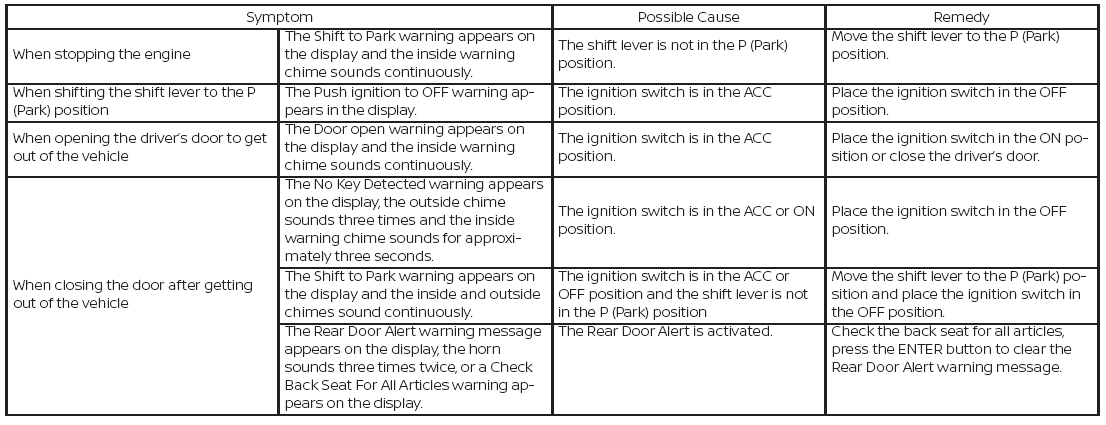
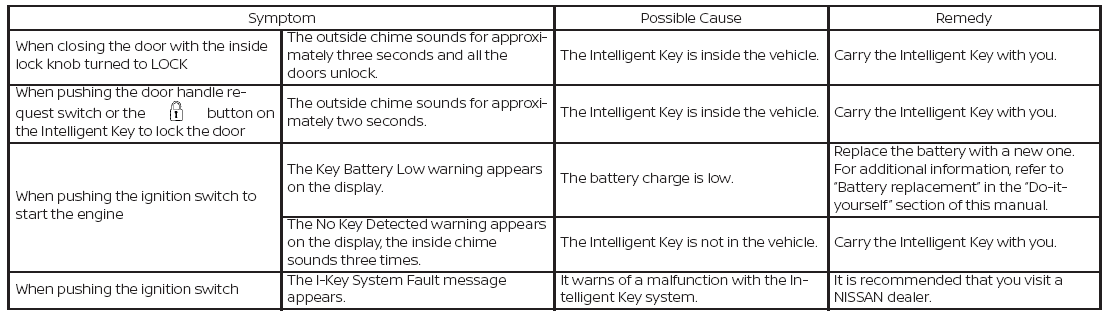
 Warning signals
To help prevent the vehicle from moving
unexpectedly by erroneous operation of
the Intelligent Key or to help prevent the
vehicle from being stolen, a chime or
buzzer sounds from inside and outside the
vehicle and a warning is displayed in the
instrument panel...
 Remote Engine Start (if so equipped)
Type A (if so equipped)
The button will be on the NISSAN
Intelligent
Key® if the vehicle has Remote Engine
Start. This feature allows the engine to
start from outside the vehicle...
Other information:
Nissan Murano (Z52) 2015-2024 Owners Manual: AEB system limitations
WARNING Listed below are the system limitations for the AEB system. Failure to operate the vehicle in accordance with these system limitations could result in serious injury or death. The AEB system cannot detect all vehicles under all conditions...
Nissan Murano (Z52) 2015-2024 Service Manual: Power Consumption Control System
System Description SYSTEM DIAGRAMINPUT SIGNAL AND OUTPUT SIGNALMajor signal transmission between each unit via communication lines is shown in the following table: Component parts Signal description IPDM E/R Each unit transmits the sleep-ready signal (ready) to BCM when all of the CAN sleep conditions are fulfilled...
Categories
- Manuals Home
- Nissan Murano Owners Manual
- Nissan Murano Service Manual
- GAS STATION INFORMATION
- System malfunction
- Warning lights
- New on site
- Most important about car
Luggage hooks

When securing items using luggage hooks located on the back of the seat or side finisher do not apply a load over more than 6.5 lbs. (29 N) to a single hook.
The luggage hooks that are located on the floor should have loads less than 110 lbs. (490 N) to a single hook.

Copyright © 2026 www.nimurano.com