
Nissan Murano: Intelligent Lane Intervention (I-LI) (if so equipped) / System maintenance
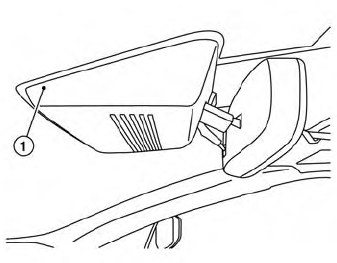
The lane camera unit  for the
I-LI system
is located above the inside mirror. To keep
the proper operation of the I-LI system and
prevent a system malfunction, be sure to
observe the following:
for the
I-LI system
is located above the inside mirror. To keep
the proper operation of the I-LI system and
prevent a system malfunction, be sure to
observe the following:
- Always keep the windshield clean.
- Do not attach a sticker (including transparent material) or install an accessory near the camera unit.
- Do not place reflective materials, such as white paper or a mirror,on the instrument panel. The reflection of sunlight may adversely affect the camera unit’s capability of detecting the lane markers.
- Do not strike or damage the areas around the camera unit. Do not touch the camera lens or remove the screw located on the camera unit. If the camera unit is damaged due to an accident, it is recommended that you visit a NISSAN dealer.
 System malfunction
If the I-LI system malfunctions, it will cancel
automatically. The LDW indicator (orange)
will illuminate in the display. If the LDWindicator
(orange) illuminates in the display,
pull off the road to a safe location and stop
the vehicle...
 Blind Spot Warning (BSW) (if so equipped)
WARNING
Failure to follow the warnings and instructions
for proper use of the BSW
system could result in serious injury or
death.
The BSWsystem is not a replacement
for proper driving procedures and is
not designed to prevent contact with
vehicles or objects...
Other information:
Nissan Murano (Z52) 2015-2024 Service Manual: Symptom Diagnosis. Rear View Monitor System
Symptom Table REAR VIEW MONITOR SYSTEM Symptom Possible cause Inspection item Camera image is not shown. (Nissan Murano Vehicle width and predictive course line are displayed.) Harness between rear view camera and audio unit Rear view camera Audio unit Camera image signal circuit...
Nissan Murano (Z52) 2015-2024 Service Manual: Preparation. Preparation
Special Service Tools The actual shape of the tools may differ from those illustrated here. Tool number (TechMate No.) Tool name Description A. — (J-52389) Engine support tool B. — (J-52604) Engine support bracket Supporting engine — (J-51307) CVT transmission jack adapter Removing CVT KV311039S0 ( — ) Charging pipe set KV31103920* ( — ) O-ring CVT fluid changing and adjustment ( — ) (J-52584) CVT stand pipe adapter kit CVT fluid changing and adjustment KV38107900 (J-52469–1) Differential side oil seal protector Installing drive shaft A: 32 mm (1...
Categories
- Manuals Home
- Nissan Murano Owners Manual
- Nissan Murano Service Manual
- Vehicle Dynamic Control (VDC) OFF switch
- Fuel recommendation
- System malfunction
- New on site
- Most important about car
Autolight system

The autolight system allows the headlights to turn on and off automatically. The autolight system can:
Turn on the headlights, front parking, tail, license plate and instrument panel lights automatically when it is dark. Turn off all the lights (except daylight running lights) when it is light. Keep all the lights on for a period of time after you place the ignition switch in the OFF position and all doors are closed.
Copyright © 2026 www.nimurano.com