
Nissan Murano: Starting and driving / Blind Spot Warning (BSW) (if so equipped)
WARNING
Failure to follow the warnings and instructions for proper use of the BSW system could result in serious injury or death.
- The BSWsystem is not a replacement for proper driving procedures and is not designed to prevent contact with vehicles or objects. When changing lanes, always use the side and rear mirrors and turn and look in the direction your vehicle will move to ensure it is safe to change lanes. Never rely solely on the BSWsystem.
The BSW system helps alert the driver of other vehicles in adjacent lanes when changing lanes.
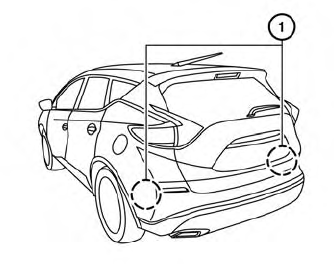
The BSW system uses radar sensors  installed near the rear bumper to detect
other vehicles in an adjacent lane.
installed near the rear bumper to detect
other vehicles in an adjacent lane.
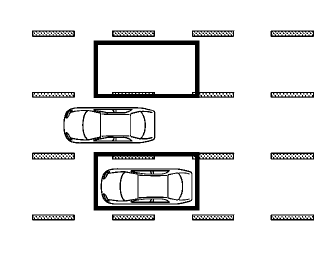
Detection zone
The radar sensors can detect vehicles on either side of your vehicle within the detection zone shown as illustrated. This detection zone starts from the outside mirror of your vehicle and extends approximately 10 ft (3.0 m) behind the rear bumper, and approximately 10 ft (3.0 m) sideways.
- BSW system operation
- How to enable/disable the BSW system
- BSW system limitations
- BSW driving situations
- System temporarily unavailable
- System maintenance
 System maintenance
The lane camera unit for the
I-LI system
is located above the inside mirror. To keep
the proper operation of the I-LI system and
prevent a system malfunction, be sure to
observe the following:
Always keep the windshield clean...
 BSW system operation
Side BSW/RCTA Indicator Light
BSW/RCTA Indicator
The BSW system operates above approximately
20 mph (32 km/h).
If the radar sensors detect a vehicle in the
detection zone, the side BSW/RCTA indicator
light (1) illuminates...
Other information:
Nissan Murano (Z52) 2015-2024 Service Manual: Horn :: Precaution. Precautions
Precaution for Supplemental Restraint System (SRS) "AIR BAG" and "SEAT BELT PRE-TENSIONER" The Supplemental Restraint System such as “AIR BAG” and “SEAT BELT PRE-TENSIONER”, used along with a front seat belt, helps to reduce the risk or severity of injury to the driver and front passenger for certain types of collisions...
Nissan Murano (Z52) 2015-2024 Owners Manual: Autolight system
The autolight system allows the headlights to turn on and off automatically. The autolight system can: Turn on the headlights, front parking, tail, license plate and instrument panel lights automatically when it is dark. Turn off all the lights (except daylight running lights) when it is light...
Categories
- Manuals Home
- Nissan Murano Owners Manual
- Nissan Murano Service Manual
- Memory storage function (key-link)
- GAS STATION INFORMATION
- Checking engine oil level
- New on site
- Most important about car
Seatback pockets

Theremaybe one or two seatback pockets located on the back of the driver and passenger seats. The pockets can be used to store maps.
WARNING
