
Nissan Murano: Sonar System :: Removal and Installation / Sonar Buzzer
REMOVAL
Remove instrument lower panel LH. Refer to Removal and Installation.
Disconnect harness connector from the sonar buzzer.
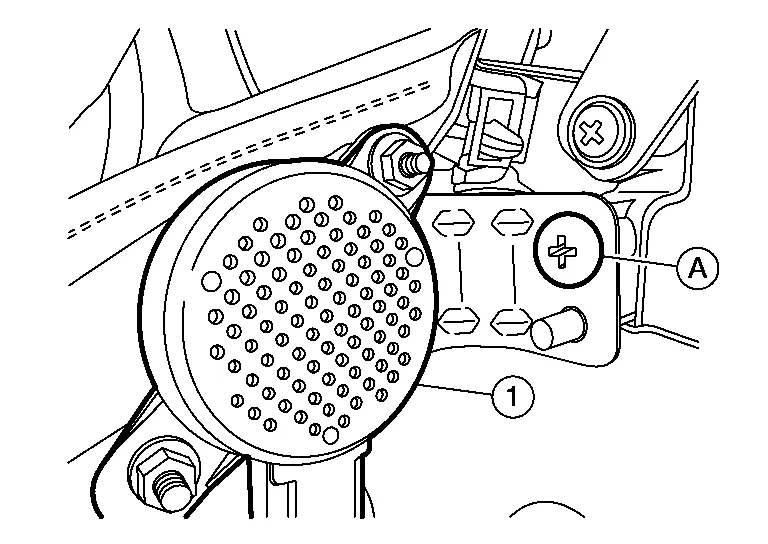
Remove sonar buzzer screw (A), then remove sonar buzzer (1).
INSTALLATION
Installation is in the reverse order of removal.
 Sonar Sensor
Removal and Installation
REAR SONAR SENSOR OUTERRelease pawls using suitable tool and remove rear sonar sensor (1).
NOTE:
Rear sonar sensor (inner) shown, rear sonar sensor (outer) similar...
 Sonar Control Unit
Removal and Installation
CAUTION:
Before replacing the Sonar Control Unit, perform “BEFORE REPLACEMENT” to save or print current Nissan Murano vehicle specification...
Other information:
Nissan Murano (Z52) 2015-2024 Service Manual: C119a Vacuum Sensor
DTC Description DTC DETECTION LOGIC DTC No. CONSULT screen item (Trouble diagnosis content) DTC detected condition C119A VACUUM SEN VOLT (Vacuum sensor voltage) Diagnosis condition When ignition switch ON. Signal (terminal) Vacuum sensor (brake booster) signal Threshold When a malfunction is detected in supply power voltage of vacuum sensor...
Nissan Murano (Z52) 2015-2024 Service Manual: Unit Removal and Installation. Transfer Assembly
Exploded View Transfer assembly Transfer gusset Rear gusset : Nissan Murano Vehicle front : N·m (kg-m, ft-lb) Removal and Installation NOTE: When removing components such as hoses, tubes/lines, etc., cap or plug openings to prevent fluid from spilling...
Categories
- Manuals Home
- Nissan Murano Owners Manual
- Nissan Murano Service Manual
- Turning the AEB system on/off
- Memory storage function (key-link)
- Tire rotation
- New on site
- Most important about car
Unfastening the seat belts. Checking seat belt operation
Unfastening the seat belts

To unfasten the seat belt, press the button
on the buckle  . The seat belt
automatically
retracts.
. The seat belt
automatically
retracts.

Copyright © 2026 www.nimurano.com