
Nissan Murano: Srs Air Bag :: Removal and Installation / Satellite Sensor
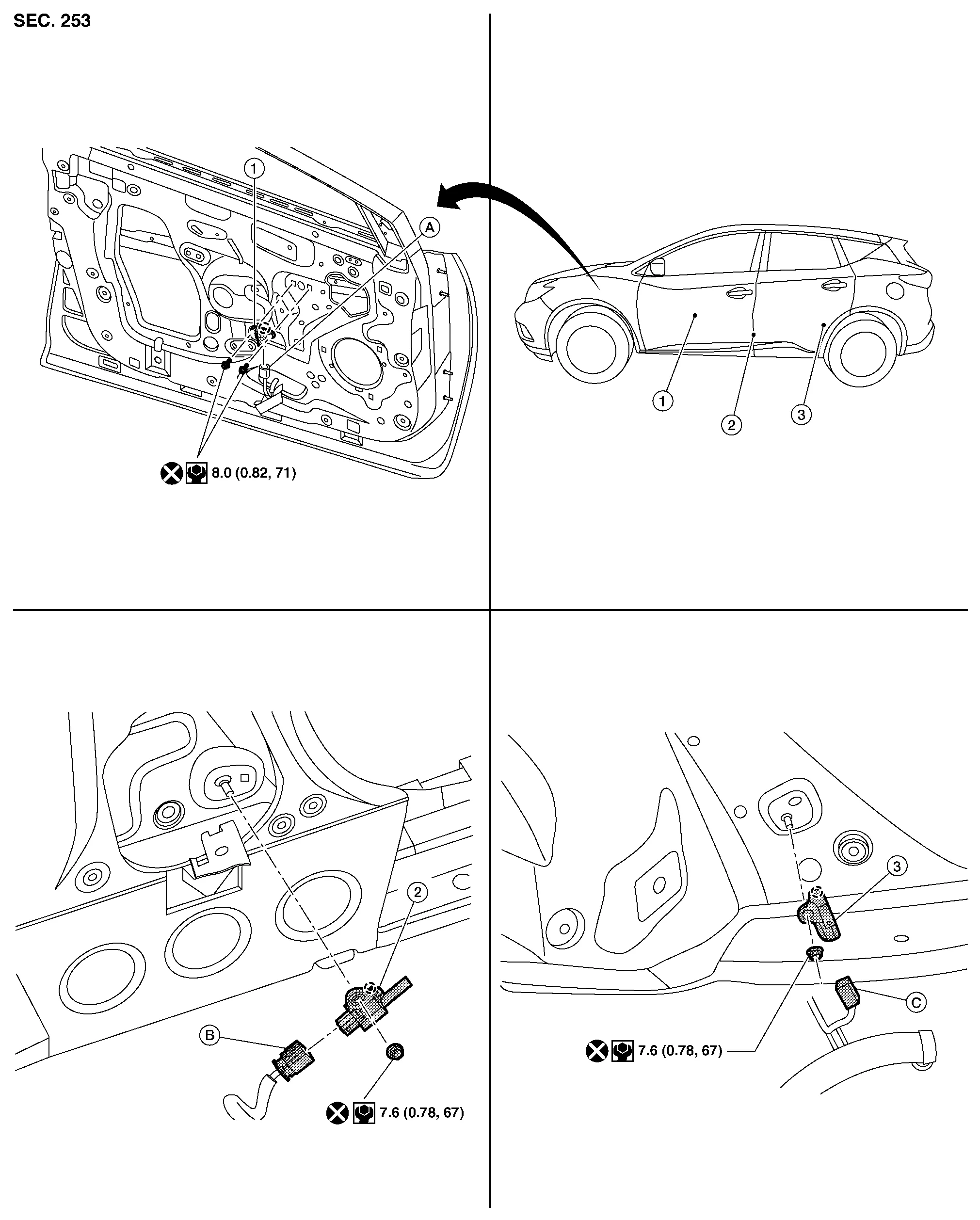
| 1. | Front door satellite sensor | 2. | Front side air bag satellite sensor | 3. | Rear side air bag satellite sensor |
| A. | Front door satellite sensor harness connector | B. | Front side air bag satellite sensor harness connector | C. | Rear side air bag satellite sensor harness connector |
 |
Pawl |
 NOTE:
NOTE:
LH side shown, RH side similar.
WARNING:
-
Before servicing SRS, place the ignition switch in the OFF position, disconnect both battery terminals then wait at least three minutes.
-
Do not use air tools or electric tools for servicing.
FRONT SIDE AIR BAG SATELLITE SENSOR
Removal
Disconnect negative and positive battery terminals then wait at least three minutes. Refer to Removal and Installation.
Remove front seat belt retractor. Refer to Removal and Installation.
Remove front side air bag satellite sensor nut.
CAUTION:
Do not reuse front side air bag satellite sensor nut.
Disconnect harness connector from front side air bag satellite sensor.
Remove front side air bag satellite sensor.
CAUTION:
-
Replace front side air bag satellite sensor if it has been dropped or sustained an impact.
-
Do not strike front side air bag satellite sensor.
Installation
Installation is in the reverse order of removal.
CAUTION:
-
Position front side air bag satellite sensor using pawl before tightening nut to specification.
-
Do not reuse front side air bag satellite sensor nut.
-
Do not damage harness connector during installation.
-
After installation is complete, check that no system malfunction is detected causing air bag warning lamp to illuminate.
-
If a malfunction is indicated by air bag warning lamp after repair or replacement of malfunctioning parts, perform SRS final check. Refer to SRS Final Check.
REAR SIDE AIR BAG SATELLITE SENSOR
Removal
Disconnect negative and positive battery terminals then wait at least three minutes. Refer to Removal and Installation.
Remove luggage side lower finisher. Refer to Removal and Installation.
Remove rear side air bag satellite sensor nut.
CAUTION:
Do not reuse rear side air bag satellite sensor nut.
Disconnect harness connector from rear side air bag satellite sensor.
Remove rear side air bag satellite sensor.
CAUTION:
-
Replace rear side air bag satellite sensor if it has been dropped or sustained an impact.
-
Do not strike rear side air bag satellite sensor.
Installation
Installation is in the reverse order of removal.
CAUTION:
-
Position rear side air bag satellite sensor using pawl before tightening bolt to specification.
-
Do not reuse rear side air bag satellite sensor nut.
-
Do not damage harness connector during installation.
-
After installation is complete, check that no system malfunction is detected causing air bag warning lamp to illuminate.
-
If a malfunction is indicated by air bag warning lamp after repair or replacement of malfunctioning parts, perform SRS final check. Refer to SRS Final Check.
FRONT DOOR SATELLITE SENSOR
Removal
Disconnect negative and positive battery terminals then wait at least three minutes. Refer to Removal and Installation.
Remove front door finisher. Refer to Removal and Installation.
Remove front door satellite sensor bolts.
CAUTION:
Do not reuse front door satellite sensor bolts.
Disconnect harness connector from front door satellite sensor.
Remove front door satellite sensor.
CAUTION:
-
Replace front door satellite sensor if it has been dropped or sustained an impact.
-
Do not strike front door satellite sensor.
Installation
Installation is in the reverse order of removal.
CAUTION:
-
Position front door satellite sensor using pawl before tightening bolts to specification.
-
Do not reuse front door satellite sensor bolts.
-
Do not damage harness connector during installation.
-
After installation is complete, check that no system malfunction is detected causing air bag warning lamp to illuminate.
-
If a malfunction is indicated by air bag warning lamp after repair or replacement of malfunctioning parts, perform SRS final check. Refer to SRS Final Check.
 Crash Zone Sensor
Exploded View
1.
Crash zone sensor
A.
Crash zone sensor harness connector
Removal and Installation
WARNING:
Before servicing SRS, place the ignition switch in the OFF position, disconnect both battery terminals then wait at least three minutes...
 Air Bag Diagnosis Sensor Unit
Exploded View
1.
Air bag diagnosis sensor unit
Front
Removal and Installation
WARNING:
Before servicing SRS, place the ignition switch in the OFF position, disconnect both battery terminals then wait at least three minutes...
Other information:
Nissan Murano (Z52) 2015-2024 Service Manual: Rear Suspension :: Symptom Diagnosis. Noise, Vibration and Harshness (nvh) Troubleshooting
..
Nissan Murano (Z52) 2015-2024 Service Manual: Stall Test
Work Procedure INSPECTIONCheck the engine oil level. Replenish if necessary. Refer to Inspection. Check for leak of the CVT fluid. Refer to Inspection. Drive for about 10 minutes to warm up the Nissan Murano vehicle so that the CVT fluid temperature is 50 to 80°C (122 to 176°F)...
Categories
- Manuals Home
- Nissan Murano Owners Manual
- Nissan Murano Service Manual
- Vehicle Dynamic Control (VDC) OFF switch
- Intelligent Forward Collision Warning (I-FCW)
- High Beam Assist (if so equipped)
- New on site
- Most important about car
Seatback pockets

Theremaybe one or two seatback pockets located on the back of the driver and passenger seats. The pockets can be used to store maps.
WARNING
