
Nissan Murano: Head restraints/headrests / Remove and Install
Remove
Use the following procedure to remove the head restraint/headrest:
- Pull the head restraint/headrest up to the highest position.
- Push and hold the lock knob.
- Remove the head restraint/headrest
from the seat.
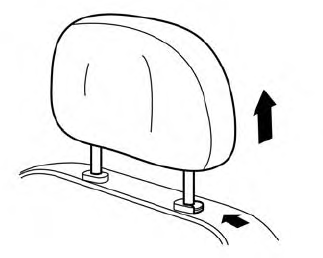
- Store the head restraint/headrest properly in a secure place so it is not loose in the vehicle.
- Reinstall and properly adjust the head restraint/headrest before an occupant uses the seating position.
Install
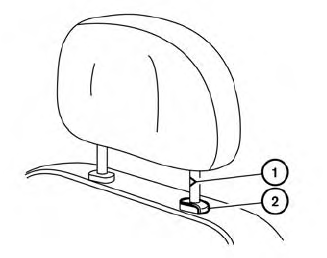
- Align the head restraint/headrest
stalks with the holes in the seat. Make
sure that the head restraint/headrest is
facing the correct direction. The stalk
with the notch (notches)
 must
be
installed in the hole with the lock knob
must
be
installed in the hole with the lock knob
 .
.
- Push and hold the lock knob and push the head restraint/headrest down.
- Properly adjust the head restraint/ headrest before an occupant uses the seating position.

 Adjust
For adjustable head restraint/headrest
Adjust the head restraint/headrest so the
center is level with the center of your ears. If
your ear position is still higher than the
recommended alignment, place the head
restraint/headrest at the highest position...
Other information:
Nissan Murano (Z52) 2015-2024 Service Manual: Brake Caliper Assembly
Exploded View 1. Torque member 2. Bushing 3. Piston boot 4. Slide pin boot 5. Slide pin 6. Piston 7. Piston seal 8. Brake caliper body 9. Brake hose 10. Copper sealing washers 11. Bleeder cap 12. Inner shim cover 13...
Nissan Murano (Z52) 2015-2024 Service Manual: Head Lamp
CONSULT Function (BCM - HEAD LAMP) ECU IDENTIFICATIONThe BCM part number is displayed.SELF DIAGNOSTIC RESULTRefer to DTC Index.DATA MONITOR Monitor Item [Unit] Description PUSH SW [On/Off] Indicates condition of push-button ignition switch. ENGINE STATE [Stop/Stall/Crank/Run] Indicates engine status received from ECM on CAN communication line...
Categories
- Manuals Home
- Nissan Murano Owners Manual
- Nissan Murano Service Manual
- Indicator lights
- Passenger compartment
- Tire rotation
- New on site
- Most important about car
Vehicle security system

Your vehicle has two types of security systems:
Vehicle security system NISSAN Vehicle Immobilizer SystemThe vehicle security system provides visual and audible alarm signals if someone opens the doors, liftgate or the hood when the system is armed. It is not, however, a motion detection type system that activates when a vehicle is moved or when a vibration occurs.

Copyright © 2026 www.nimurano.com