
Nissan Murano: Vehicle security system / Vehicle security system activation
Nissan Murano (Z52) 2015-2024 Owners Manual / Instruments and controls / Security systems / Vehicle security system / Vehicle security system activation
The vehicle security system will give the following alarm:
- The turn signals blink and the horn sounds intermittently.
- The alarm automatically turns off after
a period of time. However, the alarm
reactivates if the vehicle is tampered
with again. The alarm can be shut off by
unlocking the driver’s door or liftgate
with the key (if so equipped) or by pressing
the
 button on the Intelligent
Key.
button on the Intelligent
Key.
The alarm is activated by:
- Opening the door or liftgate without using the key (if so equipped) or Intelligent Key (even if the door is unlocked by releasing the door inside lock switch).
 How to arm the vehicle security system
Close all windows and the moonroof (if
so equipped). The system can be
armed even if the windows and
moonroof are open.
Remove the Intelligent Key fromthe vehicle...
 How to stop an activated alarm
The alarm stops only by unlocking the driver’s
door or the liftgate with the key (if so
equipped), pressing the button on
the Intelligent Key, or pushing the request
switch on the driver’s or passenger’s door
with the Intelligent Key in range of the door
handle...
Other information:
Nissan Murano (Z52) 2015-2024 Service Manual: Bsw
System Description SYSTEM DIAGRAMADAS CONTROL UNIT INPUT/OUTPUT SIGNAL ITEMADAS control unit receives signals via CAN communication. It also detects vehicle conditions that are necessary for Blind Spot Warning control.Input Signal Item Transmit unit Signal name Description TCM CAN communication Shift position signal Receives a selector lever position...
Nissan Murano (Z52) 2015-2024 Service Manual: Distance Sensor (icc Sensor) Alignment
Work Procedure Always perform the radar alignment after removing and installing or replacing the distance sensor.Application Notice Type Description TYPE 1 When using KV99112700 for radar alignment. Refer to Description. TYPE 2 When using 1-20-2851-1 for radar alignment...
Categories
- Manuals Home
- Nissan Murano Owners Manual
- Nissan Murano Service Manual
- Tire rotation
- Checking engine oil level
- How to enable/disable the LDW system
- New on site
- Most important about car
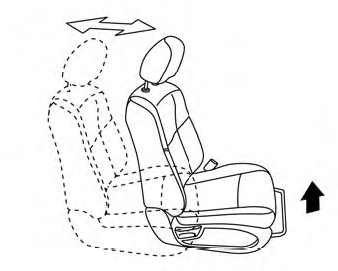
Front manual seat adjustment (if so equipped)
Your vehicle seats can be adjusted manually. For additional information about adjusting the seats, refer to the steps outlined in this section.
Forward and backward

Copyright © 2026 www.nimurano.com