
Nissan Murano: Front Wiper Blade / Front Wiper Blade Refill
REMOVAL
Remove the front wiper blade. Refer to Removal and Installation.
CAUTION:
Be careful not to drop the front wiper arm onto the windshield glass.
Hold the front wiper blade refill lip at the end (A) of the front wiper blade (1) with a suitable tool (B) as shown, and pull it firmly in the direction (C).
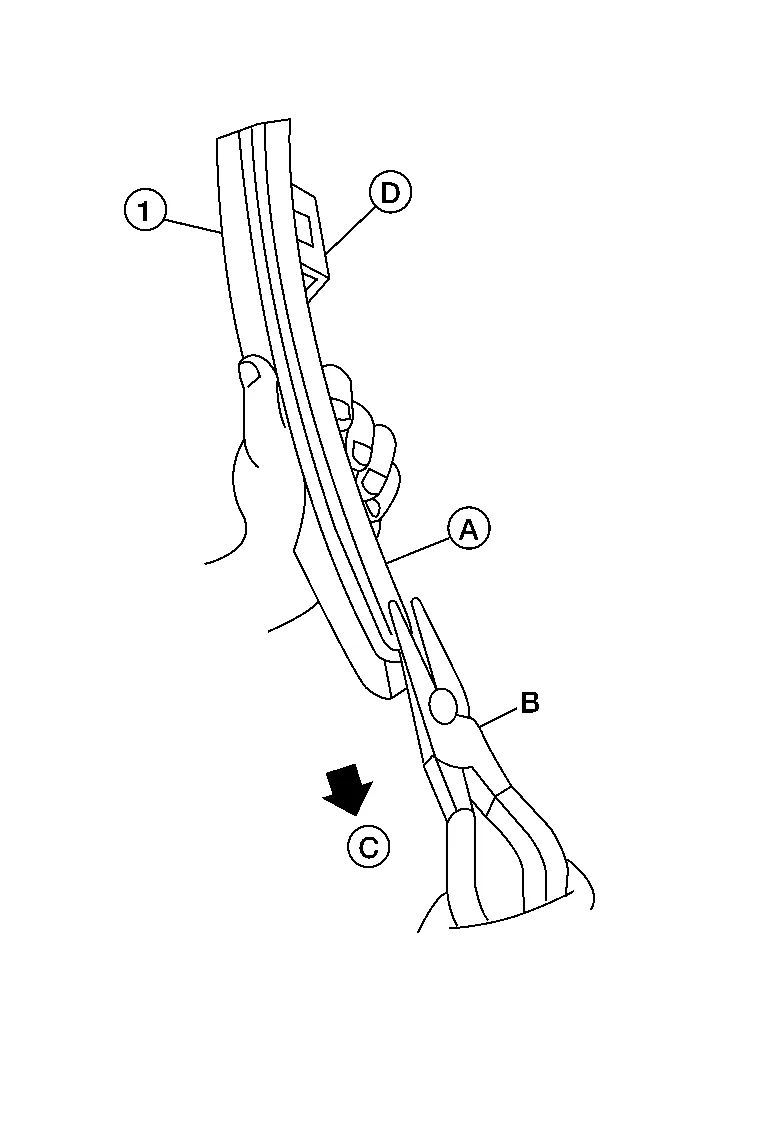
(D): U clip (part of front wiper blade)
-
If the front wiper blade refill lip is torn due to wear, insert a suitable tool (A) into the space between the end of the front wiper blade refill (1) and the front wiper blade (2) and pull the front wiper blade refill (1) out as shown.

INSTALLATION
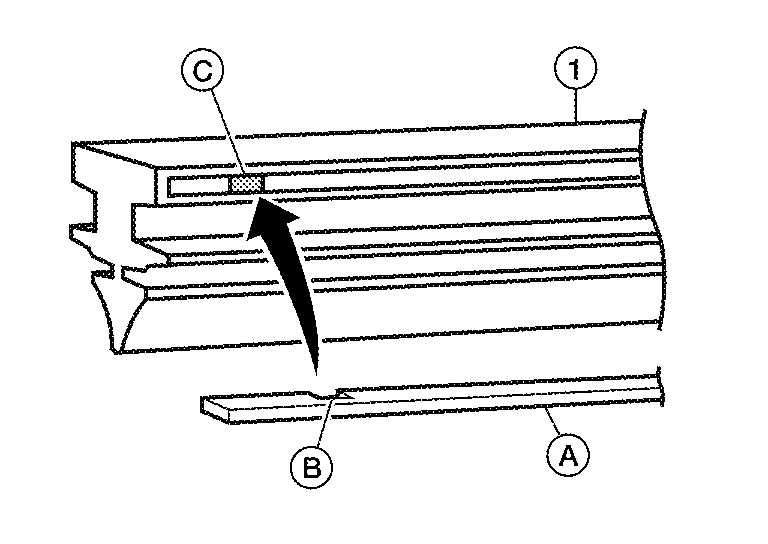
If the rib (A) has become detached from the front wiper blade refill (1), check that the curve of the rib (A) is in the same direction as the curve of the front wiper blade refill (1) and insert the rib (A) into the slit (B) in the front wiper blade refill (1) as shown.

-
If the rib (A) has a notch (B), insert the rib (A) into the front wiper blade refill (1) so the notch (B) fits over the protrusion (C) in the front wiper blade refill (1) as shown.
Insert the front wiper blade refill (1) tip into the end of the front wiper blade (2) in the direction (C). Push the front wiper blade refill (1) in while pressing it into the end of the front wiper blade (2) as shown. After the front wiper blade refill is fully inserted, remove the holder (B).

(A): Tab (part of front wiper blade) (2)
-
Make sure to slide the refill into the front wiper blade so that the front wiper blade refill is held by the tabs (A) on the front wiper blade as shown.

Push the front wiper blade refill (1) until the tabs on the front wiper blade (2) fit into the stoppers (A) in the end of the front wiper blade refill (1). Make sure the LOCK mark (B) on the front wiper blade refill (1) is aligned with the lock point symbol (C) on the front wiper blade (2) as shown.

Before installing the front wiper blade, make sure that the front wiper blade refill (1) end is fully covered by the front wiper blade (2) in area (A) and locked at point (C).

Install the front wiper blade. Refer to Removal and Installation.
 Front Wiper Blade
Exploded View
1.
Front wiper blade (RH)
2.
Front wiper arm (RH)
3.
Front wiper arm cover (RH)
4.
Front wiper arm cover (LH)
5.
Front wiper arm (LH)
6...
 Front Wiper Drive Assembly
Exploded View
1.
Front wiper drive assembly
Removal and Installation
REMOVALRemove the cowl top cover. Refer to Removal and Installation — Cowl Top Cover...
Other information:
Nissan Murano (Z52) 2015-2024 Service Manual: Water Hose
Exploded View 1. Hose clamp 2. CVT water hose A 3. Transaxle assembly 4. CVT water hose B 5. Heater thermostat 6. CVT water hose C 7. Transaxle assembly A. Water outlet Removal and Installation REMOVALWARNING: Do not remove the radiator cap when the engine is hot...
Nissan Murano (Z52) 2015-2024 Service Manual: Automatic Drive Positioner Control Unit
Reference Value TERMINAL LAYOUTPHYSICAL VALUES Terminal No. (wire color) Description Condition Voltage (Approx.) + - Signal name Input/Output 1 (LG) Ground Tilt switch up signal Input Tilt switch Operate (up) 0V Other than above 5V 2 (GR) Ground Select switch RH signal Input Select switch position RH 0V Neutral or LH 5V 3 (G) Ground Mirror switch up signal Input Mirror switch Operated (up) 0V Other than above 5V 4 (P) Ground Mirror switch left signal Input Mirror switch Operated (left) 0V Other than above 5V 5 (W) Ground Door mirror sensor RH up/down signal Input Door mirror RH position Change between 3...
Categories
- Manuals Home
- Nissan Murano Owners Manual
- Nissan Murano Service Manual
- Fuel recommendation
- Rear bench seat adjustment
- Indicator lights
- New on site
- Most important about car
Unfastening the seat belts. Checking seat belt operation
Unfastening the seat belts
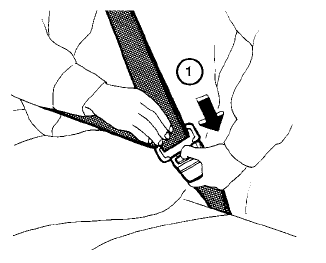
To unfasten the seat belt, press the button
on the buckle  . The seat belt
automatically
retracts.
. The seat belt
automatically
retracts.
