
Nissan Murano: Removal and Installation / Front Tweeter
REMOVAL
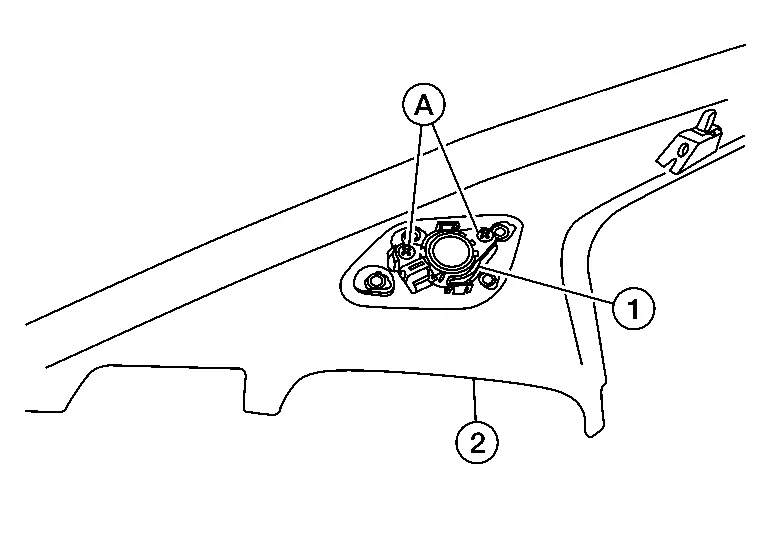
Remove front pillar finisher. Refer to Removal and Installation.
Remove screws (A) and remove front tweeter (1) from front pillar finisher (2).
INSTALLATION
Installation is the reverse order of removal.
 Instrument Panel Tweeter
Removal and Installation
REMOVALRemove instrument panel tweeter grille (LH\RH). Refer to Exploded View.
Disconnect the harness connector from instrument panel tweeter and remove screws (A) to remove instrument panel tweeter (1)...
 Front Door Speaker
Removal and Installation
REMOVALRemove front door finisher. Refer to Removal and Installation.
Disconnect the harness connector (A) from front door speaker and remove screws to remove front door speaker (1)...
Other information:
Nissan Murano (Z52) 2015-2024 Service Manual: P0520 Eop Sensor
DTC Description DTC DETECTION LOGIC A voltage signal transmitted from the engine oil pressure sensor is lower than 0.26 V. A voltage signal transmitted from the engine oil pressure sensor is higher than 4.9 V. DTC CONSULT screen terms (Trouble diagnosis content) DTC detection condition P0520 EOP SENSOR/SWITCH (Engine oil pressure sensor/switch circuit) 1 Diagnosis condition Start engine and let it idle Signal (terminal) Voltage signal transmitted from engine oil pressure sensor to ECM Threshold A voltage signal transmitted from the engine oil pressure sensor is lower than 0...
Nissan Murano (Z52) 2015-2024 Service Manual: Ignition Coil
Exploded View 1. Ignition coil 2. Spark plug 3. Rocker cover (Bank 1) 4. Rocker cover (Bank 2) Front Removal and Installation (bank 2) REMOVALRemove engine room cover. Refer to Removal and Installation. Disconnect the harness connector from ignition coil...
Categories
- Manuals Home
- Nissan Murano Owners Manual
- Nissan Murano Service Manual
- System malfunction
- GAS STATION INFORMATION
- Turning the AEB system on/off
- New on site
- Most important about car
Seatback pockets

Theremaybe one or two seatback pockets located on the back of the driver and passenger seats. The pockets can be used to store maps.
WARNING

Copyright © 2026 www.nimurano.com