
Nissan Murano: Removal and Installation / Front Camera
REMOVAL
Remove front grille. Refer to Removal and Installation.
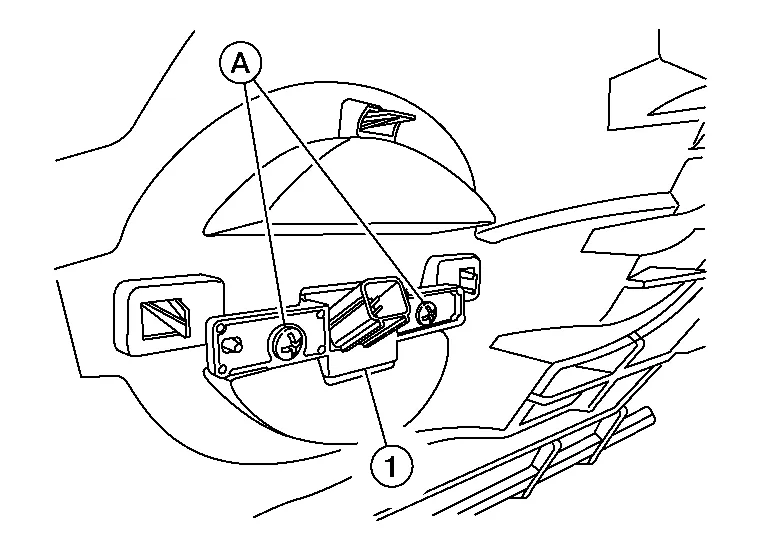
Disconnect the harness connector from the front camera.
Remove screws (A) and remove front camera (1).
INSTALLATION
Installation is in the reverse order of removal.
CAUTION:
Perform the calibration and perform the writing to the around view monitor control unit when removing and replacing each camera, removing the camera mounting parts (front grille, door mirror, etc.) and replacing the around view monitor control unit. Refer to Description.
 Around View Monitor Control Unit
Exploded View
1.
Instrument panel assembly
2.
Around view monitor control unit
Removal and Installation
REMOVALNOTE:
Before replacing around view monitor control unit, perform “Before Replace ECU” of “Read / Write Configuration” to save or print current Nissan Murano vehicle specification...

Other information:
Nissan Murano (Z52) 2015-2024 Service Manual: U1000 Can Comm Circuit
DTC Description DTC DETECTION LOGIC DTC No. CONSULT screen item (Trouble diagnosis content) DTC detected condition U1000 CAN COMM CIRCUIT (CAN communication circuit) Diagnosis condition When ignition switch ON. When power supply voltage is normal...
Nissan Murano (Z52) 2015-2024 Owners Manual: Power Windows
WARNING Make sure that all passengers have their hands, etc., inside the vehicle while it is in motion and before closing the windows. Use the window lock switch to prevent unexpected use of the power windows. To help avoid risk of injury or death through unintended operation of the vehicle and/or its systems, including entrapment in windows or inadvertent door lock activation, do not leave children, people who require the assistance of others or pets unattended in your vehicle...
Categories
- Manuals Home
- Nissan Murano Owners Manual
- Nissan Murano Service Manual
- All-Wheel Drive (AWD) (if so equipped)
- System malfunction
- Checking engine oil level
- New on site
- Most important about car
Unfastening the seat belts. Checking seat belt operation
Unfastening the seat belts

To unfasten the seat belt, press the button
on the buckle  . The seat belt
automatically
retracts.
. The seat belt
automatically
retracts.

Copyright © 2026 www.nimurano.com