
Nissan Murano: Changing a flat tire / Stopping the vehicle
Nissan Murano (Z52) 2015-2024 Owners Manual / In case of emergency / Flat tire / Changing a flat tire / Stopping the vehicle
- Safelymove the vehicle off the road and away from traffic.
- Turn on the hazard warning flashers.
- Park on a level surface and apply the parking brake. Move the shift lever to P (Park).
- Turn off the engine.
- Raise the hood to warn other traffic and to signal professional road assistance personnel that you need assistance.
- Have all passengers get out of the vehicle and stand in a safe place, away from traffic and clear of the vehicle.
WARNING
- Make sure the parking brake is securely applied and the shift lever is shifted into P (Park).
- Never change tires when the vehicle is on a slope, ice or slippery areas. This is hazardous.
- Never change tires if oncoming traffic is close to your vehicle. Wait for professional road assistance.
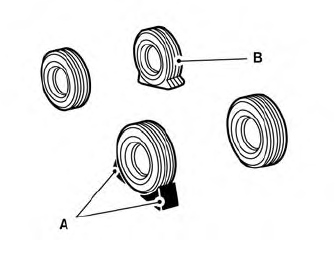
A. Blocks
B. Flat tire

 Blocking wheels
Place suitable blocks at both the front and
back of the wheel diagonally opposite the
flat tire to prevent the vehicle from moving
when it is jacked up...
Other information:
Nissan Murano (Z52) 2015-2024 Owners Manual: Towing your vehicle
When towing your vehicle, all jurisdictional and local regulations for towing must be followed. Incorrect towing equipment could damage your vehicle. Towing instructions are available from a NISSAN dealer. Local service operators are generally familiar with the applicable laws and procedures for towing...
Nissan Murano (Z52) 2015-2024 Owners Manual: Mechanical key
The Intelligent Key contains the mechanical key. To remove the mechanical key, release the lock knob on the back of the Intelligent Key. To install the mechanical key, firmly insert it into the Intelligent Key until the lock knob returns to the lock position...
Categories
- Manuals Home
- Nissan Murano Owners Manual
- Nissan Murano Service Manual
- Warning lights
- Passenger compartment
- Fuel recommendation
- New on site
- Most important about car
Luggage hooks
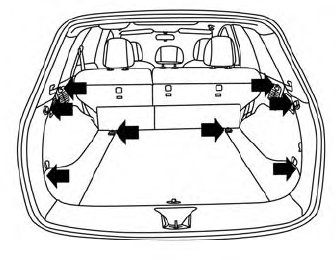
When securing items using luggage hooks located on the back of the seat or side finisher do not apply a load over more than 6.5 lbs. (29 N) to a single hook.
The luggage hooks that are located on the floor should have loads less than 110 lbs. (490 N) to a single hook.

Copyright © 2026 www.nimurano.com