
Nissan Murano: Vehicle security system / How to arm the vehicle security system
Nissan Murano (Z52) 2015-2024 Owners Manual / Instruments and controls / Security systems / Vehicle security system / How to arm the vehicle security system
- Close all windows and the moonroof (if so equipped). The system can be armed even if the windows and moonroof are open.
- Remove the Intelligent Key fromthe vehicle.
- Close all doors, hood and liftgate. Lock
all doors. The doors can be locked with
the Intelligent Key, door handle request
switch, power door lock switch or mechanical
key (if so equipped).
Key fob operation:
- Confirm that the
 indicator light
comes on. The
indicator light
comes on. The  indicator stays
illuminated
for a period of time indicating
that the system is in the pre-armed
phase.
indicator stays
illuminated
for a period of time indicating
that the system is in the pre-armed
phase.The
 indicator light will
blink every
3 seconds once the security system is
armed.
indicator light will
blink every
3 seconds once the security system is
armed.If during the pre-armed phase one of the following occurs, the system will not arm:
- Any door is unlocked with the mechanical key (if so equipped).
- A door is opened with the release button with the Intelligent Key on your person.
- The doors are unlocked using the unlock button on the Intelligent Key.
- The ignition switch is placed in the ACC or ON position.
- Even when the driver and/or passengers are in the vehicle, the system will activate when all the doors, hood and liftgate are locked with the ignition switch placed in the LOCK position. When placing the ignition switch in the ACC or ON position, the system will be released.
 Vehicle security system
Your vehicle has two types of security systems:
Vehicle security system
NISSAN Vehicle Immobilizer System
The vehicle security system provides visual
and audible alarm signals if someone
opens the doors, liftgate or the hood when
the system is armed...
 Vehicle security system activation
The vehicle security system will give the
following alarm:
The turn signals blink and the horn
sounds intermittently.
The alarm automatically turns off after
a period of time...
Other information:
Nissan Murano (Z52) 2015-2024 Service Manual: Welding (aluminum)
Welding (Aluminum) To repair a crack or a hole in a steel plate, welding is usually used. Either oxygen and acetylene gas welding, arc welding, or brazing is commonly used. For aluminum alloy panels, TIG or MIG welding, which use inert gases (argon gas) as a shield gas, are usually used...
Nissan Murano (Z52) 2015-2024 Owners Manual: Instrument panel
Vent Headlight/fog light (if so equipped)/turn signal switch Supplemental air bagHorn Meters and gaugesWarning and indicator lights Vehicle information display Wiper and washer switchRear window wiper and washer switch Audio system/Center display controls Hazard warning flasher switch Center displayNavigation display (if so equipped) Front passenger supplemental air bag Glove box Passenger supplemental knee air bag Front passenger air bag status light Power outlet USB portsAUX jack Heater and air conditioning controls Shift lever Push-button ignition switch Cruise control switches (if so equipped)Intelligent Cruise Control (ICC) switches (if so equipped) Driver supplemental knee air bag Bluetooth® Hands-Free Phone System/Audio control switches Hood releaseFuel door release Fuse box Heated steering wheel switch (if so equipped)Dynamic driver assistance switch (if so equipped) Liftgate instrument panel switch (if so equipped) 24...
Categories
- Manuals Home
- Nissan Murano Owners Manual
- Nissan Murano Service Manual
- How to enable/disable the LDW system
- Shift lock release
- Passenger compartment
- New on site
- Most important about car
Fuel gauge
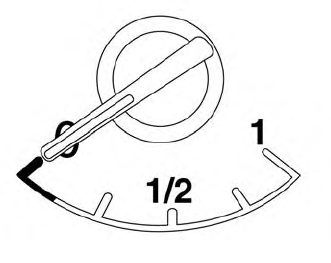
The gauge indicates the approximate fuel level in the tank.
The gauge may move slightly during braking, turning, acceleration, or going up or down hills.
The gauge needle returns to 0 (Empty) after the ignition switch is placed in the OFF position.

Copyright © 2026 www.nimurano.com