
Nissan Murano: Dtc/circuit Diagnosis / U111a Rear Camera Image Signal Circuit
DTC DETECTION LOGIC
| DTC No. |
CONSULT screen terms (Trouble diagnosis content) | DTC detection condition | |
|---|---|---|---|
| U111A |
REAR CAMERA IMAGE SIGNAL (CAN COMM CIRCUIT) |
Diagnosis condition | When ignition switch is ON |
| Signal (terminal) | Rear camera image signal (terminal 20) | ||
| Threshold | Rear camera image signal circuit is shorted or open | ||
| Diagnosis delay time | — | ||
POSSIBLE CAUSE
-
Rear camera image signal circuit
-
Around view monitor control unit
-
Rear camera
FAIL-SAFE
Camera image is not displayed (gray screen display)
PERFORM DTC CONFIRMATION PROCEDURE
 CONSULT
-
Ignition switch ON.
-
Select “Self Diagnostic Result” mode of “AVM”.
-
Check DTC.
Is DTC U111A detected?
YES>>Proceed to DTC Diagnosis Procedure.
NO>>To check malfunction symptom before repair: Intermittent Incident.
NO>>Confirmation after repair: Inspection End.
CHECK REAR CAMERA POWER SUPPLY AND GROUND CIRCUIT CONTINUITY
-
Ignition switch OFF.
-
Disconnect around view monitor control unit connector and rear camera connector.
-
Check continuity between around view monitor control unit connector and rear camera connector.
Around view monitor control unit Rear camera Continuity Connector Terminals Connector Terminals M96 17 D564 1 Yes 18 2 -
Check continuity between around view monitor control unit connector and ground.
Around view monitor control unit Ground Continuity Connector Terminal M96 18 No
Is the inspection result normal?
YES>>GO TO 2.
NO>>Repair or replace harness or connectors.
CHECK REAR CAMERA POWER SUPPLY VOLTAGE
-
Connect around view monitor control unit connector and rear camera connector.
-
Ignition switch ON.
-
Check voltage between around view monitor control unit connector and ground.
Around view monitor control unit Ground Condition Voltage
(Approx.)Connector Terminal M96 18 — CAMERA switch is ON or selector lever in R (reverse). 6.0 V
Is the inspection result normal?
YES>>GO TO 3.
NO>>Replace around view monitor control unit. Refer to Removal and Installation.
CHECK REAR CAMERA IMAGE SIGNAL AND IMAGE SIGNAL GROUND CIRCUIT CONTINUITY
-
Ignition switch OFF.
-
Disconnect around view monitor control unit connector and rear camera connector.
-
Check continuity between around view monitor control unit connector and rear camera connector.
Around view monitor control unit Rear camera Continuity Connector Terminals Connector Terminals M96 20 D564 4 Yes 19 5 -
Check continuity between around view monitor control unit connector and ground.
Around view monitor control unit Ground Continuity Connector Terminal M96 20 No
Is the inspection result normal?
YES>>GO TO 4.
NO>>Repair or replace harness or connectors.
CHECK REAR CAMERA IMAGE SIGNAL
-
Connect around view monitor control unit connector and rear camera connector.
-
Ignition switch ON.
-
Check signal between the terminals of around view monitor control unit connector.
Around view monitor control unit Condition Reference value Connector (+) (−) Terminal Terminal M96 20 19 CAMERA switch is ON or selector lever in R (reverse). 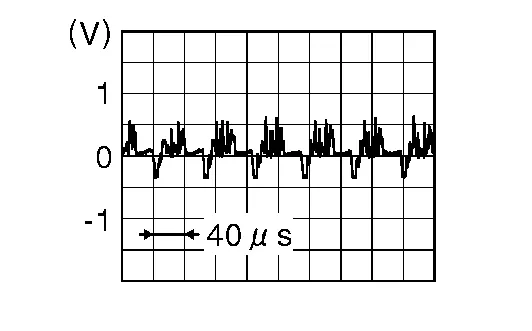
Is the inspection result normal?
YES>>Replace around view monitor control unit. Refer to Removal and Installation.
NO>>Replace rear camera. Refer to Removal and Installation.
 U1010 Control Unit(can)
DTC Description
DTC DETECTION LOGIC DTC No.
CONSULT screen terms
(Trouble diagnosis content) DTC detection condition
U1010
CONTROL UNIT(CAN)
[Control unit(CAN)]
Diagnosis condition
When ignition switch is ON
Signal (terminal)
—
Threshold
—
Diagnosis delay time
—
POSSIBLE CAUSEAround view monitor control unitFAIL-SAFE—
DTC Confirmation Procedure
PERFORM DTC CONFIRMATION PROCEDURE
CONSULT
Ignition switch ON...
 U1232 Steering Angle Sensor
DTC Description
DTC DETECTION LOGIC DTC No.
CONSULT screen terms
(Trouble diagnosis content) DTC detection condition
U1232
ST ANGLE SEN CALIB
(Steering angle sensor calibration)
Diagnosis condition
When ignition switch is ON
Signal (terminal)
—
Threshold
—
Diagnosis delay time
—
POSSIBLE CAUSE
Neutral position adjustment of the steering angle sensor is incomplete
Steering angle sensor
FAIL-SAFEPredictive course line is not displayed
DTC Confirmation Procedure
PERFORM DTC CONFIRMATION PROCEDURE
CONSULT
Ignition switch ON...
Other information:
Nissan Murano (Z52) 2015-2024 Service Manual: B2630 Sunload Sensor
DTC Description DTC DETECTION LOGIC DTC No. CONSULT screen terms (Trouble diagnosis content) DTC detection condition B2630 SUNLOAD SENSOR (SHORT) (Sunload sensor) Diagnosis condition When ignition switch is ON. Signal (terminal) - Threshold Detected calorie at sunload sensor 1395 w/m2 (1200 kcal/m2·h) or more Diagnosis delay time - POSSIBLE CAUSE Sunload sensor A/C auto amp...
Nissan Murano (Z52) 2015-2024 Owners Manual: Canceling a Remote Engine Start
To cancel a Remote Engine Start, perform one of the following: Aim the Intelligent Key at the vehicle and press until the parking lights turn off. Turn on the hazard warning flashers. Cycle the ignition switch on and then off. The extended engine run time has expired...
Categories
- Manuals Home
- Nissan Murano Owners Manual
- Nissan Murano Service Manual
- Vehicle Dynamic Control (VDC) OFF switch
- System malfunction
- Warning lights
- New on site
- Most important about car
