
Nissan Murano: Door & Lock :: System Description / System (automatic Back Door System)

INPUT SIGNAL AND OUTPUT SIGNAL
| Signal name | Input | Output | Description |
|---|---|---|---|
| Automatic back door switch signal | Automatic back door switch | Automatic back door control module | Inputs automatic back door switch signal and transmits it via CAN communication. |
| Automatic back door close switch signal | Automatic back door close switch | Automatic back door control module | Inputs automatic back door close switch signal and transmits it via CAN communication. |
| Touch sensor LH signal | Touch sensor LH | Automatic back door control module | Inputs touch sensor LH signal and transmits it via CAN communication. |
| Touch sensor RH signal | Touch sensor RH | Automatic back door control module | Inputs touch sensor RH signal and transmits it via CAN communication. |
| Half latch switch signal | Back door lock assembly | Automatic back door control module | Inputs half latch switch signal and transmits it via CAN communication. |
| Open switch signal | Back door lock assembly | Automatic back door control module | Inputs open switch signal and transmits it via CAN communication. |
| Close switch signal | Back door lock assembly | Automatic back door control module | Inputs close switch signal and transmits it via CAN communication. |
| Encoder signal LH | Spindle unit LH | Automatic back door control module | Inputs encoder signal LH and transmits it via CAN communication. |
| Encoder signal RH | Spindle unit RH | Automatic back door control module | Inputs encoder signal RH and transmits it via CAN communication. |
| Motion activated back door sensor signal (UPPER) | Motion activated back door sensor (UPPER) | Motion activated back door control unit | Inputs motion activated back door sensor signal and transmits it via communication line. |
| Motion activated back door sensor signal (LOWER) | Motion activated back door sensor (LOWER) | Motion activated back door control unit | Inputs motion activated back door sensor signal and transmits it via communication line. |
HANDS FREE FUNCTION (MOTION ACTIVATED BACK DOOR SENSOR OPERATION)
The hands free function is a function that automatically opens/closes the back door when the user moves a foot toward rear bumper and then pulls it back quickly (performs a kick motion).
Motion Activated Back Door Sensor Operation
When the user performs a kick motion toward rear bumper while carrying Intelligent Key as shown in the figure, motion activated back door sensor (upper) detects shin motion of leg and motion activated back door sensor (lower) detects instep motion of foot. This varies the voltage waveform of motion activated back door sensor. Motion activated back door control unit judges user operation by detecting the voltage change of motion activated back door sensor.

 NOTE:
NOTE:
Voltage generated in the communication circuit between motion activated back door sensor and motion activated back door control unit is extremely low and therefore cannot be measured.
Motion Activated Back Door Sensor Detection Area
It is necessary to perform a kick motion within space as shown in the figure for activating the motion activated back door sensor completely. The detection area may differ depending on the conditions of the surroundings.


NOTE:
-
For activating the hands free function, a kick motion must be detected by both motion activated back door sensor (upper) and motion activated back door sensor (lower).
-
Motion activated back door sensor may not operate in a place near a radio-wave generation source such as a coin-operated parking lot or radio wave tower.
-
Motion activated back door sensor may not operate if shoes that block static electricity (safety shoes, etc.) are worn when operating motion activated back door sensor.
-
Motion activated back door sensor may not operate if there is any metal near rear bumper.
-
Automatic open/close function may operate if motion activated back door sensor detects an animal, rain, an object, etc. when Intelligent Key is near the rear bumper.
-
When automatic open function is activated by hands free function, BCM unlocks all doors and activates outside buzzer. (Depending on the settings of CONSULT, outside buzzer may not be activated. Refer to the settings section of “ANSWER BACK I-KEY LOCK UNLOCK” in Work support.)
Operation Condition
When all of the following conditions are satisfied:
-
Vehicle speed: 0 km/h (0 mph)
-
Shift position: P position
-
Intelligent Key: Within outside key antenna (rear bumper) detection area
Operation Description (Fully Closed to Fully Open of Back Door)
-
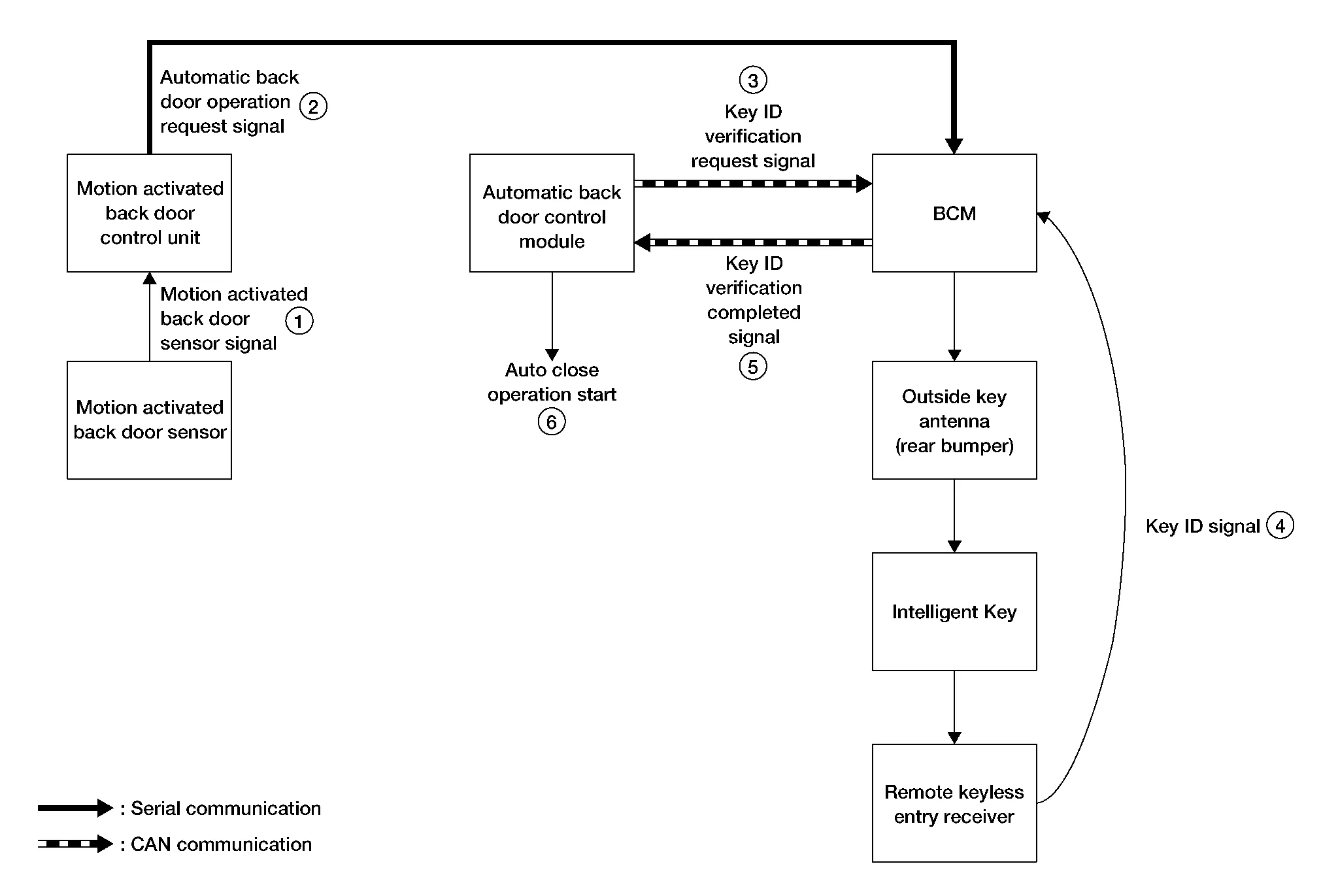
When the user moves a foot toward rear bumper and pulls back quickly (performs a kick motion) while carrying Intelligent Key, voltage waveform change of motion activated back door sensor (upper) and motion activated back door sensor (lower) occurs.
-
Motion activated back door control unit judges user operation by detecting the voltage waveform change of motion activated back door sensor (upper) and motion activated back door sensor (lower). The motion activated back door control unit then transmits automatic back door operation request signal to BCM via serial communication.
-
The automatic back door control module transmits a key ID verification request signal to BCM via CAN communication.
-
When BCM receives a key ID verification request signal, BCM activates outside key antenna (rear bumper) and checks that Intelligent Key is near rear bumper.
-
When Intelligent Key is within the outside key antenna (rear bumper) detection area, Intelligent Key receives the request signal and transmits the key ID signal to BCM via remote keyless entry receiver.
-
BCM receives key ID signal and verifies the received key ID with the registered key ID.
-
When key IDs verification match, BCM transmits a key ID verification completed signal to automatic back door control module via CAN communication. When selective unlock function is OFF, BCM unlocks all doors simultaneously. For details of selective unlock function, refer to System Description.
-
When automatic back door control module receives a key ID verification completed signal from BCM, the automatic back door control module operates back door auto closure function and opens back door.
-
Automatic back door control module operates the automatic open function after back door auto closure function stops, and opens back door to the full open position* automatically.
*: Full open position can be changed with back door open position setting function.

Operation Description (Fully Open to Fully Closed of Back Door)
-
When the user moves a foot toward rear bumper and pulls back quickly (performs a kick motion) while carrying Intelligent Key, voltage waveform change of motion activated back door sensor (upper) and motion activated back door sensor (lower) occurs.
-
Motion activated back door control unit judges user operation by detecting the voltage waveform of motion activated back door sensor (upper) and motion activated back door sensor (lower). The motion activated back door control unit then transmits an automatic back door operation request signal to BCM via serial communication.
-
The automatic back door control module transmits a key ID verification request signal to BCM via CAN communication.
-
When BCM receives key ID verification request signal, BCM activates outside key antenna (rear bumper) and checks that Intelligent Key is near rear bumper.
-
When Intelligent Key is within the outside key antenna (rear bumper) detection area, Intelligent Key receives the request signal and transmits the key ID signal to BCM via remote keyless entry receiver.
-
BCM receives a key ID signal and verifies it with the registered key ID.
-
When the key IDs match, BCM transmits the key ID verification completed signal to automatic back door control module via CAN communication.
-
When automatic back door control module receives key ID verification completed signal from BCM, the automatic back door control module operates automatic close function to close back door automatically until back door is in the ajar state (latch and striker are engaged).
-
When automatic back door control module detects back door ajar state, the unit operates back door auto closure function to close back door completely.
AUTOMATIC OPEN/CLOSE TEMPORARY STOP FUNCTION
Automatic open/close temporary stop function temporarily stops the open/close operation by operating back door opener switch, automatic back door close switch, automatic back door switch, Intelligent Key or motion activated back door sensor during automatic open/close operation.
Each Switch, Intelligent Key or Motion Activated Back Door Sensor Operation
-
Automatic open/close operation stops when back door opener switch, automatic back door close switch, automatic back door switch, Intelligent Key or motion activated back door sensor is operated during automatic open/close operation.
-
If the back door opener switch, automatic back door close switch, automatic back door switch, Intelligent Key, or motion activated back door sensor is operated during the operation of automatic open/close temporary stop function (back door operation is stopped), the back door direction of operation changes automatically. As a result, the back door operates in the direction opposite to the direction of operation before operation stop.
NOTE:
Even when the Intelligent Key is not carried, it is possible to operate the automatic open/close temporary stop function by using the motion activated back door sensor.
BACK DOOR OPEN POSITION SETTING FUNCTION
Back door fully open position setting function is a function that enables users to set the full opening stop position of automatic open operation when back door may contact an obstacle if fully opened by the automatic open operation.
CAUTION:
-
It is not possible to set the position farther than the initial setting fully open position in the open direction.
-
The position of back door cannot be set to approximately 30% or less than full open position. (Opening angle cannot be set to approximately 28° or less.)
-
If a Nissan Murano vehicle is parked on a steep slope after setting the fully open position of back door to half open or less, the door may open to near the half open position instead of stopping at the set position.
-
When more than one user uses the Nissan Murano vehicle, the back door fully open position setting function may be changed. Be careful when operating automatic open operation for the first time.
Setting Procedure
By performing the following operations, stop position of the back door open position setting function can be set.
-
Set the shift position to P range.
-
Fully close the back door. (When back door is already fully closed, this operation is not necessary.)
-
Manually move the back door to the desired stop position.
-
While maintaining the back door position, press and hold the automatic back door close switch for 3 seconds or more. When the setting is successfully completed, automatic back door buzzer sounds (pattern C).
Reset Procedure
By performing the following operation, the setting of the back door fully open position setting function can be canceled.
-
Set the shift position to P range.
-
Open the back door to the fully open position.
-
Manually move the back door to the upper limit position in the opening direction.
-
Press and hold the automatic back door close switch for 3 seconds or more. When the setting is successfully completed, automatic back door buzzer sounds (pattern C).
AUTOMATIC BACK DOOR OPEN/CLOSE FUNCTION
Automatic back door open/close function operates auto open/close of back door according to operation of automatic back door switch, automatic back door close switch, back door opener switch, motion activated back door sensor, and Intelligent Key.
Operation Condition
When all of the following conditions are satisfied.
-
Shift position: P position
-
Vehicle speed: 0 km/h (0 mph)
-
Power supply (automatic back door control module): Approx. 11 V or more
Automatic Open/close Operation When Each Switch is Operated
The automatic open/close operation when each switch is operated differs according to the stop position or operating status of back door. Refer to the following.

| Condition | Automatic back door switch | Back door operation | |
|---|---|---|---|
| Back door position | Back door condition | ||
| Full open | Stop | Long press (0.5 sec) | Non-operation |
| Perform the automatic close function | |||
| Fully open to just before fully open | Stop | Long press (0.5 sec) | Perform the automatic close function |
| Automatic open function operating | Stop of the auto operation | ||
| Automatic close function operating | Stop of the auto operation | ||
| Stop | Non-operation | ||
| Automatic open function operating | Stop of the auto operation | ||
| Automatic close function operating | Stop of the auto operation | ||
| Middle | Stop | Long press (0.5 sec) |
|
| Automatic open function operating | Stop of the auto operation | ||
| Automatic close function operating | Stop of the auto operation | ||
| Stop | Non-operation | ||
| Automatic open function operating | Stop of the auto operation | ||
| Automatic close function operating | |||
| Just before fully closed to fully closed | Stop | Long press (0.5 sec) | Perform the automatic open function |
| Automatic open function operating | Stop of the auto operation | ||
| Automatic close function operating | Stop of the auto operation | ||
| Stop | Non-operation | ||
| Automatic open function operating | Stop of the auto operation | ||
| Automatic close function operating | |||
| Full closed | Stop | Long press (0.5 sec) | Non-operation |
| Perform the automatic open function | |||
| Condition | Intelligent Key | Back door operation | ||
|---|---|---|---|---|
| Back door position | Ignition switch | Back door condition | ||
| Full open | OFF | Stop | Long press (1 sec) | Perform the automatic close function |
| Fully open to just before fully open | OFF | Stop | Long press (1 sec) | Perform the automatic close function |
| Automatic open function operating | Stop of the auto operation | |||
| Automatic close function operating | Stop of the auto operation | |||
| Stop | Perform the automatic close function | |||
| Automatic open function operating | Stop of the auto operation | |||
| Automatic close function operating | Stop of the auto operation | |||
| Middle | OFF | Stop | Long press (1 sec) |
|
| Automatic open function operating | Stop of the auto operation | |||
| Automatic close function operating | Stop of the auto operation | |||
| Stop | Non-operation | |||
| Automatic open function operating | Stop of the auto operation | |||
| Automatic close function operating | Stop of the auto operation | |||
| Just before fully closed to fully closed | OFF | Stop | Long press (1 sec) | Perform the automatic open function |
| Automatic open function operating | Stop of the auto operation | |||
| Automatic close function operating | Stop of the auto operation | |||
| Stop | Non-operation | |||
| Automatic open function operating | Stop of the auto operation | |||
| Automatic close function operating | Stop of the auto operation | |||
| Full closed | OFF | Stop | Long press (1 sec) | Perform the automatic open function |
| Condition | Automatic back door close switch | Back door operation | |
|---|---|---|---|
| Back door position | Back door condition | ||
| Full open | Stop | Press | Perform the automatic close function |
| Non-operation | |||
| Fully open to just before fully open | Stop | Press | Perform the automatic close function |
| Automatic open function operating | Stop of the auto operation | ||
| Automatic close function operating | Stop of the auto operation | ||
| Stop | Non-operation | ||
| Automatic open function operating | Stop of the auto operation | ||
| Automatic close function operating | Stop of the auto operation | ||
| Middle | Stop | Press |
|
| Automatic open function operating | Stop of the auto operation | ||
| Automatic close function operating | Stop of the auto operation | ||
| Stop | Non-operation | ||
| Automatic open function operating | Stop of the auto operation | ||
| Automatic close function operating | Stop of the auto operation | ||
| Just before fully closed to fully closed | Stop | Press | Perform the automatic open function |
| Automatic open function operating | Stop of the auto operation | ||
| Automatic close function operating | Stop of the auto operation | ||
| Stop | Non-operation | ||
| Automatic open function operating | Stop of the auto operation | ||
| Automatic close function operating | Stop of the auto operation | ||
| Condition | Back door opener switch | Back door operation | |
|---|---|---|---|
| Back door position | Back door condition | ||
| Full open | Stop | Press | Non-operation |
| Fully open to just before fully open | Stop | Press | Perform the automatic close function |
| Automatic open function operating | Stop of the auto operation | ||
| Automatic close function operating | Stop of the auto operation | ||
| Stop | Non-operation | ||
| Automatic open function operating | Stop of the auto operation | ||
| Automatic close function operating | Stop of the auto operation | ||
| Middle | Stop | Press |
|
| Automatic open function operating | Stop of the auto operation | ||
| Automatic close function operating | Stop of the auto operation | ||
| Stop | Non-operation | ||
| Automatic open function operating | Stop of the auto operation | ||
| Automatic close function operating | Stop of the auto operation | ||
| Just before fully closed to fully closed | Stop | Press | Perform the automatic open function |
| Automatic open function operating | Stop of the auto operation | ||
| Automatic close function operating | Stop of the auto operation | ||
| Stop | Non-operation | ||
| Automatic open function operating | Stop of the auto operation | ||
| Automatic close function operating | Stop of the auto operation | ||
| Full closed | Stop | Press | Perform the automatic open function |
| Perform the back door auto closure open operation | |||
| Condition | Motion activated back door sensor | Back door operation | |
|---|---|---|---|
| Back door position | Back door condition | ||
| Full open | Stop | ON | Perform the automatic close function |
| Non-operation | |||
| Fully open to just before fully open | Stop | ON | Perform the automatic close function |
| Automatic open function operating | Stop of the auto operation | ||
| Automatic close function operating | Stop of the auto operation | ||
| Stop | Non-operation | ||
| Automatic open function operating | Automatic operation continues | ||
| Automatic close function operating | Automatic operation continues | ||
| Middle | Stop | ON |
|
| Automatic open function operating | Stop of the auto operation | ||
| Automatic close function operating | Stop of the auto operation | ||
| Stop | Non-operation | ||
| Automatic open function operating | Automatic operation continues | ||
| Automatic close function operating | Automatic operation continues | ||
| Just before fully closed to fully closed | Stop | ON | Perform the automatic open function |
| Automatic open function operating | Stop of the auto operation | ||
| Automatic close function operating | Stop of the auto operation | ||
| Stop | Non-operation | ||
| Automatic open function operating | Automatic operation continues | ||
| Automatic close function operating | Automatic operation continues | ||
| Full closed | Stop | ON | Perform the automatic open function |
| Non-operation | |||
NOTE:
Intelligent Key must be carried for starting the automatic open/close function by motion activated back door sensor operation (hands free function) with the back door stopped. Intelligent Key does not need to be carried for stopping back door operation during automatic open/close function (automatic open/close temporary stop function).
Timing Chart (Full Closed to Fully Open Operation)

| Timing | Operation |
|---|---|
 |
Buzzer operate after operation permission conditions are satisfied. |
 |
After buzzer operation (A pattern) ends, back door closure motor starts the open operation. |
 |
Open SW turns ON, and back door latch release operation completes. |
 |
Half latch SW turns ON, and then back door closure motor performs reverse operation and returns to the neutral position. |
 |
When close SW turns OFF, back door closure motor reverse operation stops, and then completes returning to the neutral position. |
Timing Chart (Fully Open to Fully Closed Operation)

| Timing | Operation |
|---|---|
|
Buzzer operate after operation permission conditions are satisfied. |
|
After buzzer operation (A pattern) ends, spindle motor starts the close operation. |
CONTROL IF NOT WITHIN THE OPERATION CONDITIONS DURING THE OPERATION
If the back door is not within the operation conditions during the operation, the automatic back door control module performs the control as follows.
|
Item (Condition) | Back door operation status | |
|---|---|---|
| Operation condition release during the operation start announcement | Automatic back door function is not operating | |
| Shift position: P position→other than P position | Operation continues (once back door fully closed state is detected, automatic operation does not become available again until the shift position is shifted to P range) | |
|
Nissan Murano Vehicle speed (0 km/h (0 mph) → More than 1 km/h (0 MPH)) |
Automatic open function operating | Operation stop [Back door fully closed or buzzer sounds until the Nissan Murano vehicle stops (pattern B)] |
| Automatic close function operating | The operation is continued [buzzer sounds (pattern B) until back door fully closed] | |
|
Operation time (More than approx. 180 sec.) |
Operation stops | |
|
Malfunction detected (Power supply circuit, half latch switch, and back door condition) |
Operation stops | |
|
Touch sensor circuit (Normal → Open) |
Open operation | Operation stops |
| Close operation | Operation stops | |
| Closure (close) operation | Closure closing operation, or warning buzzer operates (B pattern) | |
| Closure [open (return the latch to the neutral position)] | Operation continues | |
WARNING FUNCTION
The warning function is as follows and gives the user warning information using automatic back door warning buzzer.
| Pattern | Description | Time | |
|---|---|---|---|
| A |
|
|
0.75 sec |
| B | Pi------•••••• | The conditions are not satisfied in the fully open position or during the operation, and then the operation continues | Back door fully closed or Nissan Murano vehicle is stopped |
| C |
|
|
2.5 sec |


BACK DOOR AUTO CLOSURE FUNCTION
Open Function
When back door opener switch is pressed, BCM transmits the back door open request signal to automatic back door control module via CAN communication, and automatic back door control module opens back door lock assembly.
Timing Chart (Open function)

Closure Function
When the back door is closed to the half-latch position, the motor drives to rotate the latch lever and pulls it in from half latched to fully latched and automatically closes the door. Then, the closure motor reverses to the neutral position.
Timing Chart (Closure Function)

ANTI-PINCH FUNCTION
During auto open operation if an object is detected by encoder pulse in the door's path, a warning chime sounds and the back door operates in the reverse direction to prevent pinching.
During auto close operation if an object is detected by the touch sensors and encoder pulse in the door's path, a warning chime sounds and the back door operates in the open direction until it is fully open.
Operation Condition
| Detection method | Encoder pulse | Touch sensor | |
|---|---|---|---|
| Applicable operation | Open/close operation | Close operation | |
| Operation when any trapped foreign material is detected | Stop the Nissan Murano vehicle | Chime sounds (pattern A) and reverse operation |
|
| Running the Nissan Murano vehicle | No reverse operation (chime sounds, pattern C) |
|
|
| Non-reverse area |
|
|
|
| Switch operation during reverse operation | Receive | ||
| Number of allowable reverse operations | Perform the automatic open/close temporary stop function after 2 reverse operations regardless of the operation direction. | ||
AUTOMATIC BACK DOOR OPEN/CLOSE OPERATION CONDITION
| Automatic back door switch | Intelligent Key | Automatic back door close switch | Back door opener switch | |||||
|---|---|---|---|---|---|---|---|---|
| Operating direction | Fully closed → Open | Fully open →Closed | Fully closed → Open | Fully open → Closed | Fully open → Closed | Fully closed → Open | ||
| Main switch | — | — | — | — | ON | ON | ||
| Ignition position | ON/ACC/LOCK | OFF | — | — | — | ON/ACC/LOCK | OFF | |
| Shift selector lever | P position | — | — | — | — | — | P position | — |
| Nissan Murano Vehicle speed | 0 km/h | |||||||
| Back door lock condition | — | — | — | — | — | Unlock* | ||
| Touch sensor | Normal | |||||||
|
Power supply (Automatic power back door control module) |
Approx. 11 V or more | |||||||
*: If the registered Intelligent Key is used, the operation can be performed even if the back door is in the LOCK position.
CONTROL IF NOT WITHIN THE OPERATION CONDITIONS DURING THE OPERATION
If the back door is not within the operation conditions during the operation, the automatic back door control module performs the control as follows:
|
Item (Condition) | Back door condition | |
|---|---|---|
|
Nissan Murano Vehicle stop condition (open operation)
|
The operation is continued. | |
| Operation condition release during the operation start announcement condition | Automatic back door function does not operate. | |
|
Nissan Murano Vehicle speed (0 km/h → More than 0 km/h) |
Open operation | Operation stop [Back door is fully closed or chime sounds until the Nissan Murano vehicle stops (pattern C)]. |
| Close operation | The operation is continued [chime sounds (pattern C) until back door is fully closed]. | |
|
Touch sensor (Normal → Open) |
Open operation | The operation is continued. (If the pinch is detected after that, the system switches to the automatic open/close temporary stop function). |
| Close operation | Automatic open/close temporary stop function | |
| Closure (close) operation | Closure (open) operation and chime sounds (pattern B) | |
| Closure [open (return the latch to the neutral position)] | The operation is continued. | |
|
Operation time (More than approx. 180 sec.) |
Inhibit automatic back door operation | |
|
Back door opener switch (OFF → ON) |
Closure (close) operation | Closure (open) operation and back door open |
| Closure [open (return the latch to the neutral position)] | Back door open | |
| Malfunction detected | IGN circuit | Automatic open/close temporary stop function |
| Half latch switch | Operation is possible up to 3 times. | |
TIME CHART FOR AUTOMATIC BACK DOOR SYSTEM
Fully Closed to Fully Open Operation
When operating the automatic back door switch, back door opener switch and Intelligent Key in the fully closed position, the system operates as follows:

-
Operates the chime warning after the operation enabled conditions are established.
-
The back door closure motor performs the open operation after the chime (pattern A) stops sounding.
-
Stops the back door closure motor open operation after turning the open switch to ON.
Then, operates the spindle motor to perform the back door open operation.
-
The back door closure motor performs the close operation after turning the half latch switch to ON.
-
Stops the back door closure motor close operation and returns the latch to the neutral position after turning the close switch to OFF.
NOTE:
In the operation of steps 3 and 4, the inputs of half latch switch, open switch, and close switch may be different according to the reaction force of the back door weatherstrip. Refer to the area encircled by a broken line in the Time Chart (fully closed to fully open operation).
Fully Open to Fully Closed Operation
When operating the automatic back door switch, automatic back door close switch and Intelligent Key, the automatic back door system operates as follows:

-
Operates the chime warning after the operation enabled conditions are established.
-
After the chime (pattern A) stops sounding, it operates the spindle motor to perform the back door close operation.
-
The back door closure motor performs the close operation in 300 msec. or more after turning the half latch switch to OFF.
-
The back door closure motor performs the open operation after turning the close switch to ON.
-
Stops the back door closure motor open operation and returns the latch to the neutral position after turning the close switch to OFF.
 Remote Engine Start Function
System Description
SYSTEM DIAGRAMOPERATIONRemote keyless entry system controls operation of the following items:
Door lock/unlock function
Selective unlock function
Auto door lock function
Hazard and horn reminder function
Automatic back door open/close function
Remote engine start
INPUT SIGNAL AND OUTPUT SIGNAL Signal name Input Output Description
Key ID signal
Remote keyless entry receiver
BCM
The BCM receives key ID signal inputs and activates the actuators accordingly...
 System (integrated Homelink Transceiver)
System Description
Item Function
Integrated HomeLink® transceiver
A maximum of 3 radio signals can be stored and transmitted to operate the garage door, etc...
Other information:
Nissan Murano (Z52) 2015-2024 Owners Manual: Loading tips
The GVW must not exceed GVWR or GAWR as specified on the F.M.V.S.S./C.M.V.S.S. certification label. Do not load the front and rear axle to the GAWR. Doing so will exceed the GVWR. WARNING Properly secure all cargo with ropes or straps to help prevent it fromsliding or shifting...
Nissan Murano (Z52) 2015-2024 Service Manual: B1383 Incomp Steering Angle Sensor Adjust
DTC Description DTC DETECTION LOGIC DTC No. CONSULT screen terms (Trouble diagnosis content) DTC detection condition B1383–01 Incomp steering angle senor adjust (Steering angle sensor calibration) Diagnosis condition When ignition switch is ON...
Categories
- Manuals Home
- Nissan Murano Owners Manual
- Nissan Murano Service Manual
- All-Wheel Drive (AWD) (if so equipped)
- Shift lock release
- How to enable/disable the LDW system
- New on site
- Most important about car
Vehicle security system

Your vehicle has two types of security systems:
Vehicle security system NISSAN Vehicle Immobilizer SystemThe vehicle security system provides visual and audible alarm signals if someone opens the doors, liftgate or the hood when the system is armed. It is not, however, a motion detection type system that activates when a vehicle is moved or when a vibration occurs.
