
Nissan Murano: System (intelligent Key System) / Remote Engine Start Function
SYSTEM DIAGRAM
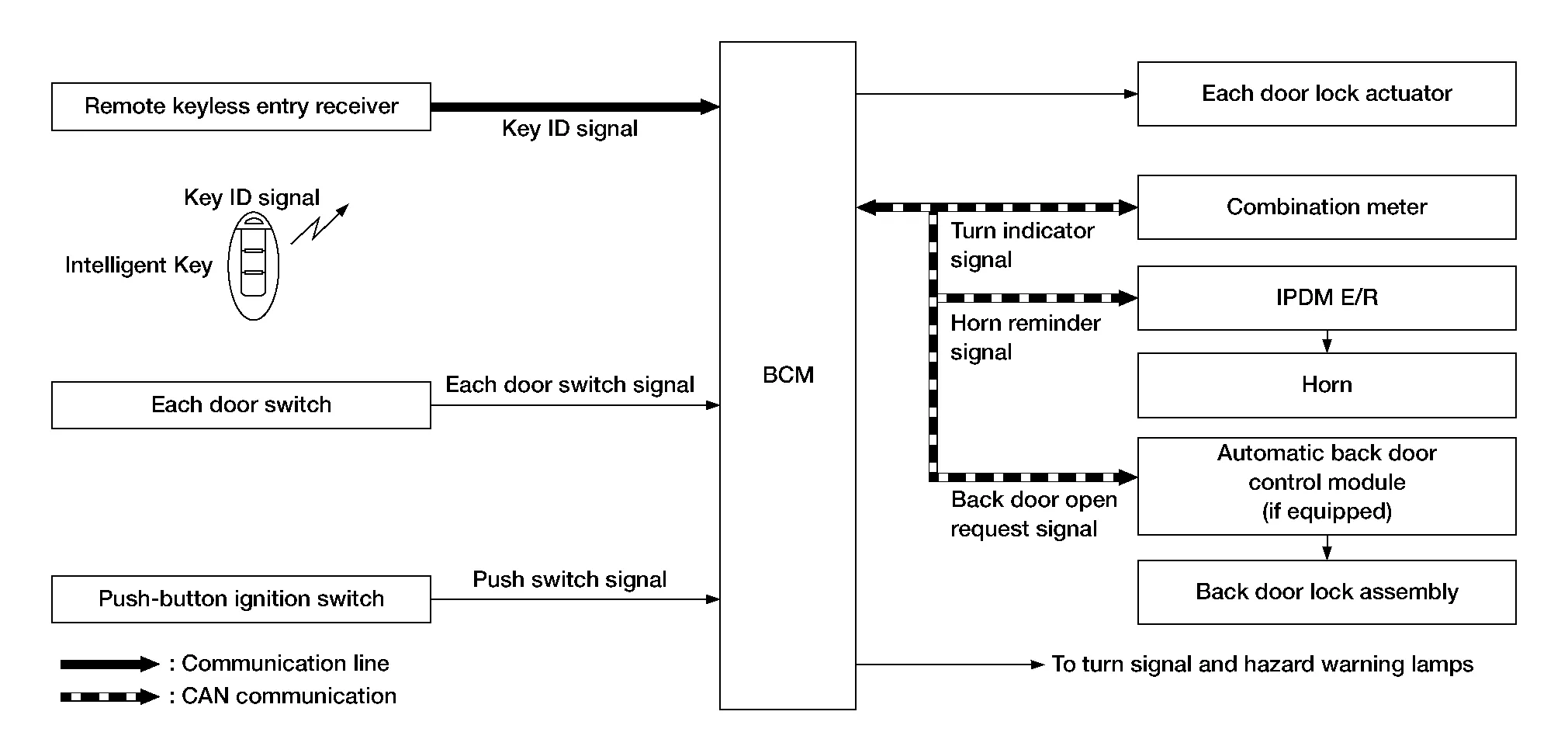
OPERATION
Remote keyless entry system controls operation of the following items:
-
Door lock/unlock function
-
Selective unlock function
-
Auto door lock function
-
Hazard and horn reminder function
-
Automatic back door open/close function
-
Remote engine start
INPUT SIGNAL AND OUTPUT SIGNAL
| Signal name | Input | Output | Description |
|---|---|---|---|
| Key ID signal | Remote keyless entry receiver | BCM | The BCM receives key ID signal inputs and activates the actuators accordingly. |
| Door switch signal | Door switch | BCM | The BCM receives door switch signals inputs and activates the actuators accordingly. |
| Push switch signal | Push-button ignition switch | BCM | The BCM receives push switch signal inputs and activates the actuators accordingly. |
| Turn indicator signal | Combination meter | BCM (CAN) | The BCM receives turn indicator signal inputs and activates the actuators accordingly. |
| Horn reminder signal | BCM | IPDM E/R (CAN) | The IPDM E/R receives horn reminder signal inputs and activates the actuators accordingly. |
| Back door open request signal | BCM | Automatic back door control module (CAN) | The automatic back door control module receives back door open request signal inputs and activates the actuators accordingly. |
OPERATION AREA
The remote engine start operating range is approximately 60 m (197 ft) from the vehicle but not inside the Nissan Murano vehicle.
REMOTE ENGINE START FUNCTION
-
The remote engine start function is activated when the lock button of the Intelligent Key is pressed and released, and then within 5 seconds, the remote engine start button is pressed and held for at least 2 seconds. At this time, a start signal is transmitted from the Intelligent Key to the BCM via the remote keyless entry receiver.
-
When the BCM receives the lock signal, it locks all doors, flashes the hazard lamps and chirps the horn (the horn will chirp only if the answer back horn feature is activated).
-
When the BCM receives a successful remote engine start signal, the turn signals will flash once and the parking/tail lamps will come on.
-
To enter normal engine run mode from inside the Nissan Murano vehicle, depress and hold the brake pedal then press the ignition switch.
-
To cancel the remote engine start mode away from the Nissan Murano vehicle, press the remote engine start button on the Intelligent Key.
-
Once the vehicle has been started using the remote engine start feature, it will remain running for 10 minutes. Extended run time can be added to the initial 10 minute running time by first pressing and releasing the lock button and then within 5 seconds, pressing and holding the remote engine start button for at least 2 seconds. The turn signals will flash once and an additional 10 minutes of running time will be added. The additional 10 minutes start when the extended run time is activated. Extended time can only be added once for a maximum run time of up to 20 minutes.
| Additional remote engine start cancel operations |
|
| Limitations/Restrictions |
|
HAZARD AND HORN REMINDER FUNCTION
When remote engine start is initiated by Intelligent Key, BCM blinks hazard warning lamps as a reminder.
The hazard and horn reminder has a horn chirp mode (C mode) and a non-horn chirp mode (S mode).
Operating Function of Hazard and Horn Reminder
| C mode | S mode | |||
|---|---|---|---|---|
| Intelligent Key operation | Lock | Unlock | Lock | Unlock |
| Hazard warning lamps blink | Twice | Once | Twice | — |
| Horn sounds | Once | — | — | — |
Hazard and horn reminder does not operate in the following conditions:
-
Ignition switch ON.
-
Door is open (only lock operation).
How to Change Hazard and Horn Reminder Mode
 CONSULT
Select “ANSWER BACK I-KEY LOCK UNLOCK” in “Work support” mode of “BCM(INTELLIGENT KEY)”.
Refer to CONSULT Function (BCM - INTELLIGENT KEY).
 CONSULT
When LOCK and UNLOCK signals are sent from the Intelligent Key for more than 2 seconds at the same time, the hazard and horn reminder mode is changed and hazard warning lamps blink and horn sounds as per the following items:

LIST OF OPERATION RELATED PARTS
Parts marked with × are the parts related to operation.
| Function | Intelligent Key | Door switch | Door lock actuator | Fuel lid lock actuator | Ignition switch | CAN communication system | BCM | IPDM E/R | Horn | Combination meter | Hazard warning lamp | Automatic back door control module | Back door lock assembly |
|---|---|---|---|---|---|---|---|---|---|---|---|---|---|
| Door lock/unlock function | × | × | × | × | × | ||||||||
| Selective unlock function | × | × | × | × | × | ||||||||
| Auto door lock function | × | × | × | × | × | × | |||||||
| Hazard and horn reminder function | × | × | × | × | × | × | |||||||
| Automatic back door open/close function | × | × | × | × | × | ||||||||
| Remote engine start function | × | × | × | × | × | × | × | × | × | × |
 Key Reminder Function
System Description
SYSTEM DIAGRAMINPUT SIGNAL AND OUTPUT SIGNAL Signal name Input Output Description
Key ID signal
Remote keyless entry receiver
BCM
The BCM receives key ID signal inputs and activates the actuators accordingly...
 System (automatic Back Door System)
System Description
INPUT SIGNAL AND OUTPUT SIGNAL Signal name Input Output Description
Automatic back door switch signal
Automatic back door switch
Automatic back door control module
Inputs automatic back door switch signal and transmits it via CAN communication...
Other information:
Nissan Murano (Z52) 2015-2024 Service Manual: Back Door Hinge
Removal and Installation REMOVALRemove back door assembly. Refer to Removal and Installation. Partially remove rear of headlining. Refer to Removal and Installation. Remove nuts and back door hinge.INSTALLATIONInstallation is in the reverse order of removal...
Nissan Murano (Z52) 2015-2024 Owners Manual: System maintenance
The two radar sensors for the BSW and RCTA systems are located near the rear bumper. Always keep the area near the radar sensors clean. The radar sensors may be blocked by temporary ambient conditions such as splashing water, mist or fog. The blocked condition may also be caused by objects such as ice, frost or dirt obstructing the radar sensors...
Categories
- Manuals Home
- Nissan Murano Owners Manual
- Nissan Murano Service Manual
- Indicator lights
- High Beam Assist (if so equipped)
- Intelligent Forward Collision Warning (I-FCW)
- New on site
- Most important about car
Driver and passenger supplemental knee air bag

Driver’s side
The knee air bag is located in the knee bolster, on the driver’s and passenger’s side. All of the information, cautions and warnings in this manual apply and must be followed. The knee air bag is designed to inflate in higher severity frontal collisions, although it may inflate if the forces in another type of collision are similar to those of a higher severity frontal impact. It may not inflate in certain collisions.

Passenger’s side
