
Nissan Murano: Instrument Panel :: Removal and Installation / Steering Column Covers
Nissan Murano (Z52) 2015-2024 Service Manual / Body Interior / Instrument Panel :: Removal and Installation / Steering Column Covers
REMOVAL
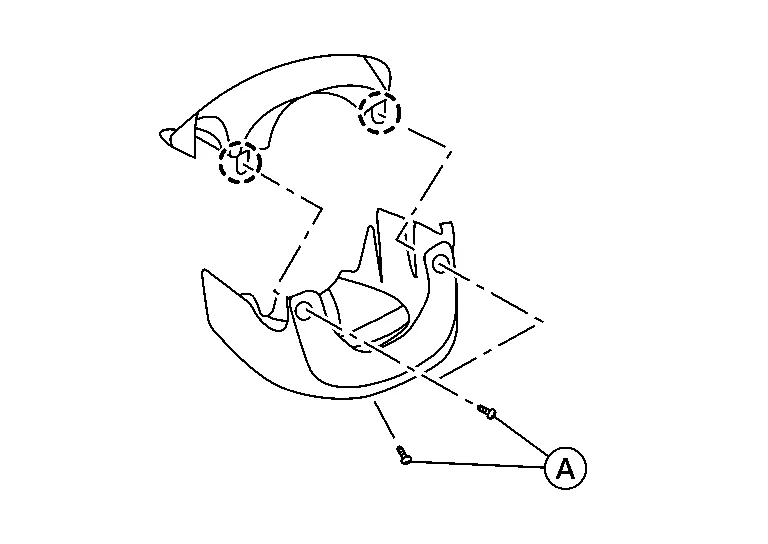
Remove steering column cover screws (A).
 NOTE:
NOTE:
Rotate steering wheel to access steering column cover screws.
Release steering column upper cover pawls using a suitable tool and remove.
 : Pawl
Release gap hider (1) pawls from the steering column upper cover (2).
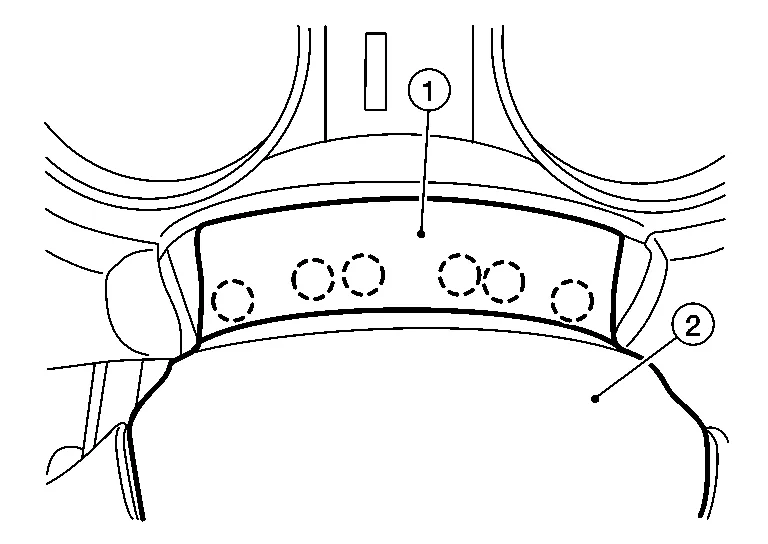
: Pawl
Disconnect harness from steering column tilt switch (if equipped).
Remove steering column lower cover.
INSTALLATION
Installation is in the reverse order of removal.
 Steering Member Assembly
Exploded View
1.
Heating and cooling unit assembly
2.
Steering member
3.
Steering member brace (LH)
4.
Steering member brace (RH)
A.
Steering member caps
Pawl
Front
Removal and Installation
REMOVALRemove front wiper drive assembly...
 Center Console Assembly
Exploded View
1.
Center console side finisher (RH)
2.
Center console side finisher (LH)
3.
Center console lower side finisher (LH)
4.
Center console reinforcement bracket
5...
Other information:
Nissan Murano (Z52) 2015-2024 Service Manual: Battery Tray
Exploded View 1. Battery frame 2. Battery rods 3. Battery 4. Battery cover 5. Battery tray liner 6. Battery tray 7. Battery tray support Front Removal and Installation REMOVALRemove the battery. Refer to Removal and Installation...
Nissan Murano (Z52) 2015-2024 Service Manual: Diagnosis and Repair Work Flow
Work Flow OVERALL SEQUENCEDETAILED FLOWGET INFORMATION FOR SYMPTOM Get detailed information from the customer about the symptom (the condition and the environment when the incident/malfunction occurs). Check operation condition of the component or system that is malfunctioning...
Categories
- Manuals Home
- Nissan Murano Owners Manual
- Nissan Murano Service Manual
- Passenger compartment
- Turning the AEB system on/off
- Memory storage function (key-link)
- New on site
- Most important about car
Autolight system

The autolight system allows the headlights to turn on and off automatically. The autolight system can:
Turn on the headlights, front parking, tail, license plate and instrument panel lights automatically when it is dark. Turn off all the lights (except daylight running lights) when it is light. Keep all the lights on for a period of time after you place the ignition switch in the OFF position and all doors are closed.
Copyright © 2026 www.nimurano.com