
Nissan Murano: Monitor, climate, audio, phone and voice recognition systems / RearView Monitor (if so equipped)
Nissan Murano (Z52) 2015-2024 Owners Manual / Monitor, climate, audio, phone and voice recognition systems / RearView Monitor (if so equipped)
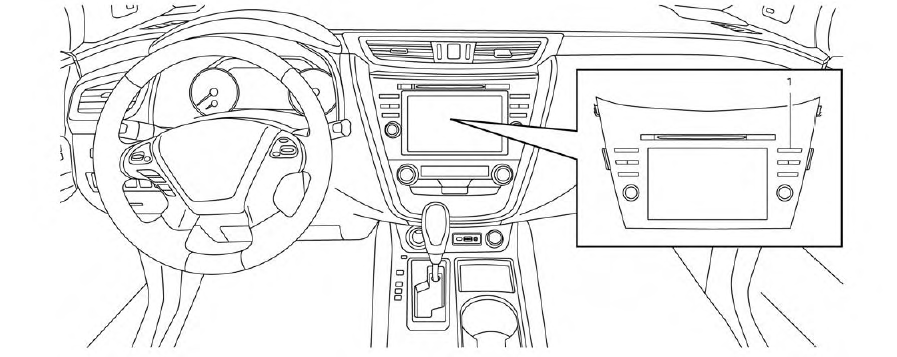
- CAMERA button
WARNING
- Failure to follow the warnings and instructions for proper use of the Rear- View Monitor system could result in serious injury or death.
- RearView Monitor is a convenience feature and is not a substitute for proper backing. Always turn and look out the windows and check mirrors to be sure that it is safe to move before operating the vehicle. Always back up slowly.
- The system is designed as an aid to the driver in showing large stationary objects directly behind the vehicle, to help avoid damaging the vehicle.
- The distance guide line and the vehicle width line should be used as a reference onlywhenthe vehicle isona level paved surface. The distance viewed on the monitor is for reference only and may be different than the actual distance between the vehicle and displayed objects.
CAUTION
Do not scratch the camera lens when cleaning dirt or snow from the front of the camera.
The RearView Monitor system automatically shows a rear view of the vehicle when the shift lever is shifted into the R (Reverse) position. While in the R (Reverse), pressing the CAMERA button will cycle through guideline options. The radio can still be heard while the RearView Monitor is active.
- RearView Monitor system operation
- How to read the displayed lines
- Difference between predicted and actual distances
- How to park with predicted course lines
- Adjusting the screen
- How to turn on and off predicted course lines
- RearView Monitor system limitations
- System maintenance

 RearView Monitor system operation
To display the rear view, the RearView Monitor
system uses a camera located just
above the vehicle’s license plate .
With the ignition switch in the ON position,
move the shift lever to the R (Reverse) position
to operate the RearView Monitor...
Other information:
Nissan Murano (Z52) 2015-2024 Service Manual: U1000-01 Can Comm Circuit
DTC Description DESCRIPTIONCAN COMMUNICATIONCAN (Controller Area Network) is a serial communication line for real time applications. It is an on-Nissan Murano vehicle multiplex communication line with high data communication speed and excellent error detection ability...
Nissan Murano (Z52) 2015-2024 Service Manual: Service Data and Specifications (sds). Service Data and Specifications (sds)
General Specifications Applied model Axle AWD Engine VQ35DE Transaxle CVT Propeller shaft model C-CVJ-C Number of joints 3 Joint type 1st joint Universal (Shell type) 2nd joint CVJ type 3rd joint Universal (Shell type) Coupling method Transfer side Flange type Rear final drive side Flange type Shaft length 1st (Spider to CVJ joint center) 1265 mm (49...
Categories
- Manuals Home
- Nissan Murano Owners Manual
- Nissan Murano Service Manual
- Intelligent Forward Collision Warning (I-FCW)
- Jacking up vehicle and removing the damaged tire
- Power Steering Fluid (PSF)
- New on site
- Most important about car

Copyright © 2026 www.nimurano.com