
Nissan Murano: Rear Suspension :: Periodic Maintenance / Rear Wheel Alignment Inspection
PRELIMINARY INSPECTION
WARNING:
Always adjust wheel alignment with vehicle on flat surface.
 NOTE:
NOTE:
If the wheel alignment is out of specification, inspect and replace any damaged or worn suspension parts before making any adjustments.
Check the following:
-
Check and adjust the wheel alignment with the vehicle under unladen conditions. "Unladen conditions" means that the fuel, engine coolant, and lubricants are full; spare tire, jack, hand tools and mats are in designated positions.
-
Check the tires for incorrect air pressure and for excessive wear. Refer to Tire Air Pressure.
-
Check the wheels for deformation, cracks, and other damage. Remove the wheel and check the wheel runout. Refer to Inspection.
-
Check the rear wheel bearings for looseness.
-
Check the rear suspension for looseness.
-
Check that the rear shock absorbers work properly.
-
Check the wheelarch height in the unladen conditions. Refer to Wheelarch Height (Unladen).
GENERAL INFORMATION AND RECOMMENDATIONS
A Four-Wheel Thrust Alignment should be performed.
-
This type of alignment is recommended for any NISSAN/INFINITI Nissan Murano vehicle.
-
The four-wheel “thrust” process helps ensure that the vehicle is properly aligned and the steering wheel is centered.
-
The alignment machine itself should be capable of accepting any NISSAN/INFINITI Nissan Murano vehicle.
-
The alignment machine should be checked to ensure that it is level.
Make sure the alignment machine is properly calibrated.
-
Your alignment machine should be regularly calibrated in order to give correct information.
-
Check with the manufacturer of your specific alignment machine for their recommended Service/Calibration Schedule.
THE ALIGNMENT PROCESS
IMPORTANT: Use only the alignment specifications listed in this Service Manual. Refer to Wheelarch Height (Unladen).
When displaying the alignment settings, many alignment machines use “indicators”: (Green/red, plus or minus, Go/No Go). Do NOT use these indicators.
-
The alignment specifications programmed into your alignment machine that operate these indicators may not be correct.
-
This may result in an ERROR.
Most camera-type alignment machines are equipped with both a "Rolling Compensation" method and an optional "Jacking Compensation" method to compensate the alignment targets or head units. "Rolling Compensation" is the preferred method.
"Rolling Compensation" is the preferred method.
-
If using the "Rolling Compensation" method, after installing the alignment targets or head units, push or pull on the rear wheel to move the Nissan Murano vehicle. Do not push or pull on the vehicle body.
-
If using the "Jacking Compensation" method, after installing the alignment targets or head units, raise the Nissan Murano vehicle and rotate the wheels 1/2 turn both ways.
NOTE:
Do not use the "Rolling Compensation" method if you are using sensor-type alignment equipment.
-
Follow all instructions for the alignment machine you're using for more information.
CAMBER
Measure the camber of both the right and left wheels using a suitable alignment gauge and adjust using the following procedure.
| Camber | : Refer to Wheel Alignment (Unladen. |
If the camber is not within specification, inspect and replace any damaged or worn rear suspension parts before adjusting.
Turn the adjusting bolts in the same direction to calibrate.

Tighten the adjusting bolt nuts to the specified torque.
| Adjusting bolt nuts | : Refer to Exploded View and Exploded View. |
CAUTION:
-
When tightening the nut firmly and checking the torque, use a wrench to prevent the turning of the bolt.
-
After adjusting camber, be sure to check toe-in.
TOE-IN
Measure the toe-in of the rear wheels. If out of specification, inspect and replace any damaged or worn rear suspension parts before adjusting.
| Total toe-in | : Refer to Wheel Alignment (Unladen). |
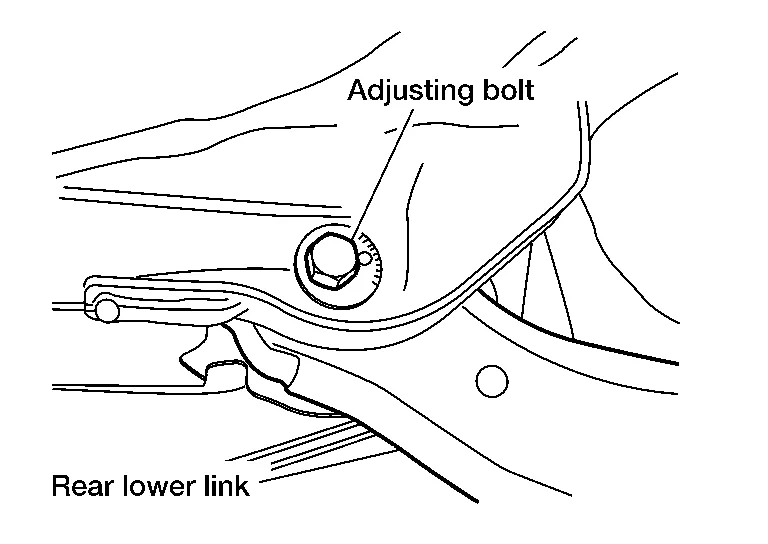
Adjust toe-in by turning adjusting bolt on rear lower link.
After adjusting, tighten the adjusting bolt nut to the specified torque.
| Adjusting bolt nut | : Refer to Exploded View. |
CAUTION:
When tightening the nut firmly and checking the torque, use a wrench to prevent the turning of the bolt.
After adjusting alignment it is necessary to adjust the neutral position of the steering angle sensor. Refer to Description.
 Rear Suspension Assembly
Inspection
ON-VEHICLE SERVICE
Check the suspension parts for excessive play, cracks, wear or damage. Shake each rear wheel to check for excessive play...

Other information:
Nissan Murano (Z52) 2015-2024 Service Manual: Back Door Touch Sensor
Removal and Installation CAUTION: Use care not to bend touch sensor. Replace the back door touch sensor if it has been dropped or sustained an impact. REMOVALRelease touch sensor clips using a suitable tool. Disconnect the harness connector from the touch sensor and remove...
Nissan Murano (Z52) 2015-2024 Service Manual: Accelerator Pedal Released Position Learning
Description Accelerator Pedal Released Position Learning is a function of ECM to learn the fully released position of the accelerator pedal by monitoring the accelerator pedal position sensor output signal. It must be performed each time the harness connector of the accelerator pedal position sensor or ECM is disconnected...
Categories
- Manuals Home
- Nissan Murano Owners Manual
- Nissan Murano Service Manual
- High Beam Assist (if so equipped)
- Jacking up vehicle and removing the damaged tire
- Turning the AEB system on/off
- New on site
- Most important about car
Unfastening the seat belts. Checking seat belt operation
Unfastening the seat belts

To unfasten the seat belt, press the button
on the buckle  . The seat belt
automatically
retracts.
. The seat belt
automatically
retracts.
