
Nissan Murano: Removal and Installation / Rear View Camera
REMOVAL
Remove back door outer finisher. Refer to Removal and Installation.
Disconnect the harness connector (A) from rear camera (1).
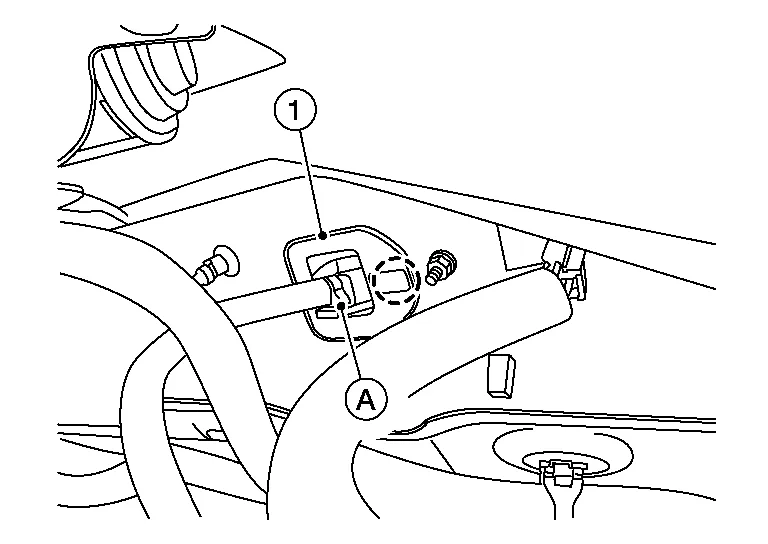
Release pawl then remove rear camera.
 : Pawl
INSTALLATION
Installation is in the reverse order of removal.
 Audio Unit
Exploded View
1.
Audio unit bracket (RH)
2.
Audio unit
3.
Audio unit bracket (LH)
4.
A/C auto amp.
Removal and Installation
REMOVALCAUTION:
Before disconnecting the audio unit and battery terminals, turn the ignition switch OFF and wait at least 30 seconds...

Other information:
Nissan Murano (Z52) 2015-2024 Service Manual: Brake Pad
Exploded View 1. Torque member 2. Bushing 3. Piston boot 4. Slide pin boot 5. Slide pin 6. Piston 7. Piston seal 8. Brake caliper body 9. Bleeder cap 10. Brake hose 11. Copper sealing washers 12. Inner shim cover 13...
Nissan Murano (Z52) 2015-2024 Service Manual: U1010-49 Control Unit (can)
DTC Description DESCRIPTIONCAN controller controls the communication of ITS communication signal and the error detection.DTC DETECTION LOGIC DTC No. CONSULT screen terms (Trouble diagnosis content) DTC detection condition U1010-49 CONTROL UNIT (CAN) [Control unit (CAN)] Diagnosis condition When ignition switch is ON...
Categories
- Manuals Home
- Nissan Murano Owners Manual
- Nissan Murano Service Manual
- Passenger compartment
- Turning the AEB system on/off
- Indicator lights
- New on site
- Most important about car
Seatback pockets

Theremaybe one or two seatback pockets located on the back of the driver and passenger seats. The pockets can be used to store maps.
WARNING

Copyright © 2026 www.nimurano.com