
Nissan Murano: Removal and Installation / Audio Unit
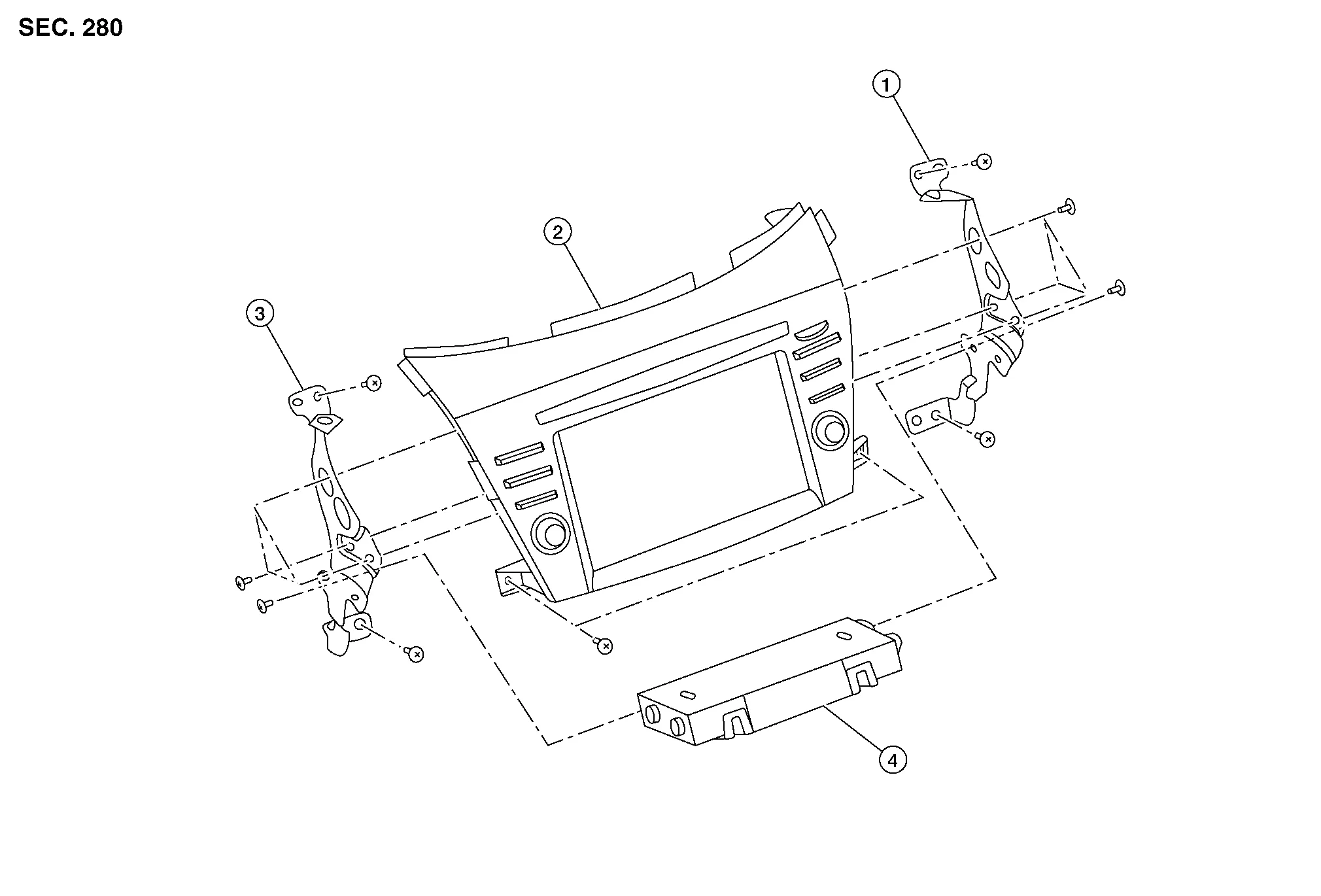
| 1. | Audio unit bracket (RH) | 2. | Audio unit | 3. | Audio unit bracket (LH) |
| 4. | A/C auto amp. |
REMOVAL
CAUTION:
Before disconnecting the audio unit and battery terminals, turn the ignition switch OFF and wait at least 30 seconds.
 NOTE:
NOTE:
-
Before replacing audio unit, perform “Before Replace ECU” of “Read / Write Configuration” to save or print current Nissan Murano vehicle specification. Refer to Description.
-
After the ignition switch is turned OFF, the audio unit continues operating for approximately 30 seconds.
-
Therefore, data corruption may occur if battery voltage is cut off within 30 seconds.
Disconnect the negative battery terminal. Refer to Removal and Installation.
Remove cluster lid D. Refer to Removal and Installation.
Remove A/C switch assembly. Refer to Removal and Installation.
Remove audio unit screws then pull out audio unit.
Disconnect the harness connectors from audio unit and remove.
Remove audio unit bracket (LH/RH) screws and audio unit brackets [(LH/RH) (if necessary)].
INSTALLATION
CAUTION:
Be sure to perform “After Replace ECU” of “Read / Write Configuration” or “Manual Configuration” when replacing audio unit. Refer to Description.
Installation is in the reverse order of removal.

 Rear View Camera
Removal and Installation
REMOVALRemove back door outer finisher. Refer to Removal and Installation.
Disconnect the harness connector (A) from rear camera (1)...
Other information:
Nissan Murano (Z52) 2015-2024 Service Manual: Seat Belt Buckle
Removal and Installation SEAT BELT BUCKLE - (LH/CONNECTOR)RemovalRelease pawls and remove rear seat (LH) front bolt covers (1) then remove bolts. : Pawl Lift and support seat cushion (LH) using a suitable tool then disconnect seat belt buckle harness connector...
Nissan Murano (Z52) 2015-2024 Service Manual: Fusible Link Inspection
Fusible Link A melted fusible link can be detected either by visual inspection or by feeling with a finger tip. If its condition is questionable, use circuit tester or test lamp. 1 : Fusible link CAUTION: If fusible link should melt, it is possible that critical circuit (power supply or large current carrying circuit) is shorted...
Categories
- Manuals Home
- Nissan Murano Owners Manual
- Nissan Murano Service Manual
- How to enable/disable the LDW system
- All-Wheel Drive (AWD) (if so equipped)
- System malfunction
- New on site
- Most important about car
Autolight system

The autolight system allows the headlights to turn on and off automatically. The autolight system can:
Turn on the headlights, front parking, tail, license plate and instrument panel lights automatically when it is dark. Turn off all the lights (except daylight running lights) when it is light. Keep all the lights on for a period of time after you place the ignition switch in the OFF position and all doors are closed.