
Nissan Murano: Liftgate / Operating the power liftgate (if so equipped)
WARNING
Make sure that all passengers have their hands, etc., inside the vehicle before closing the liftgate.
Do not leave children unattended inside the vehicle. They could unknowingly activate switches or controls. Unattended children could become involved in serious accidents.
NOTE:
To open, close or reverse the power liftgate, the shift lever must be in P (Park). Also, the power liftgate will not operate if battery voltage is low.
Power Open:
The power liftgate automatically moves
from the fully closed position to the fully
open position in approximately 5 – 8 seconds.
The power open feature can be activated
by the switch on the Intelligent Key,
the instrument panel switch, the liftgate
opener switch  . A chime sounds to
indicate
the power open sequence has been
started.
. A chime sounds to
indicate
the power open sequence has been
started.
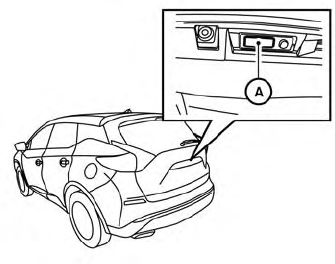
Liftgate opener switch
- The liftgate can be opened by the instrument
panel switch, liftgate opener switch
 with the Intelligent Key in
operating
range and liftgate button on the key fob
(if so equipped), even if the vehicle is
locked. The liftgate will individually unlock
and open. Once the liftgate is closed, the
vehicle will remain in the unlock status.
with the Intelligent Key in
operating
range and liftgate button on the key fob
(if so equipped), even if the vehicle is
locked. The liftgate will individually unlock
and open. Once the liftgate is closed, the
vehicle will remain in the unlock status. - The Intelligent Key button must be held for 1 second before the liftgate opens.
- The liftgate must be unlocked to open it with the liftgate opener switch A if the Intelligent Key is not in operating range.
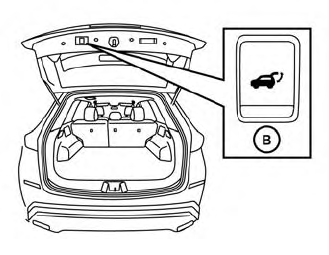
Liftgate close switch
Power Close:
The power liftgate automatically moves
from the fully open position to the secondary
position. When the liftgate reaches the
secondary position, the cinching motor engages
and pulls the liftgate to its primary
latch position. Power close takes approximately
7 – 10 seconds. The power close
feature can be activated by the switch on
the Intelligent Key, the instrument panel
and the liftgate close switch  . A
chime
sounds to indicate the power close sequence
has been started.
. A
chime
sounds to indicate the power close sequence
has been started.
- If the liftgate close switch
 is activated
while the cinching motor is engaged,
the cinching motor will disengage
and release the latch.
is activated
while the cinching motor is engaged,
the cinching motor will disengage
and release the latch. - ∙ The Intelligent Key button must be held for 1 second before the liftgate closes.
Reverse:
The power liftgate will stop immediately
during power open or power close if the
Intelligent Key switch, instrument panel
switch, liftgate opener switch  or
liftgate
close switch
or
liftgate
close switch  is pushed. The power
liftgate
will reverse direction if the Intelligent
Key switch, instrument panel switch, liftgate
opener switch A or liftgate close
switch
is pushed. The power
liftgate
will reverse direction if the Intelligent
Key switch, instrument panel switch, liftgate
opener switch A or liftgate close
switch  is pushed a second time.
 chime
will sound to announce the reversal.
chime
will sound to announce the reversal.
Auto Reverse:
If an obstacle is detected during power open or power close, a warning chime will sound and the liftgate will reverse direction and return to the full open or full close position. If a second obstacle is detected, the liftgate motion will stop and the liftgate will enter manual mode.
A pinch strip is mounted on each side of the liftgate. If an obstacle is detected by a pinch strip during power close, the liftgate will reverse direction and return to the full open position.
NOTE:
If the pinch strip is damaged or removed, the power close function will not operate.
WARNING
There are some small distances immediately before the closed position which cannot be detected. Make sure that all passengers have their hands, etc., inside the vehicle before closing the liftgate.
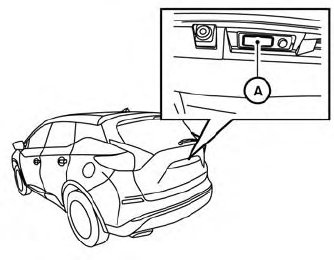
Manual Mode:
If power operation is not available, the liftgatemaybe operated manually. Power operation may not be available if multiple obstacles have been detected in a single power cycle or if battery voltage is low.
If the liftgate opener switch  is
pushed
during power open or close, the power operation
will be canceled and the liftgate can
be operated manually.
is
pushed
during power open or close, the power operation
will be canceled and the liftgate can
be operated manually.
To open the liftgate manually, push the liftgate
opener switch  and lift the
liftgate.
and lift the
liftgate.
To close, lower and push the liftgate down securely.
Auto Power Liftgate System Battery Power Saving Mode:
The vehicle goes into power saving mode when the liftgate is open for a long time (approximately 12 hours). This is to prevent deterioration of the battery. The power saving mode automatically cuts the power supply of the power liftgate door.
When the power to the liftgate is cut off, the manual mode must be performed. After the manual mode is performed, the power liftgate function is restored.
NOTE:
When a battery voltage is lower than approximately 11V, the power liftgate may not operate after automatic return.
 Operating the manual liftgate (if so equipped)
The power door lock system allows you to
lock or unlock all doors including the liftgate
simultaneously.
To open the liftgate, push the liftgate
opener switch and pull up on the
handle...
 Motion-Activated Liftgate (if so equipped)
The liftgate can be operated using a quick
kicking motion under the center of the rear
bumper.
To operate, the Intelligent Key must be
within 31.5 in (80 cm) of the liftgate...
Other information:
Nissan Murano (Z52) 2015-2024 Service Manual: Charging System :: Removal and Installation. Generator
Exploded View 1. Generator bracket 2. Generator 3. "B" terminal nut Front Removal and Installation REMOVALRemove radiator assembly. Refer to Removal and Installation. Remove cooling fan assembly. Refer to Removal and Installation...
Nissan Murano (Z52) 2015-2024 Service Manual: Additional Service When Replacing Lane Camera Unit
Work Procedure DescriptionAlways perform the lane camera unit configuration and adjust the camera aiming after; Removing and installing the lane camera unit Replacing the lane camera unit Replacing windshield glass Refer to Work Procedure.CAUTION: The system does not operate normally unless the camera aiming adjustment is performed...
Categories
- Manuals Home
- Nissan Murano Owners Manual
- Nissan Murano Service Manual
- Memory storage function (key-link)
- How to enable/disable the LDW system
- Turning the AEB system on/off
- New on site
- Most important about car
Luggage hooks

When securing items using luggage hooks located on the back of the seat or side finisher do not apply a load over more than 6.5 lbs. (29 N) to a single hook.
The luggage hooks that are located on the floor should have loads less than 110 lbs. (490 N) to a single hook.
