
Nissan Murano: Removal and Installation / Audio Unit
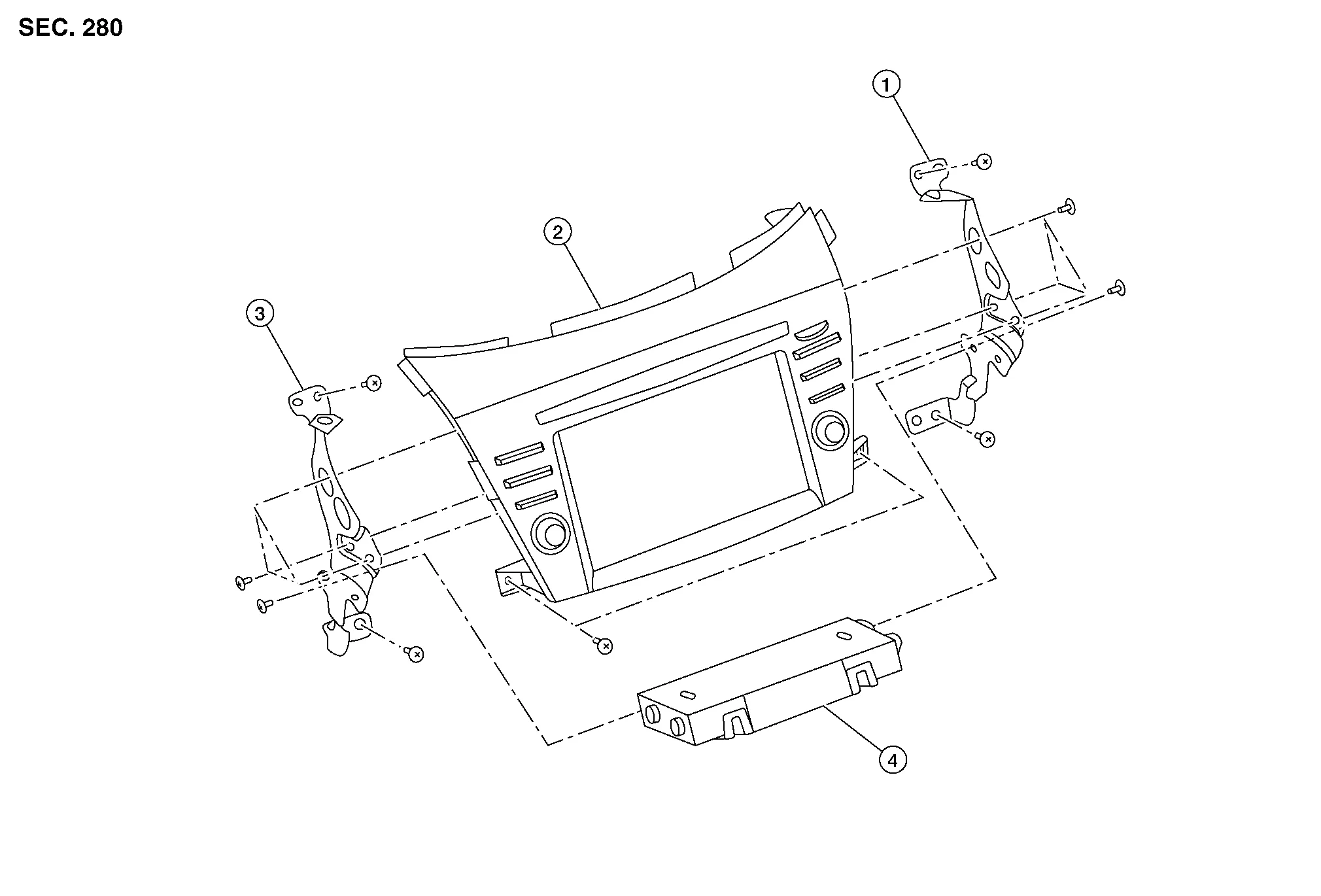
| 1. | Audio unit bracket (RH) | 2. | Audio unit | 3. | Audio unit bracket (LH) |
| 4. | A/C auto amp. |
REMOVAL
CAUTION:
Before disconnecting the audio unit and battery terminals, turn the ignition switch OFF and wait at least 30 seconds.
 NOTE:
NOTE:
-
Before replacing audio unit, perform “Before Replace ECU” of “Read / Write Configuration” to save or print current Nissan Murano vehicle specification. Refer to Description.
-
After the ignition switch is turned OFF, the audio unit continues operating for approximately 30 seconds.
-
Therefore, data corruption may occur if battery voltage is cut off within 30 seconds.
Disconnect the negative battery terminal. Refer to Removal and Installation.
Remove cluster lid D. Refer to Removal and Installation.
Remove A/C switch assembly. Refer to Removal and Installation.
Remove audio unit screws then pull out audio unit.
Disconnect the harness connectors from audio unit and remove.
Remove audio unit bracket (LH/RH) screws and audio unit brackets [(LH/RH) (if necessary)].
INSTALLATION
CAUTION:
Be sure to perform “After Replace ECU” of “Read / Write Configuration” or “Manual Configuration” when replacing audio unit. Refer to Description.
Installation is in the reverse order of removal.

 Around View Monitor Control Unit
Exploded View
1.
Instrument panel assembly
2.
Around view monitor control unit
Removal and Installation
REMOVALNOTE:
Before replacing around view monitor control unit, perform “Before Replace ECU” of “Read / Write Configuration” to save or print current Nissan Murano vehicle specification...
Other information:
Nissan Murano (Z52) 2015-2024 Service Manual: U0428 Steering Angle Sensor
DTC Description DTC DETECTION LOGIC DTC No. CONSULT screen terms (Trouble diagnosis content) DTC detection condition U0428 ST ANGLE SENSOR CALIBRATION (Steering angle sensor calibration) Diagnosis condition When ignition switch is ON Signal (terminal) — Threshold — Diagnosis delay time — POSSIBLE CAUSE Neutral position adjustment of steering angle sensor is not complete Steering angle sensor FAIL-SAFE Predicted course line is not displayed MOD (Moving Object Detection) function is stopped DTC Confirmation Procedure CHECK DTC PRIORITY If DTC U0428 is displayed with DTC U1232, first perform the diagnosis for DTC U1232...
Nissan Murano (Z52) 2015-2024 Service Manual: L Terminal Circuit (short)
Diagnosis Procedure CHECK “L” TERMINAL CIRCUIT (SHORT) Ignition switch OFF. Disconnect generator connector. Ignition switch ON. Does charge warning lamp illuminate? YES>> GO TO 2. NO>> Refer to Work Flow (With 165-DSS-5000P), or (Without 165-DSS-5000P)...
Categories
- Manuals Home
- Nissan Murano Owners Manual
- Nissan Murano Service Manual
- System malfunction
- Tire rotation
- How to enable/disable the LDW system
- New on site
- Most important about car
Vehicle security system

Your vehicle has two types of security systems:
Vehicle security system NISSAN Vehicle Immobilizer SystemThe vehicle security system provides visual and audible alarm signals if someone opens the doors, liftgate or the hood when the system is armed. It is not, however, a motion detection type system that activates when a vehicle is moved or when a vibration occurs.
