
Nissan Murano: Front Door Lock / Inside Handle
REMOVAL
Remove front door finisher. Refer to Removal and Installation.
Remove inside handle bolt.
Disconnect the door lock cables and remove the inside handle.
INSTALLATION
Installation is in the reverse order of removal.
CAUTION:
-
After installation, check that door lock cables are properly engaged to inside handle.
-
After installation, check door open/close and lock/unlock operation.
 Door Lock
Exploded View
1.
Outside handle escutcheon/door key cylinder (LH only)
2.
Rear gasket
3.
Outside handle bracket
4.
Outside handle
5.
Front gasket
6...
 Outside Handle
Removal and Installation
REMOVALFully close front door glass.
Remove front door finisher. Refer to Removal and Installation.
Remove front door vapor barrier...
Other information:
Nissan Murano (Z52) 2015-2024 Service Manual: How to Erase Permanent Dtc
Description OUTLINEWhen a DTC is stored in ECMWhen a DTC is stored in ECM and MIL is ON, a permanent DTC is erased with MIL shutoff if the same malfunction is not detected after performing the driving pattern for MIL shutoff three times in a raw. *1: When the same malfunction is detected in two consecutive trips, MIL will illuminate...
Nissan Murano (Z52) 2015-2024 Service Manual: Sonar System :: Symptom Diagnosis. Sonar System
Symptom Table Symptom Possible cause Reference page Malfunction is detected in only 1 sensor of display (Always displayed in red). Sonar sensor circuit Sonar sensor DTC Diagnosis Procedure (rear LH inner) DTC Diagnosis Procedure (rear RH inner) DTC Diagnosis Procedure (rear LH outer) DTC Diagnosis Procedure (rear RH outer) DTC Diagnosis Procedure (front LH inner) DTC Diagnosis Procedure (front RH inner) DTC Diagnosis Procedure (front LH outer) DTC Diagnosis Procedure (front RH outer) Removal and Installation Malfunction is detected in all 8 sensors of display (Always displayed in red)...
Categories
- Manuals Home
- Nissan Murano Owners Manual
- Nissan Murano Service Manual
- Passenger compartment
- Checking engine oil level
- Fuel recommendation
- New on site
- Most important about car
Fuel gauge
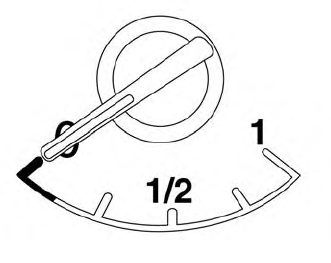
The gauge indicates the approximate fuel level in the tank.
The gauge may move slightly during braking, turning, acceleration, or going up or down hills.
The gauge needle returns to 0 (Empty) after the ignition switch is placed in the OFF position.

Copyright © 2026 www.nimurano.com