
Nissan Murano: Removal and Installation / Cvt Shift Selector
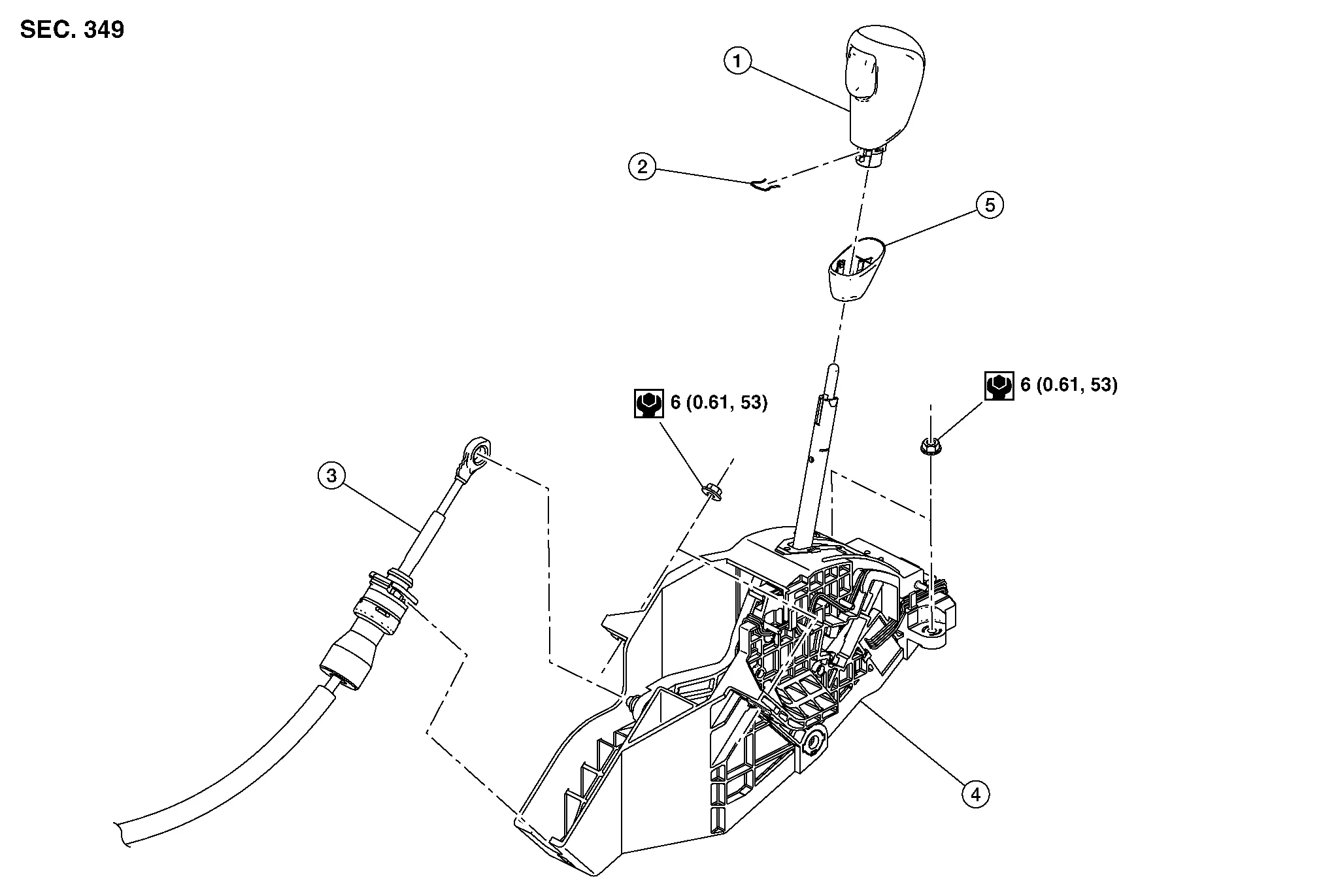
| 1. | Shift selector handle | 2. | Shift selector handle clip | 3. | Control cable |
| 4 | Shift selector assembly | 5. | Shift selector handle cover |
REMOVAL
Apply the parking brake.
CAUTION:
Make sure the vehicle cannot move with the parking brake applied.
Remove shift lock override button cover (1) using suitable tool, and insert suitable tool into opening (A) to depress the shift lock override button. Move shift selector to “N” position while depressing shift lock override button.

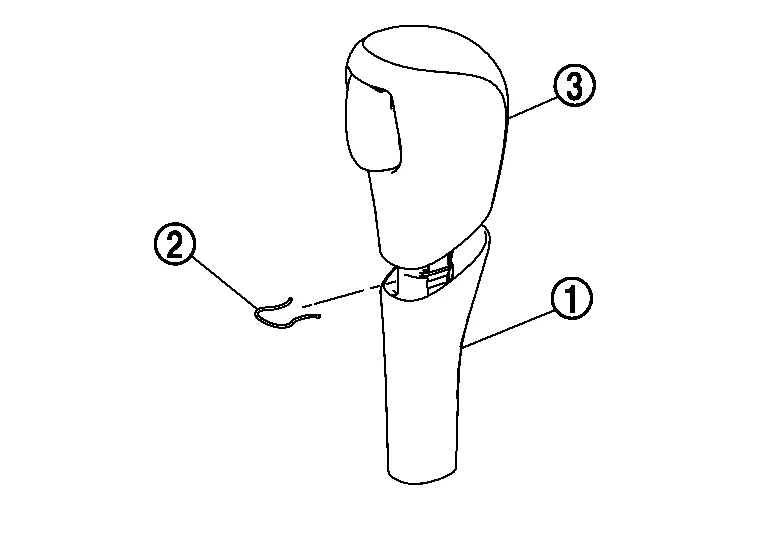
Remove the shift selector handle with the following procedure.Slide the shift selector handle cover (1) down.
CAUTION:
Do not damage the knob cover.
Pull out the lock pin (2) from the shift selector handle (3). Pull the shift selector handle and the shift selector handle cover upwards to remove them.Release the shift selector finisher clips and pawls using a suitable tool; disconnect the harness connectors and remove. Refer to Exploded View.
Depress the shift lock override button and move the shift selector to the "P" position.
Remove the center console side finisher (RH). Refer to Exploded View.
Position aside the center console lower side finisher (RH). Refer to Exploded View.
Remove control cable (1) from shift selector assembly (2).

Remove shift selector assembly nuts ( ), using suitable tool.
Disconnect shift selector harness connector (A), using a suitable tool.

Remove shift selector assembly from the Nissan Murano vehicle.
INSTALLATION
Installation is in the reverse order of removal.
Shift Selector
-
Pay attention to the following when connecting the control cable to the shift selector assembly.
-
When connecting the control cable (1) to the shift selector assembly (2), face the grooved surface of the rib (A) up and insert the control cable until it stops.

 NOTE:
NOTE:
Apply multi-purpose grease to control cable eye before installation.
-
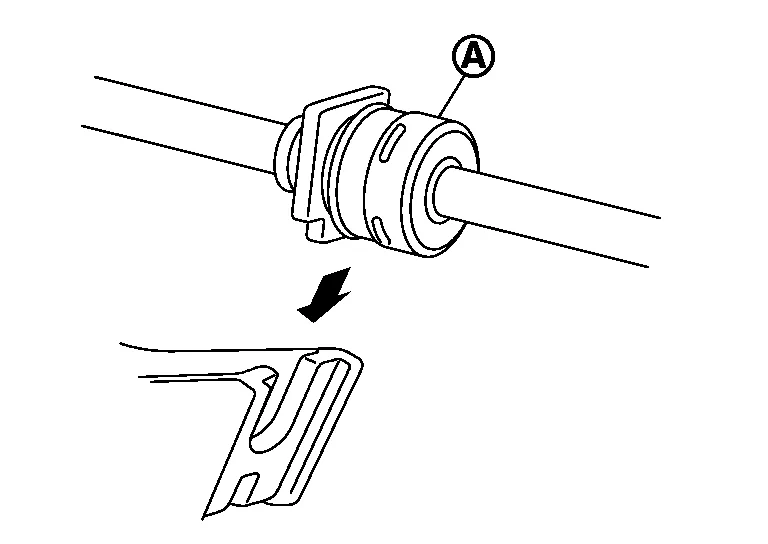
Install the socket (A) onto the shift selector assembly.
CAUTION:
-
Place the socket onto the shift selector assembly, then fasten it in place from above.
-
Check that the pulling on the socket does not disconnect it.
-
Shift Selector Handle
-
Follow the procedure below and place the selector lever knob onto the shift selector.
-
Install the lock pin (2) onto the selector lever handle (3).
-
Install the selector lever handle cover (1) onto the selector lever handle.
-
Shift the selector lever to “N” position.
-
Insert selector lever handle into the selector lever until a slight touch is felt.
-
Press and hold the selector lever handle into selector lever until you feel it click into place.
CAUTION:
Do not strike the selector lever handle to press it into place.
-
After installing selector lever handle (A), pull the handle in the direction shown (
) to check that it does not become disconnected.
Check the CVT position.
If a malfunction is found, adjust the CVT position. Refer to Inspection and Adjustment.
 Transmission Range Switch
Exploded View
1.
Lock washer
2.
Manual lever
3.
Transmission range switch
4.
CVT
5.
Manual shaft
Removal and Installation
REMOVALRemove air cleaner and air duct...
 Control Cable
Exploded View
1.
Shift selector assembly
2.
Control cable
3.
Lock plate
4.
Bracket
5.
Transaxle assembly
A.
Manual lever
B.
Grommet
Removal and Installation
REMOVALApply the parking brake...
Other information:
Nissan Murano (Z52) 2015-2024 Service Manual: Cowl Top
Exploded View 1. Cowl top cover seal 2. Cowl top side trim cover (RH) 3. Cowl top cover 4. Cowl top extension 5. Cowl top side trim cover (LH) A. Refer to Removal and Installation - Cowl Top Extension Removal and Installation - Cowl Top Cover REMOVALRemove front wiper arms (LH/RH)...
Nissan Murano (Z52) 2015-2024 Service Manual: Front Wiper Stop Position Signal Circuit
Component Function Check CHECK FRONT WIPER STOP POSITION SIGNAL CONSULT Select “WIP AUTO STOP” in “Data Monitor” mode of “IPDM E/R”. Operate the front wiper. Check that the function operates normally according to the following conditions: Monitor item Condition Monitor status WIP AUTO STOP Front wiper motor Stop position STOP P Except stop position ACT P Is the inspection result normal? YES>> Front wiper stop position signal circuit is normal...
Categories
- Manuals Home
- Nissan Murano Owners Manual
- Nissan Murano Service Manual
- Vehicle Dynamic Control (VDC) OFF switch
- GAS STATION INFORMATION
- Turning the AEB system on/off
- New on site
- Most important about car
Luggage hooks

When securing items using luggage hooks located on the back of the seat or side finisher do not apply a load over more than 6.5 lbs. (29 N) to a single hook.
The luggage hooks that are located on the floor should have loads less than 110 lbs. (490 N) to a single hook.
