
Nissan Murano: Power Outlet :: Removal and Installation / Rear Usb Charge Port
Nissan Murano (Z52) 2015-2024 Service Manual / Electrical & Power Control / Power Outlet :: Removal and Installation / Rear Usb Charge Port
REMOVAL
Remove center console rear finisher. Refer to Exploded View.
Using a suitable tool, release pawls and remove rear USB charge port (1) from center console rear finisher (2).
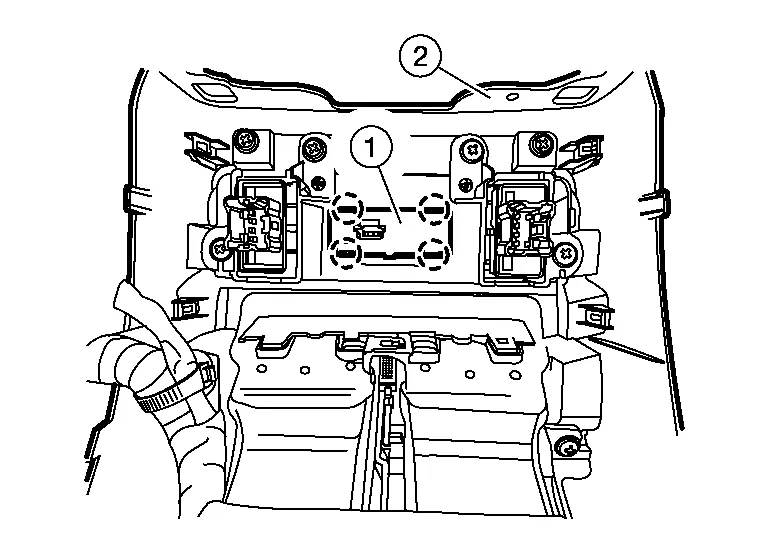
 |
: Pawl |
INSTALLATION
Installation is in the reverse order of removal.
 Power Socket
Removal and Installation
FRONT CONSOLE POWER SOCKET or REAR CARGO POWER SOCKETNOTE:
If unable to use the Tool because of power socket location or access to the harness connector, then further removal of interior components may be required...

Other information:
Nissan Murano (Z52) 2015-2024 Service Manual: Disc Brake Rotor
Inspection and Adjustment INSPECTIONAppearanceCheck surface of disc brake rotor for uneven wear, cracks or damage. Replace if any abnormal conditions exist.RunoutCheck the wheel bearing axial end play before the inspection. Refer to Inspection. Secure the disc brake rotor to the wheel hub and bearing assembly with wheel nuts at two wheel nut locations...
Nissan Murano (Z52) 2015-2024 Service Manual: Sunshade Motor Assembly
Removal and Installation REMOVALRemove the headlining. Refer to Removal and Installation. Disconnect the harness connector (A) from the sunshade motor assembly (1). Remove sunshade motor assembly screws (B). Remove the sunshade motor assembly from the moonroof unit assembly (2)...
Categories
- Manuals Home
- Nissan Murano Owners Manual
- Nissan Murano Service Manual
- Jacking up vehicle and removing the damaged tire
- Shift lock release
- Checking engine oil level
- New on site
- Most important about car
Luggage hooks

When securing items using luggage hooks located on the back of the seat or side finisher do not apply a load over more than 6.5 lbs. (29 N) to a single hook.
The luggage hooks that are located on the floor should have loads less than 110 lbs. (490 N) to a single hook.

Copyright © 2026 www.nimurano.com