
Nissan Murano: Front Camera Unit / Camera Aiming Adjustment
Description
Always adjust the camera aiming after removing and installing or replacing the lane camera unit.
CAUTION:
-
Place the vehicle on level ground when the camera aiming adjustment is operated.
-
Be sure to place the target correctly according to work procedures because the system may not operate normally.
-
Follow the CONSULT when performing the camera aiming. (Camera aiming adjustment cannot be operated without CONSULT.)
Preparation
PERFORM SELF-DIAGNOSIS
 CONSULT
Perform self-diagnosis of lane camera unit.
Is any DTC detected?
Except “C1B01-54”>>Perform diagnosis on the detected DTC and repair or replace the applicable item. Refer to DTC Description.
“C1B01-54” or no DTC>>GO TO 2.
PREPARATION BEFORE CAMERA AIMING ADJUSTMENT
-
Perform pre-inspection for diagnosis. Refer to Work Procedure.
-
Adjust the tire pressure to the specified pressure value.
-
Maintain no-load in Nissan Murano vehicle.
-
Check if coolant and engine oil are filled up to correct level and fuel tank is full.
-
Shift the selector lever to “P” position and release the parking brake.
-
Clean the windshield.
-
Completely clear off the instrument panel.
 NOTE:
NOTE:
If any fixed object is put on instrument panel, cover the upper of the instrument panel with black cloth to prevent an object from reflecting in the windshield.
>>
GO TO 3.
PREPARATION OF J-52266-2 ALIGNMENT TARGET
Prepare the alignment target according to the following procedure and the figure.
-
Attach the J-52266-2 alignment target to a movable board.
NOTE:
-
Use the board that peripheral area of the target is monochrome such as a white-board.
-
Notice that the cross of the target is horizontal and vertical.
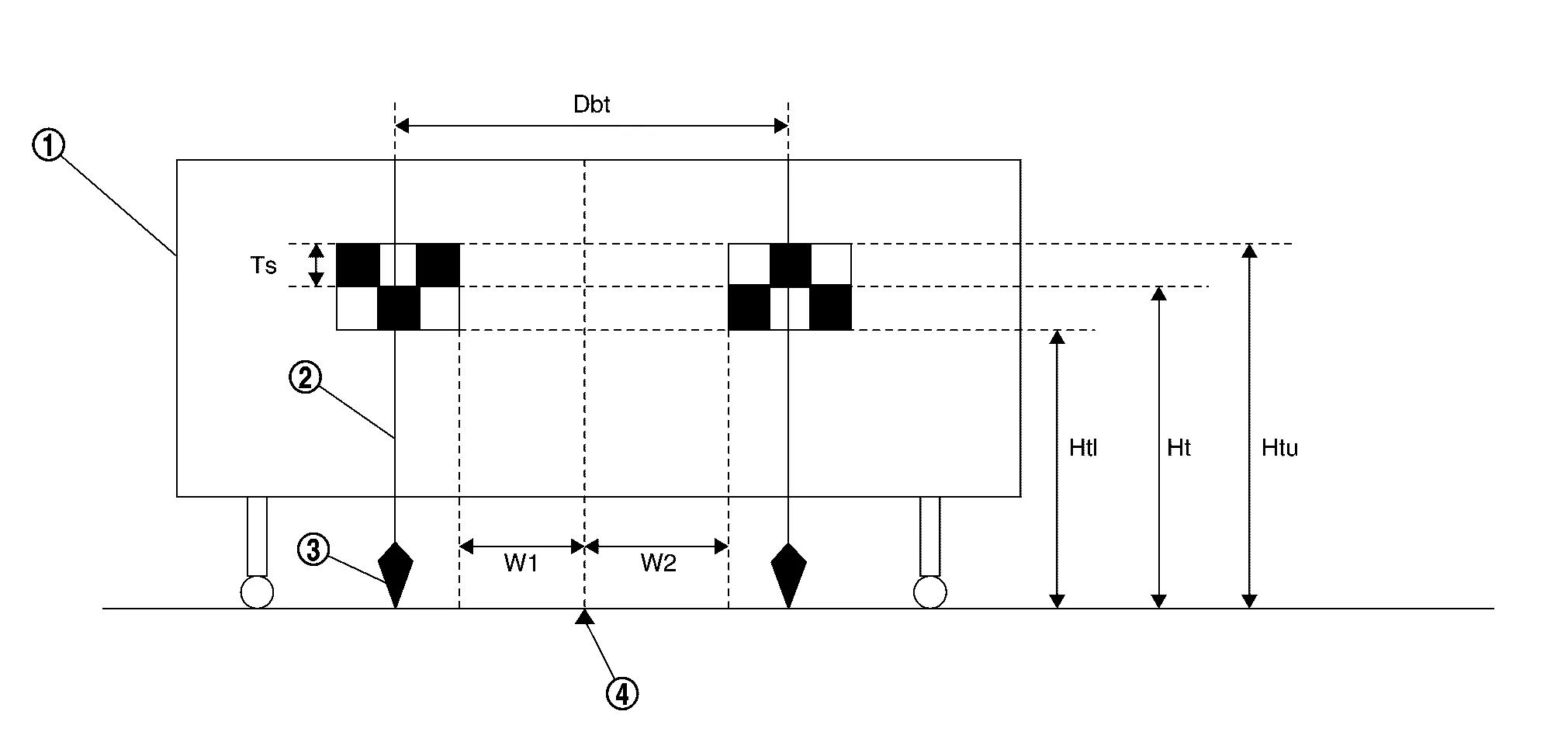

Board 
String 
Cone 
Center between two targets Side of a target (Ts) : 120 mm (4.72 in) Height of a target lower end (Htl) : 1,180 mm (46.46 in) Height of a target center (Ht) : 1,300 mm (51.18 in) Height of a target upper end (Htu) : 1,420 mm (55.91 in) Width between a right target center from a left target center (Dbt) : 720 mm (28.35 in) W1 : 180 mm (7.09 in) W2 : 180 mm (7.09 in) -
>>
Proceed to Target Setting.
Target Setting
CAUTION:
-
Be sure to place the target correctly according to work procedures because the system may not operate normally.
-
Perform this operation in a horizontal position where there is a clear view for 5 m (16.4 ft) forward and 3 m (9.84 ft) wide.
-
Place the target in a well-lighted location. (Poor lighting may make it hard to adjust.)
-
The target may not be detected when there is a light source within 1.5 m (4.92 ft) from either side and within 1 m (3.28 ft) upward/downward from the target.
-
Check the location of the sun. (Sunlight should not shine directly on the front of the Nissan Murano vehicle.)
-
The target may not be detected when there is the same pattern of black and white as the target when the pattern is within 1 m (3.28 ft) from either side and upward/downward position from the target. (It is desirable that the Nissan Murano vehicle is positioned on the opposite side of a single-color wall.)
TARGET SETTING
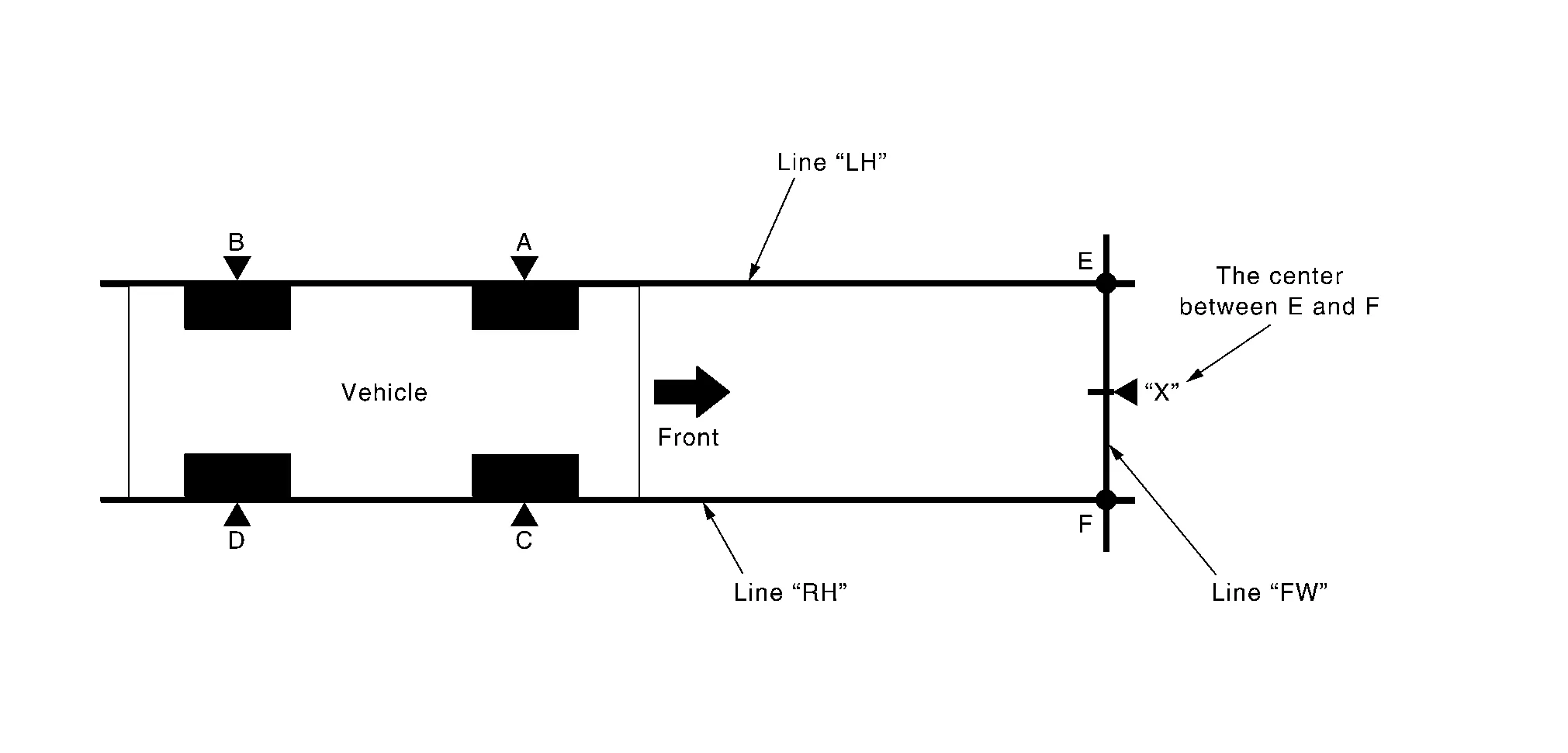
| A – E (C – F) | : 3,000 mm (118.11 in) |
-
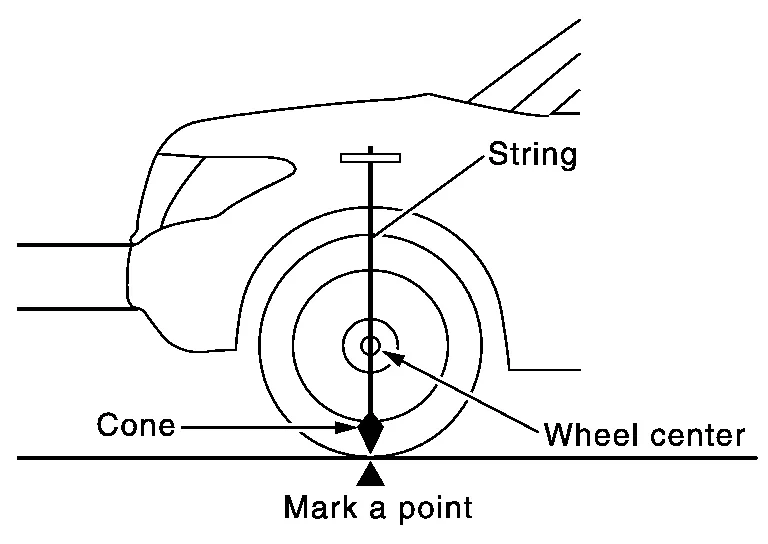
Mark points “A”, “B”, “C” and “D”at the center of the lateral surface of each wheels.
 NOTE:
NOTE:
Hang a string with a cone from the fender so as to pass through the center of wheel, and then mark a point at the center of the lateral surface of the wheel.
-
Draw line “LH” passing through points “A” and “B” on the left side of Nissan Murano vehicle.
NOTE:
Approximately 4 m (13.12 ft) or more from the front end of Nissan Murano vehicle.
-
Mark point “E” on the line “LH” at the positions 3,000 mm (118.11 in) from point “A”.
-
Draw line “RH” passing through points “C” and “D” on the right side of Nissan Murano vehicle in the same way as step 2.
NOTE:
Approximately 4 m (13.12 ft) or more from the front end of Nissan Murano vehicle.
-
Mark point “F” on the line “RH” at the positions 3,000 mm (118.11 in) from point “C”.
-
Draw line “FW” passing through the points “E” and “F” on the front side of Nissan Murano vehicle.
-
Mark point “X” at the center of point “E” and “F” on the line “FW”.
CAUTION:
Make sure that “E” to “X” is equal to “F” to “X”.
-
Center the J-52266-2 alignment target at point “X” facing the Nissan Murano vehicle.
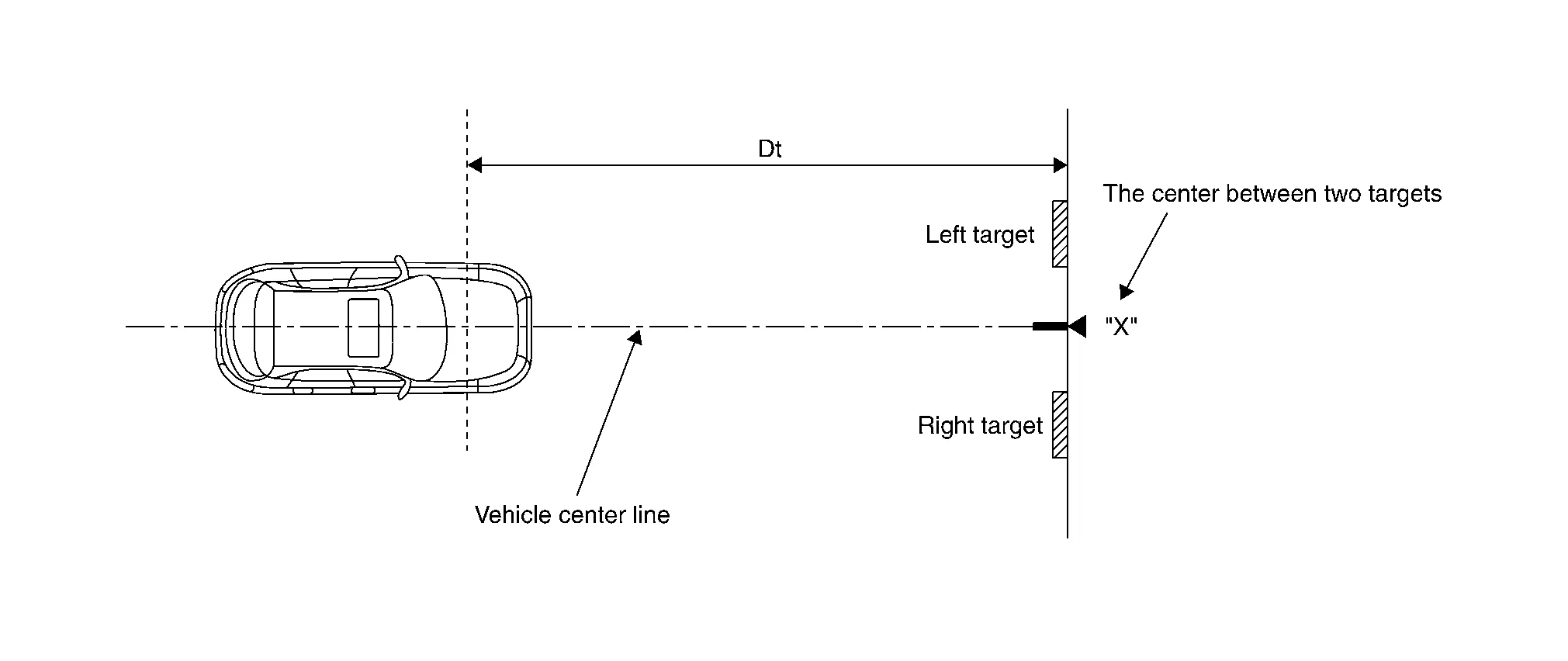
Dt : 3,000 mm (118.11 in)
>>
Proceed to Camera Aiming Adjustment.
Camera Aiming Adjustment
CAUTION:
Perform the adjustment under unloaded vehicle condition.
CHECK VEHICLE HEIGHT
Measure the wheelarch height.
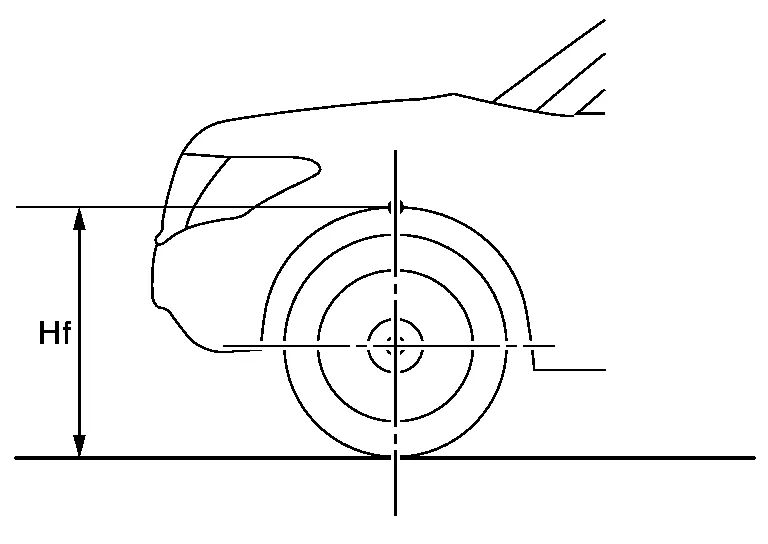
| Hfl: Front left wheelarch height [mm] | |
| Hfr: Front right wheelarch height [mm] |
CAUTION:
Be sure to measure wheelarch height correctly.
>>
GO TO 2.
CAMERA AIMING ADJUSTMENT
CONSULT
CAUTION:
Operate CONSULT outside the Nissan Murano vehicle, and close all the doors. (To retain vehicle attitude appropriately)
-
Select “Work Support” on “LANE CAMERA”.
-
Select “AUTO AIM”.
-
Confirm the following items;
-
The target should be accurately placed.
-
The Nissan Murano vehicle should be stopped.
-
-
Select “Start” to perform camera aiming.
CAUTION:
-
Never select “Start” when the J-52266-2 alignment target is not accurately placed.
-
Wait 5 seconds or more after selecting “Start”.
-
-
Input the following parameters, and then select “Start”.
Hfl : Measured value Hfr : Measured value Nissan Murano Vehicle Reference Value : 706 mm VP : 0 mm Dt : 3,000 mm Dbt : 720 mm Htu : 1,420 mm Htl : 1,180 mm Ts : 120 mm -
Confirm the displayed item.
-
“Normally Completed”: Select “Completion”.
-
“SUSPENSION”, “ABNORMALLY COMPLETED”: Perform the following services.
Displayed item Possible cause Service procedure SUSPENSION — Temporary malfunction in internal processing of the lane camera unit. Go back to step 1. 00H Routine not activated Lane camera unit malfunction. Position the target appropriately again.
Then perform the aiming again.10H Writing error -
Temporary malfunction in internal processing of the lane camera unit.
-
Lane camera unit malfunction.
ABNORMALLY COMPLETED 2 Lane camera unit cannot detect the target
-
A target is not-yet-placed.
-
The position of the targets is not correct.
-
The position of the lane camera unit is not correct.
-
Inappropriate work environment.
-
Inappropriate Nissan Murano vehicle condition.
-
Input value is not correct against actual setting position.
Position the target appropriately again.
Then perform the aiming again.3 Roll angle is outside the threshold
-
The position of the targets is not correct.
-
The position of the lane camera unit is not correct.
-
Inappropriate work environment.
-
Inappropriate Nissan Murano vehicle condition.
-
Input value is not correct against actual setting position.
4 Yaw/pitch angle is outside the threshold.
-
The position of the targets is not correct.
-
The position of the lane camera unit is not correct.
-
Inappropriate work environment.
-
Inappropriate Nissan Murano vehicle condition.
-
Input value is not correct against actual setting position.
5 Input value of aiming is invalid.
-
Input value is not correct against actual setting position.
Correct input value of aiming and perform camera aiming again. 6 The size of target is different. (A numerical value input to CONSULT differs from detected size)
-
The position of the targets is not correct.
-
The position of the lane camera unit is not correct.
-
Inappropriate work environment.
-
Inappropriate Nissan Murano vehicle condition.
-
Input value is not correct against actual setting position.
Position the target appropriately again.
Then perform the aiming again.7 The size of target is different. (A numerical value input to CONSULT differs from detected size)
-
The position of the targets is not correct.
-
The position of the lane camera unit is not correct.
-
Inappropriate work environment.
-
Inappropriate Nissan Murano vehicle condition.
-
Input value is not correct against actual setting position.
8 Yaw/pitch angle is outside the threshold.
-
The position of the targets is not correct.
-
The position of the lane camera unit is not correct.
-
Inappropriate work environment.
-
Inappropriate Nissan Murano vehicle condition.
-
Input value is not correct against actual setting position.
9 Yaw/pitch angle is outside the threshold.
-
The position of the targets is not correct.
-
The position of the lane camera unit is not correct.
-
Inappropriate work environment.
-
Inappropriate Nissan Murano vehicle condition.
-
Input value is not correct against actual setting position.
10 Detect several targets.
-
The position of the targets is not correct.
-
The position of the lane camera unit is not correct.
-
Inappropriate work environment.
-
Inappropriate Nissan Murano vehicle condition.
-
Input value is not correct against actual setting position.
11 Internal process malfunction -
Then turn the ignition switch OFF→ON. Accurately set target and perform camera aiming again.
-
If ABNOMALLY COMPLETED again after aiming, replace lane camera unit.
12 Internal process time out -
Then turn the ignition switch OFF→ON. Accurately set target and perform camera aiming again.
-
If ABNOMALLY COMPLETED again after aiming, replace lane camera unit.
13 Waiting for the start or aiming. (Insufficient passage of time from key SW ON to the start of aiming.)
-
Inappropriate work environment.
Position the target appropriately again.
Then perform the aiming again.14 Configuration of the lane camera unit is not completed. Complete the configuration of the lane camera unit.
Refer to Work Procedure.
Then turn the ignition switch OFF→ON Then position the target appropriately again.Ignition switch is not turned OFF→ON after the configuration of the lane camera unit is completed. Turn the ignition switch OFF→ON. Then position the target appropriately again. 15 Writing process malfunction -
Check self-diagnosis result. If DTC is detected, perform trouble diagnosis.
-
Then turn the ignition switch OFF→ON. Accurately set target and perform camera aiming again.
-
If ABNOMALLY COMPLETED again after aiming, replace lane camera unit.
16 Internal transmitting malfunction 19 Unit internal malfunction 20 Writing value malfunction -
If lane camera unit is already replaced, perform configuration
-
Position the target appropriately again. Then perform the aiming
-
If there is still malfunction after performing above procedure, replace lane camera unit.
22 Unit internal malfunction -
Check self-diagnosis result. If DTC is detected, perform trouble diagnosis.
-
Then turn the ignition switch OFF→ON. Accurately set target and perform camera aiming again.
-
If ABNOMALLY COMPLETED again after aiming, replace lane camera unit.
58 Unit internal malfunction -
Check self-diagnosis result. If DTC is detected, perform trouble diagnosis.
-
Then turn the ignition switch OFF→ON. Accurately set target and perform camera aiming again.
-
If ABNOMALLY COMPLETED again after aiming, replace lane camera unit.
59 Unit internal malfunction 60 Unit internal malfunction 61 Unit internal malfunction 62 Unit internal malfunction 63 No aiming done Turn the ignition switch OFF→ON Then position the target appropriately again. NOTE:
Replace lane camera unit if “00H Routine not activated” or “10H Writing error” are repeatedly indicated during the above two services are performed.
-
-
-
Confirm that “Normally completed” is displayed and then select “End” to close the adjustment procedure.
>>
GO TO 3.
PERFORM SELF-DIAGNOSIS
CONSULT
Perform self-diagnosis of “LANE CAMERA”.
Is any DTC detected?
YES>>Perform diagnosis on the detected DTC and repair or replace the applicable item. Refer to DTC Index.
NO>>GO TO 4.
ACTION TEST
-
Perform the LDW/I-LI system action test. Refer to Work Procedure for LANE DEPARTURE WARNING or INTELLIGENT LANE INTERVENTION
-
Check that the LDW and I-LI systems operate normally.
>>
Work End.
 Pre-Inspection for Diagnosis
Work Procedure
CHECK CAMERA LENS AND WINDSHIELD
Are camera lens and windshield contaminated with foreign materials?
YES>>
Clean camera lens and windshield...
 Configuration (lane Camera Unit)
Work Procedure
Description
Since vehicle specifications are not included in the lane camera unit after replacement, it is required to write Nissan Murano vehicle specifications with CONSULT...
Other information:
Nissan Murano (Z52) 2015-2024 Owners Manual: Front-door pockets. Console side pockets (if so equipped)
F..
Nissan Murano (Z52) 2015-2024 Service Manual: Diagnosis System [abs Actuator and Electric Unit (control Unit)]
CONSULT Function APPLICATION ITEMSCONSULT can display each diagnostic item using the diagnostic test modes as follows: Mode Function description ECU Identification Part number of ABS actuator and electric unit (control unit) can be read. Self Diagnostic Result Self-diagnostic results and freeze frame data can be read and erased quickly...
Categories
- Manuals Home
- Nissan Murano Owners Manual
- Nissan Murano Service Manual
- Passenger compartment
- Shift lock release
- Warning lights
- New on site
- Most important about car
Fuel gauge
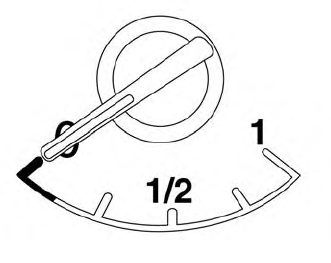
The gauge indicates the approximate fuel level in the tank.
The gauge may move slightly during braking, turning, acceleration, or going up or down hills.
The gauge needle returns to 0 (Empty) after the ignition switch is placed in the OFF position.
