
Nissan Murano: Door & Lock :: Dtc/circuit Diagnosis / B26fe Hood Sw Can Diag Error
DTC DETECTION LOGIC
 NOTE:
NOTE:
-
If DTC B26FE is displayed with DTC U1000, first perform the trouble diagnosis for DTC U1000. Refer to DTC Description.
-
If DTC B26FE is displayed with DTC U1010, first perform the trouble diagnosis for DTC U1010. Refer to DTC Description.
| DTC No. |
CONSULT screen terms (Trouble diagnosis content) | DTC Detection Condition | |
|---|---|---|---|
| B26FE |
HOOD SW CAN DIAG ERROR (Hood switch CAN communication diagnostic error) |
Diagnosis condition | When ignition switch is ON. |
| Signal (terminal) | IPDM E/R terminals 94,96 | ||
| Threshold | BCM detects that the hood switch input is malfunctioning | ||
| Diagnosis delay time | 3 seconds | ||
POSSIBLE CAUSE
-
Hood switch
-
Harness or connector
[hood switch circuit is open or shorted]
-
IPDM E/R
FAIL-SAFE
—
PERFORM DTC CONFIRMATION PROCEDURE
 CONSULT
-
Ignition switch ON.
-
Select “Self Diagnostic Result” mode of “BCM”.
Is DTC detected?
YES>>Refer to DTC Diagnosis Procedure.
NO>>Hood switch is OK.
CHECK HOOD SWITCH SIGNAL CIRCUITS
-
Ignition switch OFF.
-
Disconnect hood switch connector.
-
Check voltage between hood switch harness connector and ground.
| (+) | (–) |
Voltage (Approx.) | |
|---|---|---|---|
| Hood switch | |||
| Connector | Terminal | ||
| E205 | 1 | Ground | Battery voltage |
| 2 | |||
Is the inspection result normal?
YES>>GO TO 3.
NO>>GO TO 2.
CHECK HOOD SWITCH SIGNAL CIRCUITS
-
Disconnect IPDM E/R connector.
-
Check continuity between IPDM E/R harness connector and hood switch harness connector.
IPDM E/R Hood switch Continuity Connector Terminal Connector Terminal E218 94 E205 1 Yes 96 2 -
Check continuity between IPDM E/R harness connector and ground.
IPDM E/R Ground Continuity Connector Terminal E218 94 No 96
Is the inspection result normal?
YES>>Replace IPDM E/R. Refer to Removal and Installation.
NO>>Repair or replace harness.
CHECK HOOD SWITCH GROUND CIRCUIT
Check continuity between hood switch harness connector and ground.
| Hood switch | Ground | Continuity | |
| Connector | Terminal | ||
| E205 | 3 | Yes | |
Is the inspection result normal?
YES>>GO TO 4.
NO>>Repair or replace harness.
CHECK HOOD SWITCH
Refer to Component Inspection.
Is the inspection result normal?
YES>>GO TO 5.
NO>>Replace hood switch. Refer to Removal and Installation.
CHECK BCM CONFIGURATION
Refer to Configuration List.
>>
Inspection End.
CHECK HOOD SWITCH
-
Ignition switch OFF.
-
Disconnect hood switch connector.
-
Check continuity between hood switch terminals.
Hood switch Condition Continuity Terminal 1 3 Hood switch Press Yes Release No 2 Press No Release Yes
Is the inspection result normal?
YES>>Inspection End.
NO>>Replace hood switch. Refer to Removal and Installation.
 B26fd Shft Lck Slnoid Insid F/b Mlfnc
DTC Description
DTC DETECTION LOGIC DTC No.
CONSULT screen terms
(Trouble diagnosis content) DTC Detection Condition
B26FD
SHFT LCK SLNOID INSID F/B MLFNC
(Shift lock solenoid inside feedback malfunction)
Diagnosis condition
When ignition switch is ON...
 B26ff Intelligent Tuner Comm Err
DTC Description
DTC DETECTION LOGIC DTC No. CONSULT screen terms (Trouble diagnosis content) DTC Detection Condition
B26FF
INTELLIGENT TUNER COMM ERR
(Intelligent tuner communication error)
Diagnosis condition
When ignition switch is ON...
Other information:
Nissan Murano (Z52) 2015-2024 Service Manual: Dash Side Finisher
Removal and Installation REMOVALRemove front kicking plate. Refer to Removal and Installation - Front Kicking Plate. Release metal clips using a suitable tool (A) as shown and remove dash side finisher (1). : Metal clip : FrontINSTALLATIONInstallation is in the reverse order of removal...
Nissan Murano (Z52) 2015-2024 Service Manual: Diagnosis System [distance Sensor (icc Sensor)]
CONSULT Function (LASER/RADAR) APPLICATION ITEMSCONSULT performs the following functions via CAN communication with ADAS control unit and the communication with distance sensor (ICC sensor). Diagnosis mode Description Self Diagnostic Result Displays malfunctioning system memorized in distance sensor (ICC sensor) Data Monitor Displays real-time input/output data of distance sensor (ICC sensor) Work support It can monitor the adjustment direction indication in order to perform the radar adjustment operation smoothly ECU Identification Displays distance sensor (ICC sensor) part number CAN Diag Support Monitor The results of transmit/receive diagnosis of ITS communication can be read...
Categories
- Manuals Home
- Nissan Murano Owners Manual
- Nissan Murano Service Manual
- Memory storage function (key-link)
- All-Wheel Drive (AWD) (if so equipped)
- How to enable/disable the LDW system
- New on site
- Most important about car
Fuel gauge
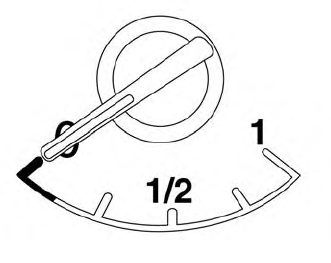
The gauge indicates the approximate fuel level in the tank.
The gauge may move slightly during braking, turning, acceleration, or going up or down hills.
The gauge needle returns to 0 (Empty) after the ignition switch is placed in the OFF position.
