
Nissan Murano: Heater & Air Conditioning Control System :: Removal and Installation / In-Vehicle Sensor
REMOVAL
Remove the instrument lower panel LH. Refer to Removal and Installation.
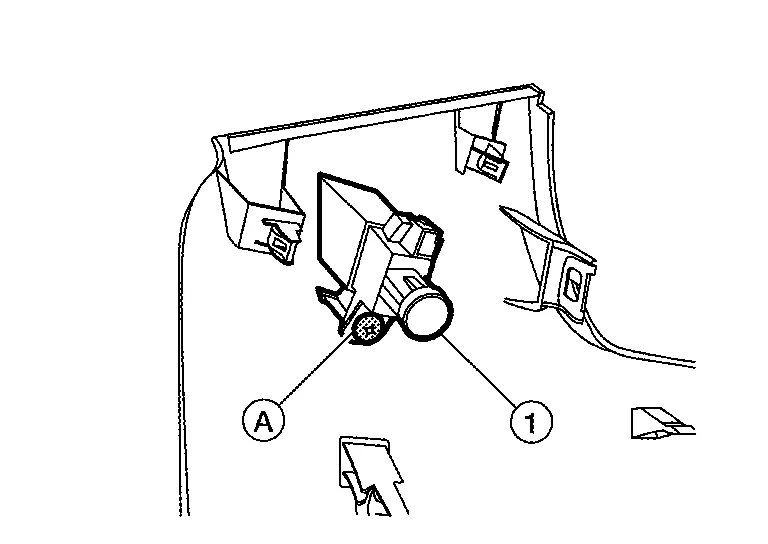
Remove the screw (A) and in-Nissan Murano vehicle sensor (1).
INSTALLATION
Installation is in the reverse order of removal.
CAUTION:
Make sure that the aspirator hose is securely attached to the in-vehicle sensor when installing the instrument lower panel LH.
 Ambient Sensor
Removal and Installation
REMOVALRemove the front bumper fascia. Refer to Removal and Installation.
Disconnect the harness connector (A) from the ambient sensor (1)...
 Sunload Sensor
Removal and Installation
REMOVALRelease the pawls using a suitable tool, then remove sunload sensor (1) from the instrument panel (2).
: Pawl
Disconnect the harness connector from the sunload sensor...
Other information:
Nissan Murano (Z52) 2015-2024 Service Manual: Seat Belt Buckle Switch Signal Circuit
Component Function Check CHECK COMBINATION METER INPUT SIGNAL CONSULT Select “BUCKLE SW” in “Data Monitor” mode of “METER/M&A”. Check that the function operates normally according to the following conditions: Monitor item Condition Status BUCKLE SW When front seat belt LH is fastened OFF When front seat belt LH is unfastened ON Is the inspection result normal? YES>> Inspection End...
Nissan Murano (Z52) 2015-2024 Service Manual: Brake Pedal
Inspection Check the brake pedal height with the floor trim removed. Check the brake pedal height (H) between the dash lower panel (2) and the brake pedal upper surface. Brake pedal height (H) from dash lower panel (2) Refer to Brake Pedal. Clearance (A) between brake pedal bracket (1), stop lamp switch (3) and brake pedal position switch (4) contact ends Refer to Brake Pedal...
Categories
- Manuals Home
- Nissan Murano Owners Manual
- Nissan Murano Service Manual
- Tire rotation
- High Beam Assist (if so equipped)
- Fuel recommendation
- New on site
- Most important about car

Copyright © 2026 www.nimurano.com