
Nissan Murano: Door & Lock :: Dtc/circuit Diagnosis / B2622 Inside Antenna
 NOTE:
NOTE:
The Signal Tech II Tool [- (J-50190)] can be used to perform the following functions: Refer to the Signal Tech II User Guide for additional information.
-
Check Intelligent Key relative signal strength.
-
Confirm Nissan Murano vehicle Intelligent Key antenna signal strength.
DTC DETECTION LOGIC
| DTC No. |
CONSULT screen terms (Trouble diagnosis content) | DTC Detection Condition | |
|---|---|---|---|
| B2622 |
INSIDE ANTENNA [(Inside key antenna (console)] |
Diagnosis condition | When ignition switch is ON. |
| Signal (terminal) | BCM terminals 116, 128 | ||
| Threshold | An excessive high or low voltage from inside key antenna (console) is sent to BCM | ||
| Diagnosis delay time | — | ||
POSSIBLE CAUSE
-
Inside key antenna (console)
-
Harness or connector
[Inside key antenna (console) circuit is open or shorted]
-
BCM
FAIL-SAFE
—
PERFORM DTC CONFIRMATION PROCEDURE
 CONSULT
-
Select "Self Diagnostic Result" mode of "BCM".
-
Check BCM for DTC.
Is inside key antenna DTC detected?
YES>>Refer to DTC Diagnosis Procedure.
NO>>Inside key antenna (console) is OK.
NOTE:
The Signal Tech II Tool [- (J-50190)] can be used to perform the following functions: Refer to the Signal Tech II User Guide for additional information.
-
Check Intelligent Key relative signal strength.
-
Confirm Nissan Murano vehicle Intelligent Key antenna signal strength.
CHECK INSIDE KEY ANTENNA INPUT SIGNAL 1
-
Ignition switch OFF.
-
Check signal between BCM harness connector and ground using oscilloscope.
(+) (–) Condition Signal
(Reference value)BCM Connector Terminal M80 116 Ground When Intelligent Key is in the antenna detection area. 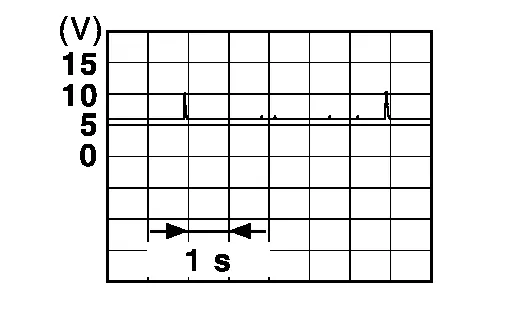
When Intelligent Key is not in the antenna detection area. 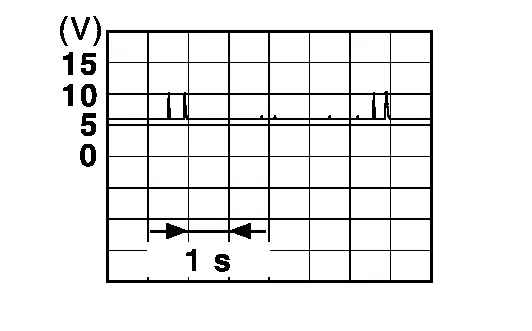
128 Ground When Intelligent Key is in the antenna detection area. When Intelligent Key is not in the antenna detection area.
Is the inspection result normal?
YES>>Replace BCM. Refer to Removal and Installation.
NO>>GO TO 2.
CHECK INSIDE KEY ANTENNA CIRCUIT
-
Disconnect BCM connector and inside key antenna (console) connector.
-
Check continuity between BCM harness connector and inside key antenna (console) harness connector.
BCM Inside key antenna (console) Continuity Connector Terminal Connector Terminal M80 116 B83 1 Yes 128 2 -
Check continuity between BCM harness connector and ground.
BCM Ground Continuity Connector Terminal M80 116 No 128
Is the inspection result normal?
YES>>GO TO 3.
NO>>Repair or replace harness.
CHECK INSIDE KEY ANTENNA INPUT SIGNAL 2
-
Replace inside key antenna (console) (New antenna or other antenna).
-
Connect BCM connector and inside key antenna (console) connector.
-
Check signal between BCM harness connector and ground using oscilloscope.
(+) (–) Condition Signal
(Reference value)BCM Connector Terminal M80 116 Ground When Intelligent Key is in the antenna detection area. When Intelligent Key is not in the antenna detection area. 128 Ground When Intelligent Key is in the antenna detection area. When Intelligent Key is not in the antenna detection area.
Is the inspection result normal?
YES>>Replace inside key antenna (console). Refer to Removal and Installation.
NO>>Replace BCM. Refer to Removal and Installation.
 B261b Res Eng Run Stuck Malfunc
DTC Description
DTC DETECTION LOGICNOTE:
If DTC B261B is displayed with DTC U1000, first perform the trouble diagnosis for DTC U1000. Refer to DTC Description...
 B26fd Shft Lck Slnoid Insid F/b Mlfnc
DTC Description
DTC DETECTION LOGIC DTC No.
CONSULT screen terms
(Trouble diagnosis content) DTC Detection Condition
B26FD
SHFT LCK SLNOID INSID F/B MLFNC
(Shift lock solenoid inside feedback malfunction)
Diagnosis condition
When ignition switch is ON...
Other information:
Nissan Murano (Z52) 2015-2024 Service Manual: Power Supply and Ground Circuit
Diagnosis Procedure CHECK FUSIBLE LINKS Check that the following fusible links are not blown: Terminal Signal name Fusible link No. Capacity 1 Battery power supply E 80 A 2 A 250 A C 80 A 3 A 250 A B 100 A N 40 A Is the fusible link blown? YES>> Replace the blown fusible link after repairing the affected circuit...
Nissan Murano (Z52) 2015-2024 Service Manual: Door Sash Molding
Exploded View 1. Front door sash molding 2. Rear door rear sash molding 3. Front door panel 4. Rear door panel Removal and Installation FRONT DOORRemovalRemove door mirror. Refer to Removal and Installation. Remove front door sash molding clip (A) using a suitable tool (B)...
Categories
- Manuals Home
- Nissan Murano Owners Manual
- Nissan Murano Service Manual
- Passenger compartment
- Settings
- Vehicle Dynamic Control (VDC) OFF switch
- New on site
- Most important about car
Seatback pockets

Theremaybe one or two seatback pockets located on the back of the driver and passenger seats. The pockets can be used to store maps.
WARNING
