
Nissan Murano: Monitor, climate, audio, phone and voice recognition systems / Vents
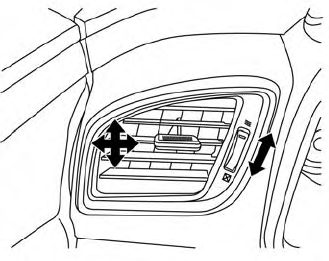
Side
Adjust air flow direction by moving the vent slides.
Open or close the vents by using the dial.
Move the dial toward the  to open
the
vents or toward the
to open
the
vents or toward the  to close them.
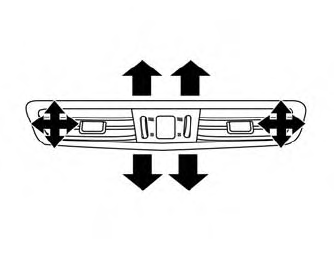
Center
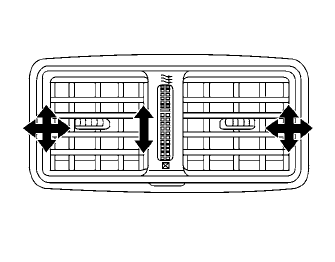
Rear
 System maintenance
CAUTION
Do not use alcohol, benzine or thinner
to clean the camera. This will cause
discoloration.
Do not damage the camera as the
monitor screen may be adversely
affected...
 Heater and Air Conditioner (automatic)
Temperature control dial (driver’s side)/AUTO button
ON-OFF button
Display screen
MODE (manual air flow control) button
Temperature control dial (passenger’s side)/DUAL button
Fresh air intake button
Air recirculation button
A/C (air conditioner)
button
fan speed control buttons
REAR window and outside
mirror (if so equipped) defroster switch
FRONT (defroster) button
WARNING
The air conditioner cooling function
operates only when the engine is
running...
Other information:
Nissan Murano (Z52) 2015-2024 Service Manual: Seat Belt Warning
Seat Belt Warning Chime SYSTEM DIAGRAMWARNING OPERATION CONDITIONSFront Seat BeltsIf all of the following conditions are fulfilled: Operation conditions Ignition switch ON Nissan Murano Vehicle speed Approximately 9.3 mph (15 km/h) or more. Front seat belt buckle switch LH Unfastened (front seat belt buckle switch LH ON) Front seat belt buckle switch RH Front passenger seat is occupied, seat belt unfastened (front seat belt buckle switch RH ON)...
Nissan Murano (Z52) 2015-2024 Service Manual: C1a12 Laser Beam Off Center
DTC Description DTC DETECTION LOGIC DTC No. CONSULT screen terms DTC detection condition C1A12–78 LASER BEAM OFFCNTR Diagnosis condition When Ignition switch is ON. Signal (terminal) — Threshold Radar of distance sensor (ICC sensor) is off the aiming point...
Categories
- Manuals Home
- Nissan Murano Owners Manual
- Nissan Murano Service Manual
- Tire rotation
- Turning the AEB system on/off
- System malfunction
- New on site
- Most important about car
LATCH (Lower Anchors and Tethers for CHildren) system

LATCH system lower anchor locations - bench seat
Your vehicle is equipped with special anchor points that are used with LATCH system compatible child restraints. This system may also be referred to as the ISOFIX or ISOFIX compatible system. With this system, you do not have to use a vehicle seat belt to secure the child restraint unless the combined weight of the child and child restraint exceeds 65 lbs. (29.5 kg). If the combined weight of the child and child restraint is greater than 65 lbs. (29.5 kg), use the vehicle’s seat belt (not the lower anchors) to install the child restraint. Be sure to follow the child restraint manufacturer’s instructions for installation.
