
Nissan Murano: Moving Object Detection (MOD) (if so equipped) / System maintenance
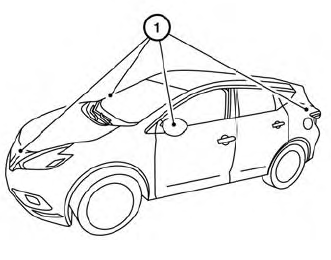
CAUTION
Do not use alcohol, benzine or thinner to clean the camera. This will cause discoloration.
Do not damage the camera as the monitor screen may be adversely affected.
If dirt, rain or snow accumulates on any of the cameras м, the MOD system may not operate properly. Clean the camera by wiping with a cloth dampened with a diluted mild cleaning agent and then wiping with a dry cloth.
 MOD system limitations
WARNING
Listed below are the system limitations
for MOD. Failure to operate the vehicle
in accordance with these system limitations
could result in serious injury or
death...
 Vents
Vents
Side
Adjust air flow direction by moving the vent
slides.
Open or close the vents by using the dial.
Move the dial toward the to open
the
vents or toward the to close them...
Other information:
Nissan Murano (Z52) 2015-2024 Service Manual: Seat Belt Warning System
Seat Belt Warning System Does Not Function SEAT BELT WARNING LIGHT Ignition switch ON. Does the seat belt warning lamp come ON? YES>> GO TO 2. NO>> Check 5A fuse [No. 31, located in the fuse block (J/B)]. Check front seat belt buckle switch LH...
Nissan Murano (Z52) 2015-2024 Service Manual: B1383 Incomp Steering Angle Sensor Adjust
DTC Description DTC DETECTION LOGIC DTC No. CONSULT screen terms (Trouble diagnosis content) DTC detection condition B1383–01 Incomp steering angle senor adjust (Steering angle sensor calibration) Diagnosis condition When ignition switch is ON...
Categories
- Manuals Home
- Nissan Murano Owners Manual
- Nissan Murano Service Manual
- Jacking up vehicle and removing the damaged tire
- Checking engine oil level
- All-Wheel Drive (AWD) (if so equipped)
- New on site
- Most important about car

Copyright © 2026 www.nimurano.com