
Nissan Murano: Warning Chime System :: Symptom Diagnosis / The Light Reminder Warning Does Not Sound
Light reminder warning does not sound even though headlamp is illuminated.
CHECK COMBINATION SWITCH (LIGHTING SWITCH) OPERATION
Check that the headlamps operate normally by operating the combination switch (lighting switch).
Do they operate normally?
YES>>GO TO 2.
NO>>Refer to Symptom Table.
CHECK FRONT DOOR SWITCH LH SIGNAL CIRCUIT
Check the front door switch LH signal circuit. Refer to Diagnosis Procedure.
Is the inspection result normal?
YES>>GO TO 3.
NO>>Repair or replace harness or connector.
CHECK FRONT DOOR SWITCH LH
Check the front door switch LH. Refer to Component Inspection.
Is the inspection result normal?
YES>>Replace BCM. Refer to Removal and Installation.
NO>>Replace front door switch LH. Refer to Removal and Installation.
 Warning Chime System Symptoms
Symptom Table
CAUTION:
Perform the self-diagnosis with CONSULT before the symptom diagnosis. Perform the trouble diagnosis if any DTC is detected.
Symptom Possible cause Inspection item
The light reminder warning does not sound...
 The Seat Belt Warning Continues Sounding, or Does Not Sound
Diagnosis Procedure
Seat belt warning does not sound even though driver seat belt is not fastened.
Seat belt warning sounds even though driver seat belt is fastened...
Other information:
Nissan Murano (Z52) 2015-2024 Service Manual: B242e Hands Free Sensor 2
DTC Description DTC DETECTION LOGIC DTC No. CONSULT screen items (Trouble diagnosis content) DTC detecting condition B242E HANDS FREE SENOR 2 (Kick sensor 2) Diagnosis condition All times Signal (terminal) – Threshold BCM detects the abnormal resistance value of motion activated back door sensor (upper) via serial communication Diagnosis delay time – POSSIBLE CAUSE Motion activated back door sensor (upper) Harness or connectors [motion activated back door sensor (upper) circuit is open or shorted] BCM Motion activated back door control unit FAIL-SAFEInhibit motion activated automatic back door system DTC Confirmation Procedure PERFORM DTC CONFIRMATION PROCEDURE CONSULT Ignition switch ON...
Nissan Murano (Z52) 2015-2024 Owners Manual: Adjusting the screen
Press the MENU button. Touch the “Settings” key. Touch the “ > ” key to move to the next page. Touch the “Camera” key. Touch “Display settings” key. Touch the “Brightness,” “Contrast,” “Tint,” “Color,” or “Black Level” key...
Categories
- Manuals Home
- Nissan Murano Owners Manual
- Nissan Murano Service Manual
- Passenger compartment
- Jacking up vehicle and removing the damaged tire
- Warning lights
- New on site
- Most important about car
Unfastening the seat belts. Checking seat belt operation
Unfastening the seat belts
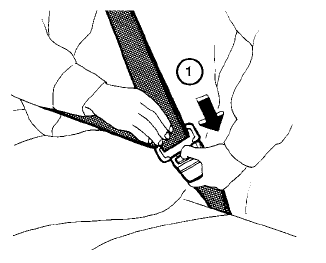
To unfasten the seat belt, press the button
on the buckle  . The seat belt
automatically
retracts.
. The seat belt
automatically
retracts.
