
Nissan Murano: Steering System :: Removal and Installation / Steering Wheel
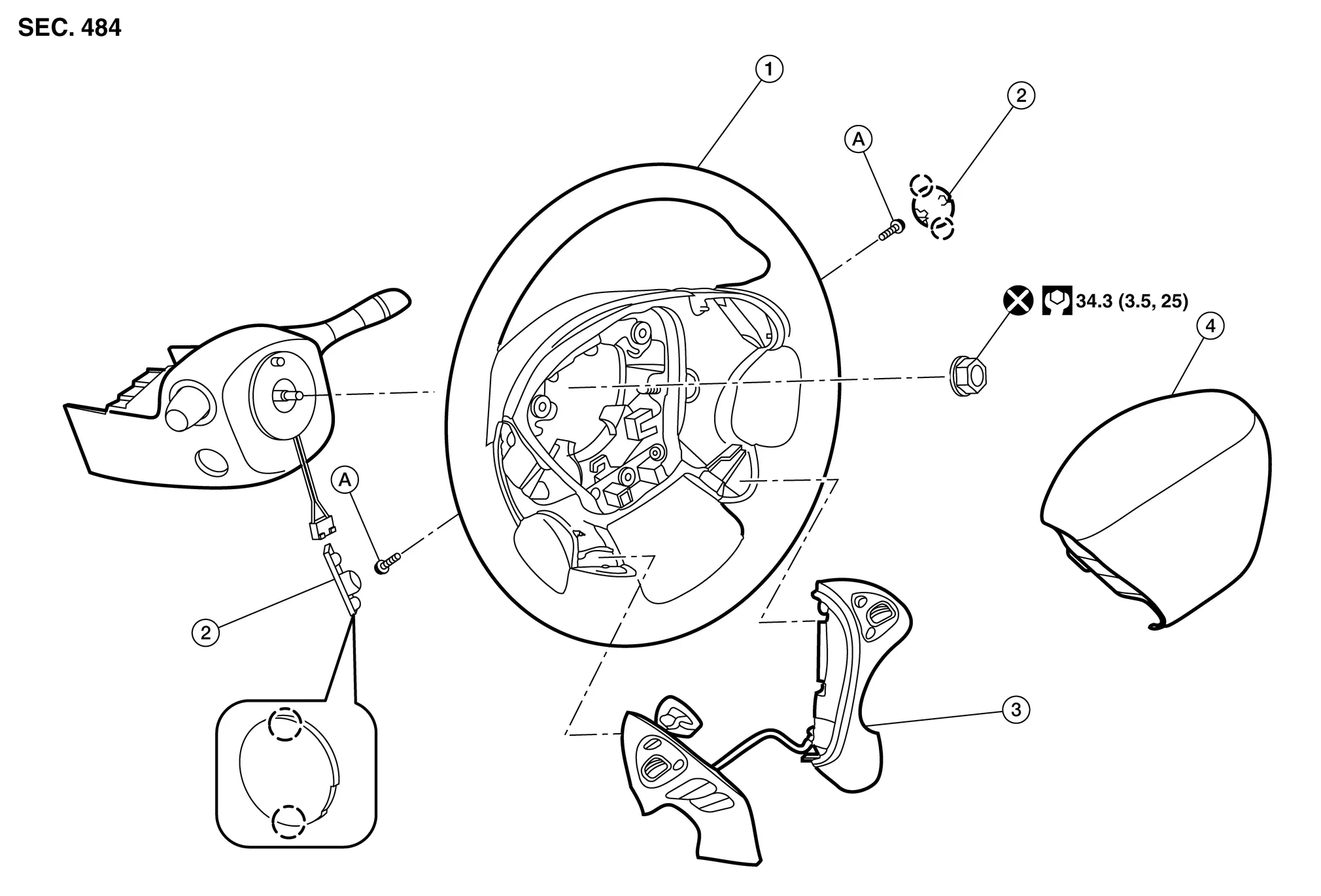
| 1. | Steering wheel | 2. | Cover | 3. | Steering switches |
| 4. | Driver air bag module | A. | Refer to Exploded View. |  |
Pawl |
REMOVAL
Set the front wheels and tires in the straight-ahead position.
Remove driver air bag module. Refer to Removal and Installation.
Disconnect harness connector from steering switches.
Disconnect harness connector from steering wheel heater (if equipped).
Remove steering wheel lock nut.
Remove steering wheel using suitable tool.
CAUTION:
Place a piece of tape across the spiral cable so it will not be rotated out of position.
If necessary, remove steering switches. Refer to Removal and Installation (NAVIGATION WITHOUT BOSE) or Removal and Installation (NAVIGATION WITH BOSE).
Inspect steering wheel near the puller holes for damage. Replace as necessary.
INSTALLATION
Installation is in the reverse order of removal.
Align spiral cable correctly before installing steering wheel. Make sure that the spiral cable is in the neutral position. Refer to Removal and Installation.
CAUTION:
-
If the spiral cable is not installed in the correct position, the spiral cable may snap by turning the steering wheel beyond the limited number of turns.
-
Do not reuse steering wheel lock nut.

 Steering Column
Exploded View
Electric steering column 1.
Steering column
2.
Hole cover
3.
Lower boot
4.
Steering intermediate shaft
Mechanical steering column 1...
Other information:
Nissan Murano (Z52) 2015-2024 Service Manual: Main Power Window and Door Mirror Switch
Removal and Installation REMOVALRemove main power window and door lock/unlock switch finisher. Refer to Removal and Installation. Release pawls and remove door mirror remote control switch (1) from main power window and door lock/unlock switch finisher (2)...
Nissan Murano (Z52) 2015-2024 Service Manual: Cylinder Head
Exploded View 1. Cylinder head bolt 2. Cylinder head 3. Cylinder head gasket 4. Engine block A. Refer to Removal and Installation. Removal and Installation REMOVALRemove the engine from the vehicle. Refer to Removal and Installation (FWD) or Removal and Installation (AWD)...
Categories
- Manuals Home
- Nissan Murano Owners Manual
- Nissan Murano Service Manual
- Intelligent Forward Collision Warning (I-FCW)
- Jacking up vehicle and removing the damaged tire
- GAS STATION INFORMATION
- New on site
- Most important about car
Unfastening the seat belts. Checking seat belt operation
Unfastening the seat belts

To unfasten the seat belt, press the button
on the buckle  . The seat belt
automatically
retracts.
. The seat belt
automatically
retracts.
