
Nissan Murano: Removal and Installation / Steering Switches
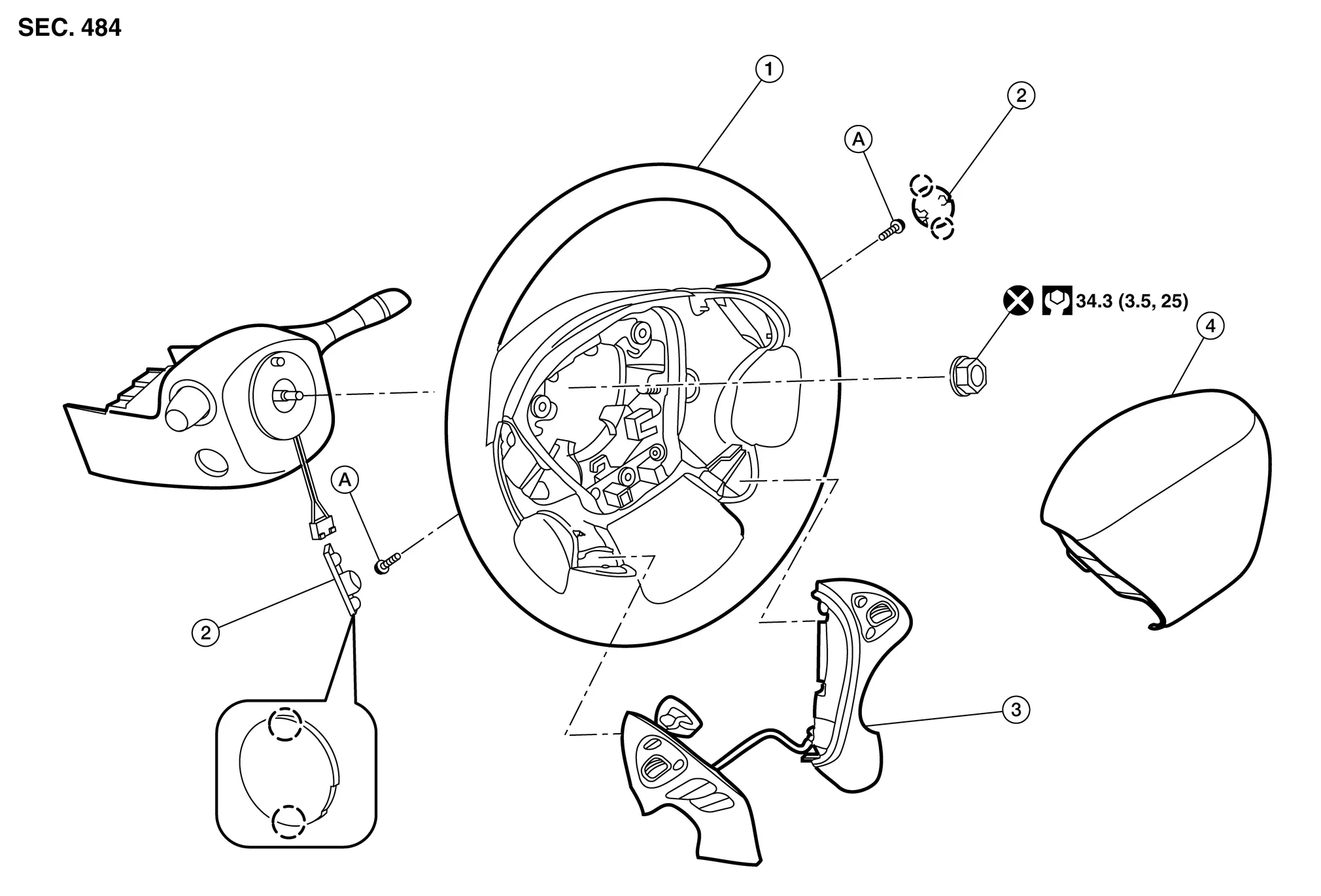
| 1. | Steering wheel | 2. | Cover | 3. | Steering switches |
| 4. | Driver air bag module | A. | Refer to Exploded View. |  |
Pawl |
REMOVAL
 NOTE:
NOTE:
The steering switches is serviced as an assembly.
Remove steering wheel. Refer to Removal and Installation.
Release pawls ( ) and remove steering wheel rear finisher (1) from steering wheel (2).

Remove steering switch screws.

Remove steering switches (1) from steering wheel (2).
INSTALLATION
Installation is in the reverse order of removal.
 Av Control Unit
Exploded View
1.
AV control unit bracket (RH)
2.
AV control unit
3.
AV control unit bracket (LH)
4.
A/C auto amp.
Removal and Installation
REMOVALCAUTION:
Before disconnecting the AV control unit and battery terminals, turn the ignition switch OFF and wait at least 30 seconds...
 Front Auxiliary Input Jacks Control Unit
Removal and Installation
RemovalRemove A/C switch assembly Removal and Installation.
Disconnect the harness connectors from the front auxiliary input jacks control unit...
Other information:
Nissan Murano (Z52) 2015-2024 Service Manual: Symptom Diagnosis. Rear View Monitor System
Symptom Table REAR VIEW MONITOR SYSTEM Symptom Possible cause Inspection item Camera image is not shown. (Nissan Murano Vehicle width and predictive course line are displayed.) Harness between rear view camera and audio unit Rear view camera Audio unit Camera image signal circuit...
Nissan Murano (Z52) 2015-2024 Service Manual: Additional Service When Replacing Around View Monitor Control Unit
Description BEFORE REPLACEMENTWhen replacing around view monitor control unit, save or print current vehicle specification with CONSULT configuration before replacement.NOTE: If “Before Replace ECU” cannot be used, use the “After Replace ECU” or “Manual Configuration” after replacing around view monitor control unit...
Categories
- Manuals Home
- Nissan Murano Owners Manual
- Nissan Murano Service Manual
- Fuel recommendation
- Checking engine oil level
- Jacking up vehicle and removing the damaged tire
- New on site
- Most important about car
Driver and passenger supplemental knee air bag

Driver’s side
The knee air bag is located in the knee bolster, on the driver’s and passenger’s side. All of the information, cautions and warnings in this manual apply and must be followed. The knee air bag is designed to inflate in higher severity frontal collisions, although it may inflate if the forces in another type of collision are similar to those of a higher severity frontal impact. It may not inflate in certain collisions.

Passenger’s side
