
Nissan Murano: Removal and Installation / Steering Switches
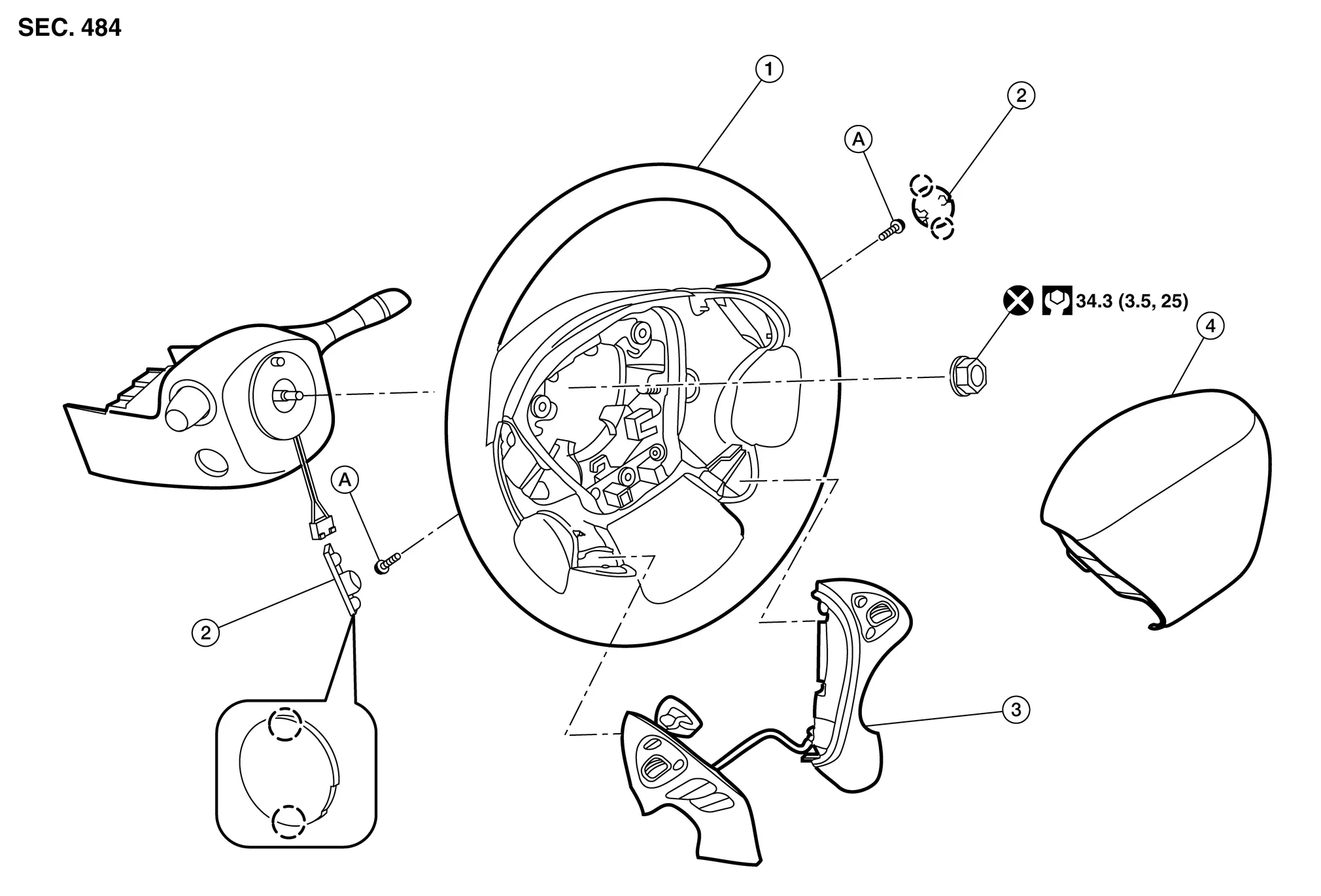
| 1. | Steering wheel | 2. | Cover | 3. | Steering switches |
| 4. | Driver air bag module | A. | Refer to Exploded View. |  |
Pawl |
REMOVAL
 NOTE:
NOTE:
The steering switches is serviced as an assembly.
Remove steering wheel. Refer to Removal and Installation.
Release pawls ( ) and remove steering wheel rear finisher (1) from steering wheel (2).

Remove steering switch screws.

Remove steering switches (1) from steering wheel (2).
INSTALLATION
Installation is in the reverse order of removal.
 Av Control Unit
Exploded View
1.
AV control unit bracket (RH)
2.
AV control unit
3.
AV control unit bracket (LH)
4.
A/C auto amp.
Removal and Installation
REMOVALCAUTION:
Before disconnecting the AV control unit and battery terminals, turn the ignition switch OFF and wait at least 30 seconds...
 Front Auxiliary Input Jacks Control Unit
Removal and Installation
RemovalRemove A/C switch assembly Removal and Installation.
Disconnect the harness connectors from the front auxiliary input jacks control unit...
Other information:
Nissan Murano (Z52) 2015-2024 Service Manual: Body Construction
Body Construction 1. Body side outer 2. Front pillar inner upper 3. Upper front pillar reinforcement 4. Dash side inner 5. Front hinge pillar lower reinforcement 6. Outer sill reinforcement 7. Inner sill 8. Center pillar reinforcement 9...
Nissan Murano (Z52) 2015-2024 Service Manual: Power Supply and Ground Circuit. Audio Unit
Diagnosis Procedure CHECK FUSE Check that the following fuses are not blown: Terminal No. Signal name Fuse No. Capacity 7 ACC power supply 7 10 A 17 Ignition power supply 29 10 A 19 Battery power supply 15 20 A Are the fuses blown? YES>> Replace the blown fuse after repairing the affected circuit...
Categories
- Manuals Home
- Nissan Murano Owners Manual
- Nissan Murano Service Manual
- Rear bench seat adjustment
- Checking engine oil level
- Jacking up vehicle and removing the damaged tire
- New on site
- Most important about car
Seatback pockets

Theremaybe one or two seatback pockets located on the back of the driver and passenger seats. The pockets can be used to store maps.
WARNING

Copyright © 2026 www.nimurano.com