
Nissan Murano: Front Suspension :: Removal and Installation / Steering Knuckle
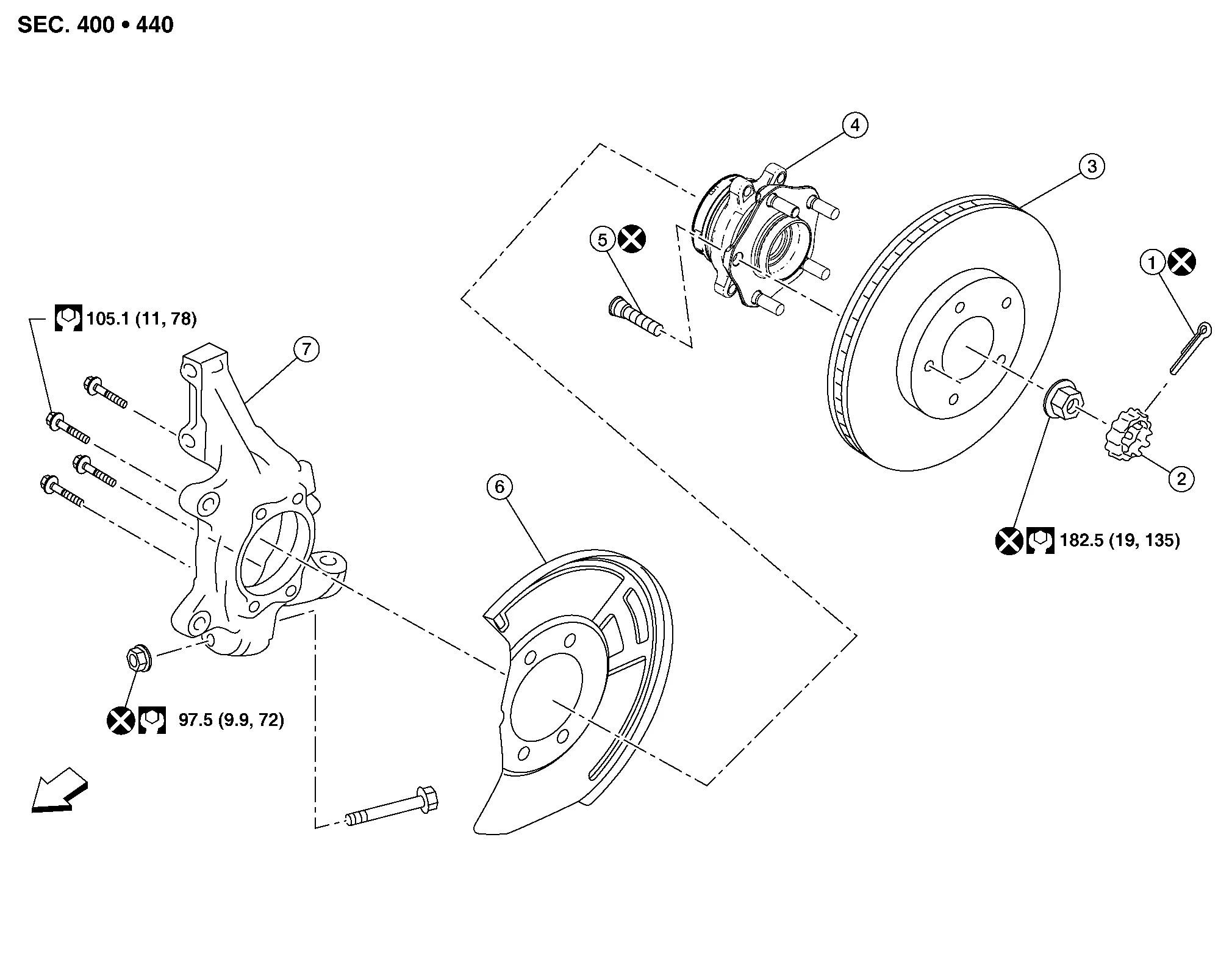
| 1. | Cotter pin | 2. | Nut retainer | 3. | Disc brake rotor |
| 4. | Wheel hub and bearing | 5. | Wheel stud | 6. | Splash guard |
| 7. | Steering knuckle |  |
Front |
REMOVAL
Remove front wheel hub and bearing. Refer to Removal and Installation.
Remove cotter pin from outer socket stud.
Loosen outer socket nut and separate outer socket from steering knuckle using suitable tool.
CAUTION:
Leave outer socket nut half threaded on outer socket to prevent damage to threads and to prevent suitable tool from coming off suddenly.
Remove outer socket nut and separate outer socket from steering knuckle.
Remove steering knuckle lower pinch bolt and separate transverse link from steering knuckle.
Remove lower strut nuts and bolts and then remove steering knuckle. Refer to Exploded View.
INSPECTION AFTER REMOVAL
Check for deformity, cracks and damage on each part. Replace if necessary.
INSTALLATION
Installation is in reverse order of removal.
CAUTION:
-
Do not reuse lower strut nuts.
-
Do not reuse wheel hub lock nut.
-
Do not reuse cotter pin.
-
Do not reuse steering knuckle lower nut.
-
Check wheel alignment. Refer to Inspection.
-
Adjust neutral position of the steering angle sensor. Refer to Description.
 Front Stabilizer
Exploded View
1.
Stabilizer
2.
Front suspension member
3.
Stabilizer connecting rod
4.
Stabilizer bushing
5.
Stabilizer clamp
Removal and Installation
REMOVALRemove front wheels and tires using power tool...
 Front Suspension :: Unit Removal and Installation. Front Suspension Member
Exploded View
1.
Front suspension member
2.
Rebound stopper
3.
Front suspension member stay
Front
Removal and Installation
REMOVALRemove engine and transmission with front suspension member...
Other information:
Nissan Murano (Z52) 2015-2024 Service Manual: Microphone
Removal and Installation REMOVALRemove the map lamp assembly. Refer to Removal and Installation. Remove the microphone connector from the map lamp assembly . Release the microphone pawls, then remove the microphone . : Pawl INSTALLATIONInstallation is in the reverse order of removal...
Nissan Murano (Z52) 2015-2024 Owners Manual: USB/iPod® charging port
2nd row There are USB/iPod® charging ports located in the 2nd row on the back of the center console. These ports will charge compatible devices. NOTE: Only the USB connection port(s) located below the instrument panel will allow operation of USB/iPod® devices through the audio system...
Categories
- Manuals Home
- Nissan Murano Owners Manual
- Nissan Murano Service Manual
- Passenger compartment
- Indicator lights
- Memory storage function (key-link)
- New on site
- Most important about car
Vehicle security system

Your vehicle has two types of security systems:
Vehicle security system NISSAN Vehicle Immobilizer SystemThe vehicle security system provides visual and audible alarm signals if someone opens the doors, liftgate or the hood when the system is armed. It is not, however, a motion detection type system that activates when a vehicle is moved or when a vibration occurs.
