
Nissan Murano: Suspension / Front Suspension :: Unit Removal and Installation. Front Suspension Member
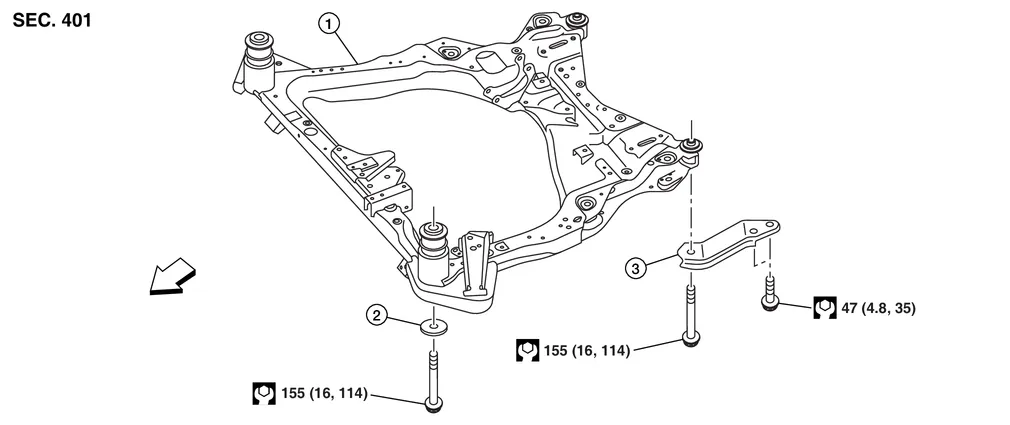
| 1. | Front suspension member | 2. | Rebound stopper | 3. | Front suspension member stay |
 |
Front |
REMOVAL
Remove engine and transmission with front suspension member. Lift engine and transmission off suspension member. Refer to Removal and Installation (FWD) or Removal and Installation (AWD).
 NOTE:
NOTE:
Engine, transmission and suspension member must be removed as an assembly.
If necessary, remove steering knuckles. Refer to Exploded View.
If necessary, remove transverse links. Refer to Exploded View.
If necessary, remove stabilizer. Refer to Exploded View.
If necessary, remove steering gear and hydraulic lines. Refer to Exploded View.
INSPECTION AFTER REMOVAL
Check front suspension member for significant deformation, cracks, or damages. Replace it if necessary.
INSTALLATION
Installation is in reverse order of removal.
-
After installation, perform final tightening of each part under unladen conditions with tires on level ground.
-
Check wheel alignment. Refer to Inspection.
-
Adjust neutral position of the steering angle sensor. Refer to Description.
 Steering Knuckle
Exploded View
1.
Cotter pin
2.
Nut retainer
3.
Disc brake rotor
4.
Wheel hub and bearing
5.
Wheel stud
6.
Splash guard
7.
Steering knuckle
Front
Removal and Installation
REMOVALRemove front wheel hub and bearing...
 Front Suspension :: Unit Disassembly and Assembly. Front Coil Spring and Strut
Exploded View
1.
Piston rod lock nut
2.
Strut mount insulator
3.
Strut mount bearing
4.
Front coil spring
5.
Bound bumper
6.
Lower rubber seat
7...
Other information:
Nissan Murano (Z52) 2015-2024 Service Manual: C1a24-97 Np Range
DTC Description DTC DETECTION LOGIC DTC No. CONSULT screen items (Trouble diagnosis content) DTC detection condition C1A24-97 NP RANGE (NP range) Diagnosis condition When engine is running When MAIN switch of ICC system is ON When waiting for approximately 5 minutes or more after shifting the selector lever to “P” position...
Nissan Murano (Z52) 2015-2024 Service Manual: Heavy Tight-Corner Braking Symptom Occurs
Diagnosis Procedure Heavy tight-corner braking symptom occurs when the vehicle is driven and the steering wheel is turned fully to either side after the engine is started.NOTE: Light tight-corner braking symptom may occur depending on driving conditions...
Categories
- Manuals Home
- Nissan Murano Owners Manual
- Nissan Murano Service Manual
- Warning lights
- Indicator lights
- How to enable/disable the LDW system
- New on site
- Most important about car
