
Nissan Murano: Rear Cross Traffic Alert (RCTA) (if so equipped) / RCTA system limitations
Nissan Murano (Z52) 2015-2024 Owners Manual / Starting and driving / Rear Cross Traffic Alert (RCTA) (if so equipped) / RCTA system limitations
WARNING
Listed below are the system limitations for the RCTA system. Failure to operate the vehicle in accordance with these system limitations could result in serious injury or death.
- Always check surroundings and turn
to check what is behind you before
backing up. The radar sensors detect
approaching (moving) vehicles. The
radar sensors cannot detect every
object such as:
- Pedestrians, bicycles, motorcycles, animals or child-operated toy vehicles
- A vehicle that is passing at speeds greater than approximately 19 mph (30 km/h)
- A vehicle that is passing at speeds lower than approximately 5 mph (8 km/h)
- The radar sensors may not detect approaching
vehicles in certain
situations:
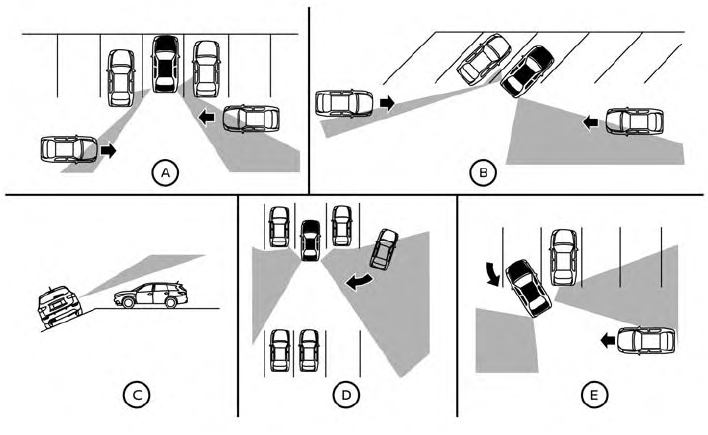
- Illustration
 :
When a vehicle
parked next to you obstructs the
beam of the radar sensor.
:
When a vehicle
parked next to you obstructs the
beam of the radar sensor. - Illustration
 :
When the vehicle is
parked in an angled parking space.
:
When the vehicle is
parked in an angled parking space. - Illustration
 :
When the vehicle is
parked on inclined ground.
:
When the vehicle is
parked on inclined ground. - Illustration
 :
When an approaching
vehicle turns into your vehicle’s
parking lot aisle.
:
When an approaching
vehicle turns into your vehicle’s
parking lot aisle. - Illustration
 :
When the angle
formed by your vehicle and approaching
vehicle is small.
:
When the angle
formed by your vehicle and approaching
vehicle is small.
- Illustration
- The following conditions may reduce
the ability of the radar to detect other
vehicles:
- Severe weather
- Road spray
- Ice/frost/snow/dirt build-up on the vehicle
- Do not attach stickers (including transparent material), install accessories or apply additional paint near the radar sensors. These conditions may reduce the ability of the radar to detect other vehicles.
- Excessive noise (e.g., audio system volume, open vehicle window) will interfere with the chime sound, and it may not be heard.
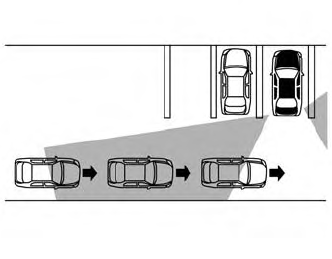
Illustration 1
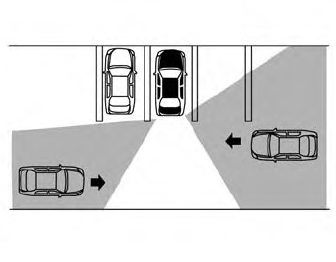
Illustration 2
NOTE:
In the case of several vehicles approaching in a row (Illustration 1) or in the opposite direction (Illustration 2),a chimemay not be sounded by the RCTA system after the first vehicle passes the sensors.
 How to enable/disable the RCTA system
Perform the following steps to enable or
disable the RCTA system.
Using “Settings” in the vehicle information
display:
Press the button until
“Settings”
displays in the vehicle information display
and then press the OK button...
 System temporarily unavailable
When radar blockage is detected, the system
will be deactivated automatically. The
“Unavailable: Side Radar Obstruction”
warning message will appear and the
BSW/RCTA indicator (white) will blink
in
the vehicle information display...
Other information:
Nissan Murano (Z52) 2015-2024 Service Manual: Chassis Can Communication Circuit
Diagnosis Procedure CHECK CAN DIAGNOSIS Check the CAN diagnosis results from CONSULT to see that the Nissan Murano vehicle CAN communication circuit and ITS CAN communication circuit have no malfunction. Are the CAN communication circuits normal? YES>> GO TO 2...
Nissan Murano (Z52) 2015-2024 Service Manual: Periodic Maintenance
Introduction of Periodic Maintenance The following tables show the normal maintenance schedule. Depending upon weather and atmospheric conditions, varying road surfaces, individual driving habits and Nissan Murano vehicle usage, additional or more frequent maintenance may be required...
Categories
- Manuals Home
- Nissan Murano Owners Manual
- Nissan Murano Service Manual
- Vehicle Dynamic Control (VDC) OFF switch
- High Beam Assist (if so equipped)
- Turning the AEB system on/off
- New on site
- Most important about car
Seatback pockets

Theremaybe one or two seatback pockets located on the back of the driver and passenger seats. The pockets can be used to store maps.
WARNING

Copyright © 2026 www.nimurano.com