
Nissan Murano: Heater & Air Conditioning Control System :: System Description / Operation
Controller (A/C switch assembly)
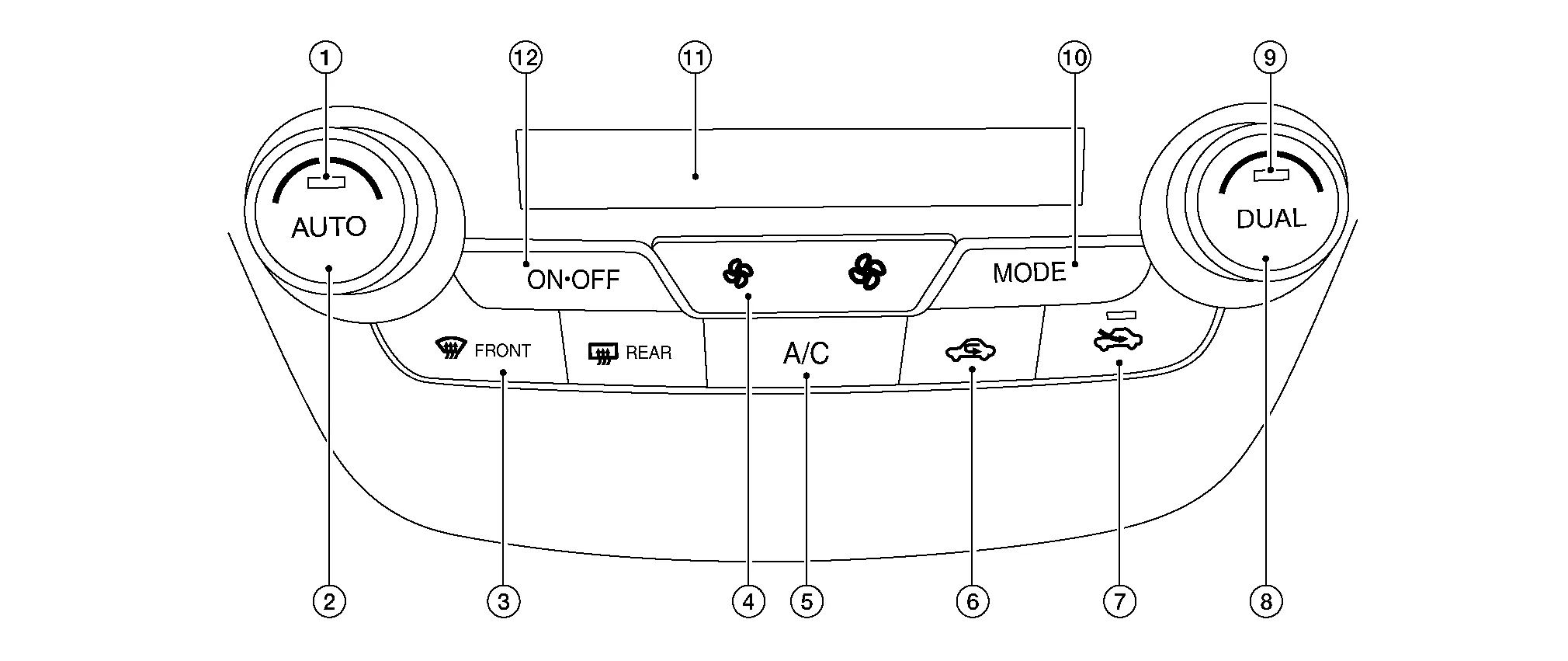
| 1. | AUTO switch | 2. | Temperature control dial (driver side) | 3. | Defroster switch |
| 4. | Fan switch | 5. | A/C switch | 6. | Recirculation switch |
| 7. | Fresh air switch | 8. | Temperature control dial (passenger side) | 9. | DUAL switch |
| 10. | MODE switch | 11. | Display | 12. | ON·OFF switch |
Switch Operation
| AUTO switch |
Turns the switch indicator lamp and “AUTO” indicator on the display ON and then front air conditioning system becomes the following state:
|
| Defroster switch |
Turns defroster mode (switch indicator) between ON ⇔ OFF each time. When defroster switch is pressed while front air conditioning system is in the ON position.
When defroster switch is pressed while front air conditioning system is in the OFF position.
When defroster mode turns ON while front air conditioning system is in automatic control (“AUTO” is indicated), automatic control is released (“AUTO” turns OFF). |
| DUAL switch |
When front air conditioning system is in the OFF position, left and right ventilation temperature control can be selected only while front air conditioning system state (when MODE switch is pressed) is indicated on the display. |
| Fan switch (UP/DOWN) |
Blower fan speed is manually controlled with these switches. Seven speeds are available for manual control (as shown on the display screen).
|
| A/C switch |
Compressor control (switch indicator) changes between ON ⇔ OFF each time this switch is pressed while front blower motor is operated.
|
| MODE switch |
Selects air outlet sequentially from VENT ⇒ B/L ⇒ FOOT ⇒ D/F ⇒ VENT each time.
|
| ON·OFF switch |
|
| Fresh air switch |
Air inlet changes to fresh air (FRE) when this switch is pressed:
When front air conditioning system is in the OFF position, air inlet can be selected. |
| Recirculation switch |
Air inlet changes to recirculation (REC) when this switch is pressed:
|
| Temperature control dial (Driver side) |
Setting temperature is selected using this dial within a range between 60°F or 61°F (18°C) and 89°F or 90°F (32°C) at a rate of 1.0°F (0.5°C) per adjustment.
When air conditioning system is OFF, setting temperature can be selected only while air conditioning system status screen [only when MODE switch (driver side) is pressed] is indicated on display. |
| Temperature control dial (Passenger side) |
|
 NOTE:
NOTE:
 System
System Description
SYSTEM DIAGRAMINPUT/OUTPUT SIGNAL Component Signal status
BCM
Receives blower motor ON signal from A/C auto amp. via CAN communication...
 Diagnosis System (hvac)
Description
Air conditioning system performs self-diagnosis, operation check, function diagnosis, and various settings using diagnosis function of each control unit...
Other information:
Nissan Murano (Z52) 2015-2024 Service Manual: C1a12 Laser Beam Off Center
DTC Description DTC DETECTION LOGIC DTC No. CONSULT screen terms DTC detection condition C1A12–78 LASER BEAM OFFCNTR Diagnosis condition When Ignition switch is ON. Signal (terminal) — Threshold Radar of distance sensor (ICC sensor) is off the aiming point...
Nissan Murano (Z52) 2015-2024 Service Manual: Sheet Metal Work Tools
Sheet Metal Work Tools This section explains various tools used in body repair work. Hammers A hammer is used to correct dents, projections or other deformations. Various shapes have been designed according to their purposes.(1) TYPES AND FEATURES OF HAMMERS(2) SELECTION AND MAINTENANCE OF HAMMERSIt is necessary to choose lighter or heavier hammers according to application or purpose...
Categories
- Manuals Home
- Nissan Murano Owners Manual
- Nissan Murano Service Manual
- Vehicle Dynamic Control (VDC) OFF switch
- Shift lock release
- Rear bench seat adjustment
- New on site
- Most important about car
Luggage hooks

When securing items using luggage hooks located on the back of the seat or side finisher do not apply a load over more than 6.5 lbs. (29 N) to a single hook.
The luggage hooks that are located on the floor should have loads less than 110 lbs. (490 N) to a single hook.
