
Nissan Murano: Door & Lock :: Removal and Installation / Intelligent Key Battery
-
Release lock knob on back of Intelligent Key and remove key.
-
Insert a suitable tool (A) wrapped with a cloth into slit of corner and twist it to separate upper part from lower part.
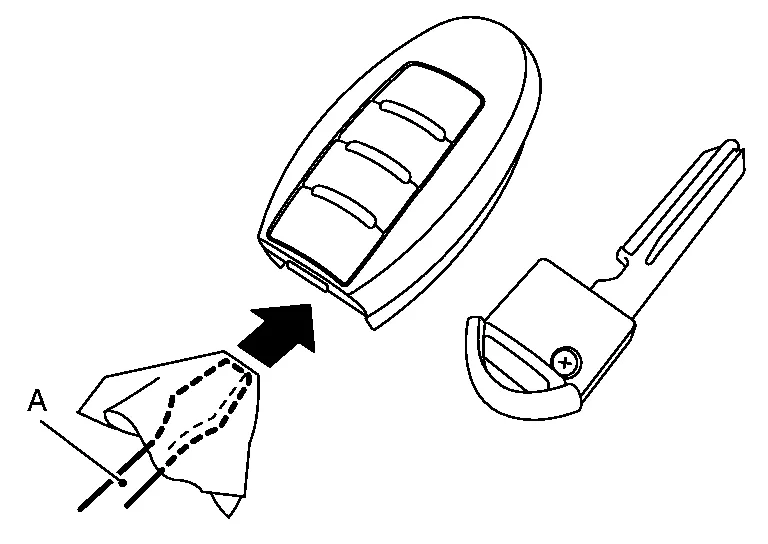
CAUTION:
-
Do not insert a tool into notches of Intelligent Key to pry it open as this may damage circuit board.
-
Do not use excessive force when opening Intelligent Key as this may result in damage to internal components.
-
Do not touch circuit board or battery terminal.
-
Key fob is water-resistant. However, if it does get wet, immediately wipe it dry.
-
-
Replace battery with a new one.
Battery replacement :Coin-type lithium battery (CR2032) -
Align tips of upper and lower parts, and then push them together until unit is securely closed.
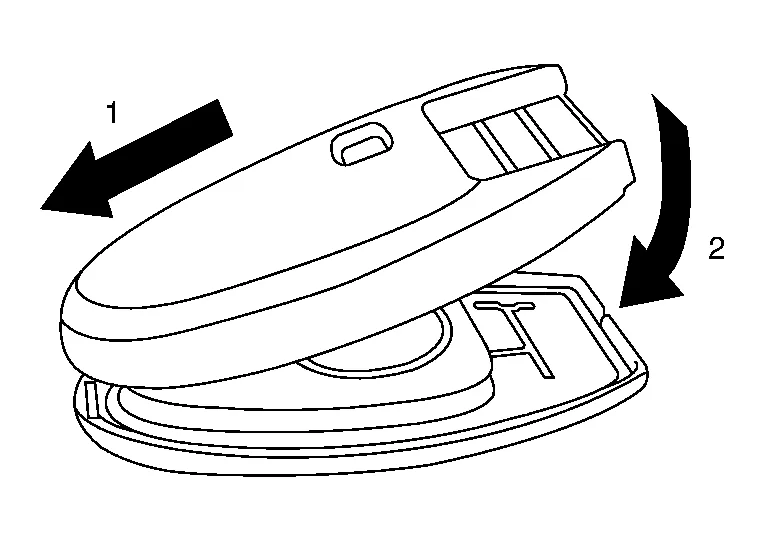
CAUTION:
-
When replacing battery, keep dirt, grease, and other foreign materials off electrode contact area.
-
After replacing battery, check that all Intelligent Key functions work normally.
-
 Remote Keyless Entry Receiver
Removal and Installation
REMOVALRemove glove box assembly. Refer to Removal and Installation.
Remove remote keyless entry receiver bolt.
Disconnect the harness connector from the remote keyless entry receiver...
 Motion Activated Back Door System. Motion Activated Back Door Control Unit
Exploded View
1.
Motion activated back door bracket
2.
Motion activated back door sensor (upper)
3.
Motion activated back door sensor (lower)
4...
Other information:
Nissan Murano (Z52) 2015-2024 Service Manual: Nats Antenna Amp.
Exploded View 1. NATS antenna amp. 2. Push-button ignition switch Removal and Installation REMOVALRemove the shift selector finisher. Refer to Exploded View. Release the pawl on each side of NATS antenna amp (1) using suitable tool and remove from the shift selector finisher (2)...
Nissan Murano (Z52) 2015-2024 Service Manual: Automatic Air Conditioning System
Diagnosis Chart By Symptom NOTE: Perform self-diagnoses with CONSULT before performing the symptom diagnosis. If DTC is detected, perform the corresponding diagnosis. Symptom Corresponding malfunction part Reference Air conditioning does not activate...
Categories
- Manuals Home
- Nissan Murano Owners Manual
- Nissan Murano Service Manual
- High Beam Assist (if so equipped)
- Vehicle Dynamic Control (VDC) OFF switch
- Memory storage function (key-link)
- New on site
- Most important about car
Driver and passenger supplemental knee air bag

Driver’s side
The knee air bag is located in the knee bolster, on the driver’s and passenger’s side. All of the information, cautions and warnings in this manual apply and must be followed. The knee air bag is designed to inflate in higher severity frontal collisions, although it may inflate if the forces in another type of collision are similar to those of a higher severity frontal impact. It may not inflate in certain collisions.

Passenger’s side
