
Nissan Murano: Heater & Air Conditioning Control System :: Removal and Installation / Intake Sensor
REMOVAL
Remove the evaporator assembly from the heating and cooling unit. Refer to Removal and Installation.
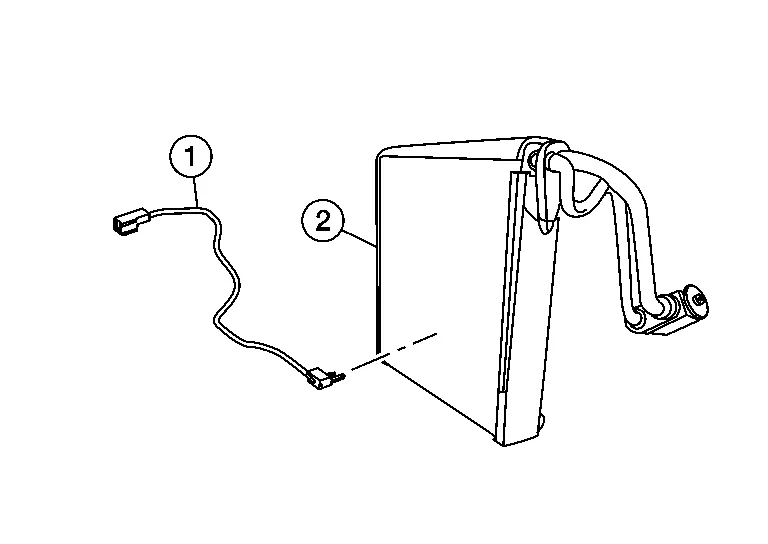
Remove the intake sensor (1) from the evaporator (2).
 NOTE:
NOTE:
Mark the position of the intake sensor for installation.
INSTALLATION
Installation is in the reverse order of removal.
 Sunload Sensor
Removal and Installation
REMOVALRelease the pawls using a suitable tool, then remove sunload sensor (1) from the instrument panel (2).
: Pawl
Disconnect the harness connector from the sunload sensor...

Other information:
Nissan Murano (Z52) 2015-2024 Service Manual: Charging System :: Preparation. Preparation
Special Service Tool The actual shape of the tools may differ from those illustrated here. Tool number (TechMate No.) Tool name Description 165-GR8-1200KIT (—) Midtronics Battery Charger and Tester Tests batteries, starting and charging systems and charges batteries...
Nissan Murano (Z52) 2015-2024 Owners Manual: All-Wheel Drive (AWD) models with Continuously Variable Transmission (CVT)
NISSAN recommends that towing dollies be used when towing your vehicle or place the vehicle on a flatbed truck as illustrated. CAUTION Never tow All-Wheel Drive (AWD) models equipped with a Continuously Variable Transmission (CVT) with any of the wheels on the ground as thismaycause serious and expensive damage to the transfer case and transmission...
Categories
- Manuals Home
- Nissan Murano Owners Manual
- Nissan Murano Service Manual
- Passenger compartment
- Shift lock release
- Tire rotation
- New on site
- Most important about car
Autolight system
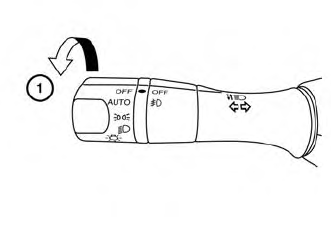
The autolight system allows the headlights to turn on and off automatically. The autolight system can:
Turn on the headlights, front parking, tail, license plate and instrument panel lights automatically when it is dark. Turn off all the lights (except daylight running lights) when it is light. Keep all the lights on for a period of time after you place the ignition switch in the OFF position and all doors are closed.
Copyright © 2026 www.nimurano.com